Find sponsored YouTube channels in a niche in 10 minutes
Filter a channel inventory by niche, size and has-sponsors, then read the brand chips per row. On 8 Nov 2026 I got 14 Cloud & DevOps channels and who paid them.
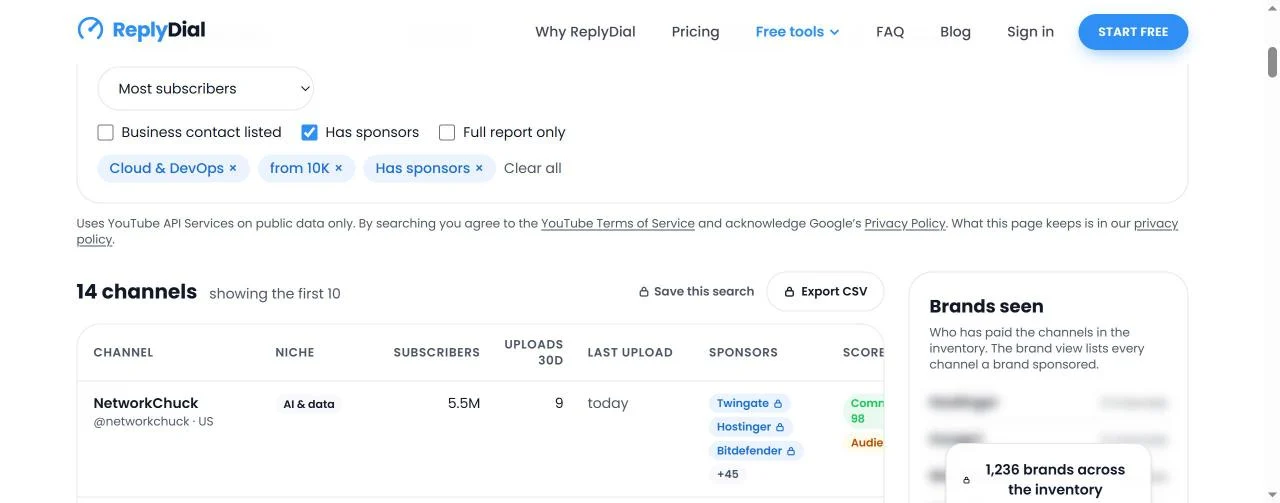
The quickest way to find YouTube channels in a niche that already take sponsors is to stop searching YouTube, which cannot filter by sponsor at all, and search an inventory of channels that someone has already read for sponsor disclosures. Pick the niche, set the smallest channel size your budget makes sense for, tick "has sponsors", and read what comes back: each row shows the first three brands that paid the channel, how many more there are, how recently the channel uploaded, and whether a business contact is published. On 8 November 2026 at 12:47 UTC I ran exactly that search on Discover: Cloud & DevOps, from 10,000 subscribers, has sponsors. It returned 14 channels, 10 of them shown without an account, and every one of the 10 came with named brands, from Twingate and Hostinger on a 5.5M-subscriber channel to a single brand on a 112K one. The whole read took me under ten minutes, and most of that was reading, not searching.
I run a 105,000-subscriber Cloud & DevOps channel next to a full-time job, and my own channel is row 12 of those 14, so I am writing this from both sides of the table: the creator whose sponsors are on display, and the person who built the page that displays them. This post is the method, the 14 rows as they appeared, what each column means and where its number comes from, the three rows that will confuse you the first time (a channel tagged AI & data under a DevOps filter, an Audience score of 0 next to a Commercial score of 98, a channel with 0 uploads in 30 days), what the brand view adds, why a live YouTube search is rationed, what is free and what costs $79 a month, and the thing that broke on 6 November when a test campaign of mine went blank overnight. Every number has a date; nothing here is estimated.
What did the search return on 8 November 2026?
The inventory that morning held 2,540 channels, 138 of them with a full report, and 1,236 sponsoring brands. Cloud & DevOps had 99 channels. With "from 10K" and "Has sponsors" ticked, 14 remained. These are the first 10, the ones a visitor sees without signing in, in the order the page showed them (most subscribers first). "Uploads" is videos published in the last 30 days, Shorts included. "Last" is the last upload relative to 8 November. The sponsor column shows the three chips on the row and the count behind the plus sign.
#
Channel
Primary niche
Subs
Uploads
Last
Sponsors on the row
Commercial
Audience
Contact
1
NetworkChuck
AI & data
5.5M
9
same day
Twingate, Hostinger, Bitdefender +45
98
0
listed
2
Corey Schafer
Programming
1.6M
0
3 months ago
Brilliant, Skillshare, Linode +2
51
44
not listed
3
TechWorld with Nana
Cloud & DevOps
1.5M
4
2 days ago
Kasten, Pulumi, JetBrains +21
52
34
not listed
4
sentdex
Programming
1.4M
2
19 days ago
Tii, Pugetsystems, Kite
85
71
listed
5
Jeff Geerling
Tech reviews & gadgets
1.1M
3
8 days ago
MyElectronics, Micro Center, DeskPi +94
92
33
listed
6
Abhishek.Veeramalla
Cloud & DevOps
677K
14
1 day ago
Google Cloud, KodeKloud, AWS +7
77
35
listed
7
Christian Lempa
Cloud & DevOps
278K
6
1 day ago
Infisical, Pi, Kestra +35
92
46
listed
8
DevOps Toolbox
Cloud & DevOps
138K
8
same day
Twingate.com, Aikido.dev, Coder +26
54
36
not listed
9
Phillip Wylie
AI & data
135K
19
1 day ago
Suzu Labs, Black Hat, Teleport +1
78
70
listed
10
Thetips4you
Cloud & DevOps
112K
16
1 day ago
Vcloud
35
none
not listed
Rows 11 to 14 are blurred on the public page and open with a free account: DevOps Directive (107K, 0 uploads in 30 days, last upload 9 months ago, 7 sponsors, Commercial 88), my own channel (105K, 3 uploads, last upload 3 days before, 7 sponsors, Commercial 89), That DevOps Guy (98.9K, 6 uploads, 4 days before, 3 sponsors, Commercial 75), and one more.
Three facts to lift from that table before anything else. Only 5 of the 10 free rows carry Cloud & DevOps as their primary niche. Two of the 14 (Corey Schafer and DevOps Directive) had not uploaded a long video in 30 days. And the brand counts behind the plus signs run from 0 extra on Thetips4you to 94 extra on Jeff Geerling, which is the difference between a channel that has taken one sponsor and a channel that runs a sponsorship business.
Discover on 8 November 2026, 12:47 UTC: the filter chips Cloud & DevOps, from 10K, Has sponsors; '14 channels, showing the first 10'; Save this search and Export CSV locked without a plan; the NetworkChuck row with Twingate, Hostinger, Bitdefender and +45 more; and the blurred Brands seen panel with '1,236 brands across the inventory'.
Where do the channels in the inventory come from?
This is the question to ask of any discovery tool before you trust a row, and the answer here is short: nothing is crawled. Every channel someone runs through the free channel analyzer leaves one row in the inventory, with its size, country, niche, uploads in the last 30 days, last upload, the brands found on its newest 300 videos, two of its five scores, and whether a business contact is listed. The analyzer reads those 300 videos through the official YouTube Data API, combines YouTube's paid-promotion label, the "sponsored by" lines in descriptions and the links followed through tracking redirects to the brand's real domain, and counts a brand at high and medium confidence only. I wrote up how that reading works, and the two brands it once invented on my own channel, in who sponsored a YouTube channel.
So the inventory is the set of channels people have asked about, plus the channels a nightly job adds. On 8 November that was 2,540 channels across 21 niches: Business & marketing 228, Personal finance & investing 211, Fitness & health 169, AI & data 136, Creator & YouTube growth 113, Programming 109, Cooking & food 100, Cloud & DevOps 99, Gaming 96, Tech reviews & gadgets 91, Music 90, Travel & vlog 90, Beauty & fashion 80, Education & study 78, Cars & vehicles 78, Entertainment & comedy 74, Home & DIY 72, News & commentary 62, Self-improvement 55, Kids & family 47, Real estate 32. By country it was United States 689, India 441, Great Britain 152, Canada 74, Pakistan 54, Australia 48, Germany 35, down to 6 each for Finland and Sweden.
The number that matters more than 2,540 is 138. That is how many rows had a full report behind them. The other 2,400 or so were stubs: a name, a handle, a subscriber count, a country and a niche guess, stored when a keyword search found them, with no sponsors, no scores and no upload pace until someone opens the report. "Has sponsors" therefore only ever matches rows with a report, which is why a 99-channel niche narrowed to 14 the moment I ticked it. When I wrote about the same page on 3 November the inventory was 602 channels with 13 reports, so in five days the reports went from 13 to 138 and the brands from 145 to 1,236, helped by visitors running about 20 analyzer reports on 6 November alone and by the nightly job running 10 more each night. The inventory fills in the niches people ask about, not the ones I would have guessed.
How do you run the search, step by step?
The page is a form over a database. Searching it is a plain query over the stored rows: no YouTube call, no quota spent, and the result is on screen in well under a second. Here is the sequence I used, with what each step did on 8 November.
Pick the niche. The niche dropdown lists all 21 with the channel count next to each. I picked Cloud & DevOps (99). You can type a keyword or a channel handle in the box instead.
Set the subscriber floor. I chose from 10K and left the ceiling open. For a campaign that wants micro channels, set the ceiling at 100K too; for this post I wanted to see the whole size range in one list.
Tick "Has sponsors". This is the filter that turns a list of channels into a list of channels with a sponsorship history. It dropped 99 to 14.
Leave pace alone, or not. The "at least N uploads in 30 days" filter is what removes dormant channels. I left it off on purpose, which is why Corey Schafer, with 0 uploads in 30 days, is still in the table above, and why I come back to him below.
Sort. Most subscribers is the default. Sorting by most sponsors or by commercial readiness puts the channels that already run integrations at the top, which for a sponsorship shortlist is usually what you want.
Read the row, then open the report. Every channel name links to its analyzer report, where each brand has the sponsored video, the date, the evidence chips and an example video to click. The row is the shortlist; the report is the check.
The URL carries the filters (niche=Cloud & DevOps, min=10000, sponsored=1), so you can bookmark the search or paste it to a colleague and they see the same rows. With a free account the same search can be saved to a workspace and re-run; on an Agency plan it can be attached to a campaign, which I describe further down.
What does each column mean?
Each column has one source, and knowing the source tells you how far to trust it.
Column
What it shows
Where it comes from
Channel
Name, handle, country
YouTube's channel record; the country is the one the creator declared, not where the audience lives
Niche
The channel's primary niche
The share of the channel's recent videos that match each niche's keywords; a channel can match several niches
Subscribers
Rounded count
YouTube's public figure, as YouTube rounds it
Uploads 30d
Videos published in the last 30 days, Shorts included
Counted from the newest 300 videos in the report
Last upload
Relative date of the newest long video
Same report
Sponsors
First three brands, plus a count
Brands found on the newest 300 videos at high and medium confidence; the chips on the public page are locked, the report shows the videos
Commercial
0 to 100
Disclosed sponsors and their recency, affiliate links, products sold, whether a contact is published
Audience
0 to 100, or none
Reply rate and median response time across the comment threads of the newest 5 long videos, up to 100 threads each
Contact
Listed or not listed
Whether a business contact appears in a channel or video description; the address itself is never stored in the inventory or exported
Two things the columns deliberately do not include: totals across channels (no "combined reach of your shortlist" number, because adding subscriber counts across channels tells a brand nothing true), and estimated earnings or rates, because no public data source has them. The scores are ReplyDial's read, not a YouTube metric, and the page says so; I explained what goes into all five in the five numbers of a channel health score.
How do you read the rows without fooling yourself?
A filtered list looks authoritative. It is not; it is a first pass. Three rows in my 14 show the three ways a first pass misleads, and each one is a thing to check before a name goes in a deck.
The niche is a share, not a label. NetworkChuck's row says AI & data. Corey Schafer's says Programming. sentdex says Programming, Jeff Geerling says Tech reviews & gadgets, Phillip Wylie says AI & data. Yet all five are in a Cloud & DevOps result. That is because the niche match is computed from the share of each channel's recent videos that fit a niche's keywords, and a channel with 300 videos about networking, Python or hardware will have enough cloud, Linux and DevOps material to pass the threshold even though its biggest share is elsewhere. For a brand selling a DevOps tool that is good news in one direction (NetworkChuck's audience does watch DevOps content) and a warning in the other (his primary audience is not DevOps engineers, and his rate reflects 5.5M subscribers, not the DevOps slice). My own report puts my channel at Cloud & DevOps 99 percent, Programming 9 percent, AI & data 6 percent, which is what a pure niche channel looks like. When the primary niche on the row is not the niche you searched, open the report and read the niche share before you decide.
Commercial 98 next to Audience 0 is not a contradiction. NetworkChuck's row shows a Commercial score of 98, the highest in the list, with 48 brands and a listed contact. Next to it is an Audience score of 0. The Audience score comes from the comment threads on the newest 5 long videos, and 0 means that in the sampled threads the channel did not reply. That is normal for a channel of that size, and it tells a brand something concrete: the questions viewers ask under your integration will not be answered by the creator, so plan to answer them yourself or accept that they go unanswered. At the other end, sentdex and Phillip Wylie show Audience 71 and 70, which means they do answer. If a sponsored video's comment thread matters to your campaign, that column is the one to sort by, not the subscriber count.
0 uploads in 30 days is still a match. Corey Schafer is in the list with 1.6M subscribers, five sponsors, and 0 uploads in the last 30 days; his last long video was 3 months before the search. DevOps Directive, in the blurred rows, had 0 uploads and a last upload 9 months before. Both matched because "Has sponsors" asks about history and I did not ask about pace. That is the right behaviour for a research question ("which channels in this niche have ever taken sponsors, and from whom"), and the wrong one for a shortlist that needs an upload slot this quarter. Tick "at least 1 upload in 30 days" and both rows leave. The point is to decide which question you are asking before you read the list.
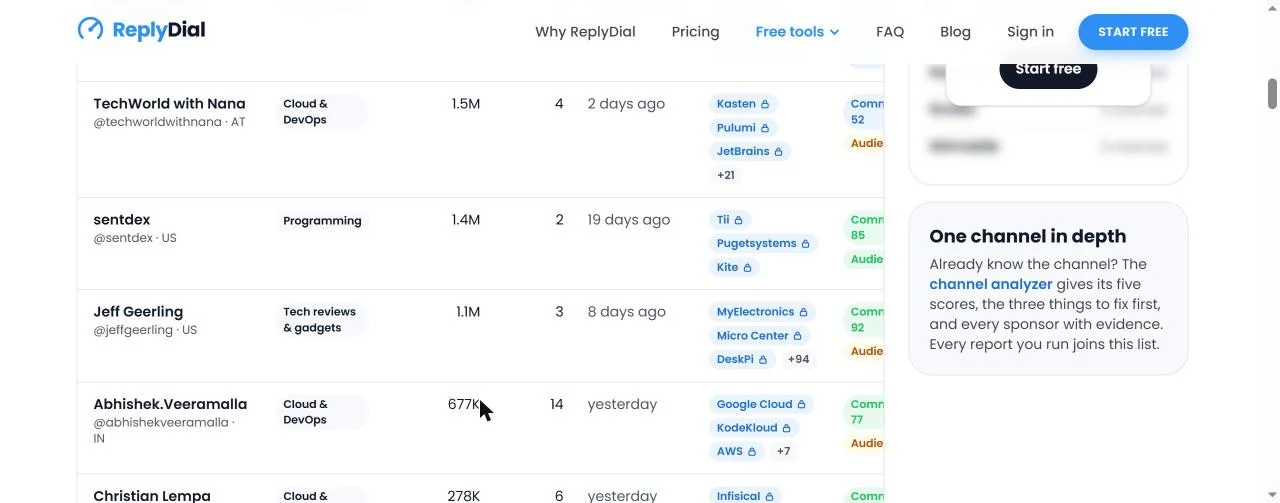
Rows 3 to 7 of the same search on 8 November 2026: TechWorld with Nana (1.5M, 4 uploads, 2 days ago, Kasten, Pulumi, JetBrains +21), sentdex (1.4M, 2 uploads, 19 days ago), Jeff Geerling (1.1M, 3 uploads, 8 days ago, +94 sponsors), Abhishek.Veeramalla (677K, 14 uploads, yesterday, Google Cloud, KodeKloud, AWS +7), Christian Lempa (278K, 6 uploads), and the 'One channel in depth' box linking to the analyzer.
A fourth thing to notice in that screenshot is the brand chips themselves. TechWorld with Nana shows Kasten, Pulumi and JetBrains; Abhishek.Veeramalla shows Google Cloud, KodeKloud and AWS; Christian Lempa shows Infisical, Pi and Kestra. Kestra is also one of my seven sponsors. If you sell a workflow engine or a secrets manager, those chips are your competitor map for the niche, and the dates on the report tell you how recently each competitor was there. The seven checks I would run on any of these channels before a conversation, from the competitor window to the comment section, are in vetting a YouTube creator before a deal; the row answers the first three of them at a glance.
Which brands paid these channels, and how do you go from a brand to its channels?
To the right of the table is the "Brands seen" panel: who has paid the channels in the inventory, ranked by how many channels each brand appears on. On 8 November the panel held 1,236 brands. On the public page the names are blurred and the counts show; the names behind the top counts were Hostinger on 9 channels, Incogni, Warthunder and Betterhelp on 6 each, and Twingate, Revolut, Nvidia and Wtmobile on 5 each, spelled as the tool groups them. Hostinger is also one of my own sponsors, which is a small illustration of how a brand ends up on 9 channels: it sponsors across a niche, and every one of those channels that gets analyzed adds a row to its count.
The brand view is the panel turned inside out: pick a brand and see every channel it sponsored. Since 6 November, released as revision 00119, each brand in the signed-in panel opens to the three channels it paid most, with each channel's subscribers, number of sponsored videos, the month the brand last appeared, and niche, followed by a link to all N channels in the table. For an agency this is the fastest way to answer two questions a client asks in the first meeting. "Who is our competitor already working with?" is one click on the competitor's name. "Which creators like ours does this brand already trust?" is the same click, read as a pitch list. I wrote the manual version of that method, reading descriptions brand by brand, in how to find brands that sponsor YouTube channels in your niche; the brand view is that method run across 138 reports at once.
A limit to state plainly: a brand's channel count is a count of analyzed channels. Hostinger on 9 channels means 9 of the 138 reports found Hostinger, not that Hostinger sponsors 9 channels on YouTube. As the reports grow, so do the counts, and a brand that sponsors heavily in a niche nobody has analyzed yet will show 0 or not appear. The counts are only ever a floor.
With a free account every channel also gets a "similar channels" list, other rows in the inventory near it, so a shortlist of one can become a shortlist of five without a new search.
What happens when the inventory has nothing for your keyword, and why is that search rationed?
If you type a keyword and the inventory has no row for it, Discover runs one YouTube search, stores up to 50 of the channels YouTube returns as not-yet-analyzed rows, and shows them with name, handle, size, country and YouTube's topic tags. Those rows stay for everyone, which is how the inventory grows in the directions people pull it.
That search is rationed, and the reason is arithmetic, not stinginess. An inventory search costs 0 YouTube API units because it never touches YouTube. A YouTube search.list call is booked at 100 units, and the project has 10,000 units a day for everything: every analyzer report at about 18 units, every handle lookup at 1, the nightly job, and the searches. One hundred fallback searches would be the whole day's quota with nothing left for reports. So visitors get 2 YouTube searches a day and 5 handle lookups, all visitors together share a daily ceiling, Agency plans and the first 7 days of any account get 10 YouTube searches a day on demand even when the inventory already has rows, and crawlers and link previews never trigger one. The nightly inventory job shows the same arithmetic from the inside: on 7 November at 02:17 UTC it ran 6 YouTube searches, found 300 channels, stored 300 stub rows, ran 10 full reports, and booked 606 units for the inventory work. Six searches a night is what keeps the job well inside its budget while leaving room for the reports that actually fill rows. I wrote the longer explanation of this constraint, and why every discovery tool you have ever used has a "searches left" counter, in why YouTube influencer tools limit searches.
The practical consequence for you: search the inventory first and generously, since it is free in every sense, and spend the YouTube searches on keywords where the inventory really is empty. Once your keyword has 50 stub rows, the next job is to open reports on the ones that fit, which is what turns a stub into a row with sponsors.
What is free, what needs an account, and what costs $79?
The page is a three-step ladder with no credits, no seats and no card. Here is what each step held on 8 November.
Step
Price
What you get
No sign-in
$0
The first 10 rows of every search, every column; the full analyzer report for any channel; 2 YouTube searches a day when the inventory has nothing
Free account
$0
Every matching row with paging; similar channels; save, watch and compare reports; searches kept in a workspace
Agency
$79 a month (launch price), 7 days free, no card
Brand view; YouTube search on demand, 10 a day; paste up to 25 handles at once; 100 fresh channel reports a day; watch 10 channels; campaigns with a pipeline; CSV export of any search up to 500 rows and of a campaign pipeline
Agency Team
$249 a month for three accounts
Everything in Agency, with 250 reports a day, 25 watched channels, and CSV export up to 2,000 rows
Every new account gets everything on the Agency step free for 7 days, which is long enough to build one real shortlist and decide whether the brand view and the exports earn the price. Current prices are on the pricing page; I compared the ladder with what the paid suites charge for the same job in influencer discovery tool pricing for a small agency, and the short version is that the suites start where Discover's top step ends and sell demographics, Instagram and TikTok, which Discover does not have and will not add.
Campaigns are the agency's unit of work on the Agency plans. A campaign has a name, a client and a brief, and a pipeline of channels, each with one of six statuses: shortlisted, contacted, replied, negotiating, booked, declined. Each channel in the pipeline carries a note and a date (the last touch), and the campaign keeps its own saved searches so a re-run shows what is new since last time. The pipeline exports to CSV, and so does any search, within the row limits above. The CSV carries the same columns as the table and never a contact address.
What does the 30-day rule mean for a saved row?
Every row in the inventory is tied to a report, and a report is kept for 30 days. The page states it as: "Rows are refreshed when a report is re-run and deleted after 30 days without one, so nothing here is older than 30 days. The niches people ask about most are refreshed nightly." In practice that means a row's sponsors, scores, upload pace and contact flag are never more than 30 days old, and if you saw a channel at 3 uploads in the last 30 days, that was true within the last month, not last year.
It also means a row can go stale if nobody re-runs it, and until 6 November that happened in a way I did not expect, which is the next section. The rule exists for a reason I will not trade away: the inventory is built on YouTube's public data under the API's terms, and 30 days is the retention the privacy policy promises. A discovery database that quietly kept every number forever would be easier to build and wrong to run.
Three more things the inventory deliberately does not hold: totals across channels, estimated earnings or rates for any channel, and contact details. The contact column is a yes or a no; the address stays on the report, as the creator published it, and is never exported.
What broke?
Two things, one of them mine to fix and one of them the shape of the API.
The test campaign whose row went blank. I created a campaign called "test campaign 1" on my own account, put a channel in it, and signed out. When I signed in again on 6 November the campaign showed its name and nothing else: every other cell on the channel's row was a dash. My first thought was that sign-in had lost the campaign's data. The logs said otherwise. The retention sweep runs every day at 03:17 UTC, and on 6 November it expired 24 analyzer scans that had passed 30 days. The inventory code treats a row whose scan has expired as a stub again: it keeps the title, handle and subscriber count and wipes the last upload, sponsors, contact flag and scores. The channel in my campaign was one of the 24, so the campaign page drew a name and dashes.
Two weaknesses made it worse. The nightly inventory job, which could have re-run the report before it expired, runs at 02:17 UTC, an hour before the sweep, and it only considered campaign channels after they had already expired, and only channels between 20K and 3M subscribers. So nothing refreshed the row before the sweep wiped it, and a channel outside that band would never have been refreshed at all. The fix went live the same day as revision 00119: channels held in open campaigns or saved reports are now re-scanned first in the nightly slot, at any size, once their scan passes 27 days, three days before the sweep would wipe them. And a row that does expire no longer shows dashes; it says "Report from expired after 30 days; a fresh one runs tonight" with a "Run it now" link, and opening the report from the campaign re-scans it and fills the row again. The lesson for anyone building on a retention rule: schedule the refresh before the sweep, not after, and never let a row explain itself with a dash.
The 100-unit search. A single YouTube search.list call is booked at 100 units of the project's 10,000 a day. That one number is why the YouTube fallback is limited to 2 a day for visitors and 10 for Agency plans, why the nightly job runs 6 searches and not 60, and why the inventory exists at all: if a live YouTube search cost what a database query costs, there would be no reason to store rows. It is also why I keep saying "search the inventory first". The inventory search is instant and free because the expensive call was made once, by whoever first asked, and the answer was kept for everyone for 30 days.
What this means for you
Ask one question per search. "Who in this niche has ever taken sponsors" and "who can I book this quarter" are different filters: the first is niche plus has sponsors, the second adds at least 1 or 2 uploads in 30 days. Running the first when you meant the second puts a channel that has not uploaded in 9 months on your shortlist.
Read the primary niche on the row before you read the sponsor chips. A channel that matches your niche filter with a different primary niche has an audience that is partly yours; open the report and look at the niche shares before you price it as a niche channel.
Treat the Audience score as a campaign cost, not a quality grade. Audience 0 next to Commercial 98 means a professional sponsorship operation whose comment sections you will have to staff yourself.
Use the brand view in both directions: your competitor's name gives you the channels to avoid or to counter-bid on; a brand that sells to your buyers gives you a pitch list of creators who already run integrations well.
Expect the brand counts to be a floor. 1,236 brands across 138 reports means the inventory has read 138 channels, not that YouTube has 1,236 sponsoring brands. The counts grow as you open reports, and the reports you open fill rows for the next person.
Date everything you take from the page. Every row is less than 30 days old by construction, so a screenshot with the date is a reproducible fact in a client deck, which is more than an estimate from a suite can say.
If you are the creator in the row, run the search on your own niche. My row shows 7 sponsors and Commercial 89 to anyone who signs in; it also showed 4 sponsored videos without the paid-promotion label on the report behind it, which a careful brand would ask about. Better to know first.
Quick answers
Can I see which YouTube channels a specific brand sponsors?
Yes, on the Agency plans and during the 7-day trial: pick the brand in the Brands seen panel and it opens to the three channels it paid most, then to every channel in the inventory where it appeared. The list covers analyzed channels only, so it is a floor, not a census.
Does "has sponsors" mean the channel is open to new sponsors?
No. It means the newest 300 videos show at least one brand at high or medium confidence. Whether the creator takes new deals, has an exclusivity window or has a rate card is a question for the creator; the row only tells you there is a history and how recent it is.
Why does my niche show so few channels with sponsors?
Because "has sponsors" only matches rows with a full report, and on 8 November 138 of 2,540 rows had one. Open the reports of the stubs that look right for you; each one costs about 18 units, takes about a minute, and fills the row for everyone.
Is the search free?
The inventory search is free and costs no API quota at any step of the ladder. The first 10 rows show without an account, every row shows with a free account, and the $79 Agency plan adds the brand view, campaigns and CSV export. The questions agencies and creators ask about the page, from fake subscribers to usage rights, are answered one by one on the Discover FAQ.
How is this different from YouTube search?
YouTube search returns videos ranked for a viewer and cannot filter by subscriber count, country, upload pace or sponsorship. Discover returns channels filtered on exactly those fields, from reports that already read the sponsor disclosures. I compared the two, and the paid suites, in how to find YouTube channels in your niche.
This week, with no tool at all: pick the niche you sell into, open the five channels you already know in it, and for each one read the first three lines of the descriptions on the last ten videos and write down every brand you find with the date; if two channels share a brand, that brand has a budget for your niche right now, and the others on your list are who it has not reached yet. ReplyDial's Discover does the same reading across 138 reports and 1,236 brands in under a second, free, at replydial.com/tools/discover.
See your own unanswered comments
ReplyDial lists every comment on your channel still waiting for a reply, drafts answers in your voice, and posts only what you approve. Free for 7 days on Creator limits, no card.
How the analyzer's discoverability score is built: six packaging checks with fixed weights. My 70 and three others, 54 to 70, recomputed by hand on 9 Nov 2026.
Studio's Response status: Unresponded filter lists the comments you never answered. What it counts, what it misses, and my channel's numbers on 9 November 2026.
Paste a video link into the free exporter and download its comments as a CSV: author, text, likes, date, link. My 2023 VPC video gave 365 rows in one minute.