Export YouTube comments to CSV: 365 rows, free, in a minute
Paste a video link into the free exporter and download its comments as a CSV: author, text, likes, date, link. My 2023 VPC video gave 365 rows in one minute.
To export the comments of a YouTube video to a CSV, paste the video link into the free comment exporter, wait for the row count, and click Download CSV. The file has one row per comment and one row per reply, with ten columns: comment id, parent id, type, author, author channel id, text, likes, reply count, date, and a link that opens that exact comment on YouTube. It opens in Excel, Numbers and Google Sheets with the right characters and emoji. No sign-in, no password, nothing is posted; the tool reads the same public comments anyone can see on youtube.com, through the official YouTube Data API. The one limit is the newest 200 top-level comments and up to five replies under each, which is every comment on most videos and a sample on the very big ones.
I run a 105,000-subscriber Cloud and DevOps tutorial channel next to a full-time job, and I built the exporter. On 8 November 2026 I ran it on my own most-viewed video, "AWS how to setup VPC, Public, Private Subnet, NAT, Internet Gateway, Route Table? - (Part-5)", published on 10 October 2023 and sitting at 276,300 views. YouTube counts 364 comments on it. The export came back with 365 rows, 190 top-level comments and 175 replies, in under a minute, and the download itself cost nothing because the preview had already cached the result. This post is that file: what each column holds, why 365 is one more than 364, what the 200 cap means when your video has 5,000 comments, why there is an apostrophe in front of my own name, what one export costs in API units, and what I found when I sorted it.
The VPC video export, 8 November 2026
Video published
10 October 2023, 11:00 UTC
Comments by YouTube's count
364
Rows in the CSV
365 (190 top-level comments, 175 replies)
Unique comment ids
362 (the pinned thread is in the file twice)
Cut off by the 200 cap
No, every top-level comment is in the file
Top-level comments containing a question mark
41 of 190, about 22 percent
Rows by year
2023: 13, 2024: 169, 2025: 125, 2026: 58
Oldest and newest row
10 October 2023, 12:52 UTC, and 5 November 2026
Lines in the file
448, because comment text wraps inside quotes
API cost
About 3 units; the same video again within 24 hours costs 0
Time from paste to download
Under a minute
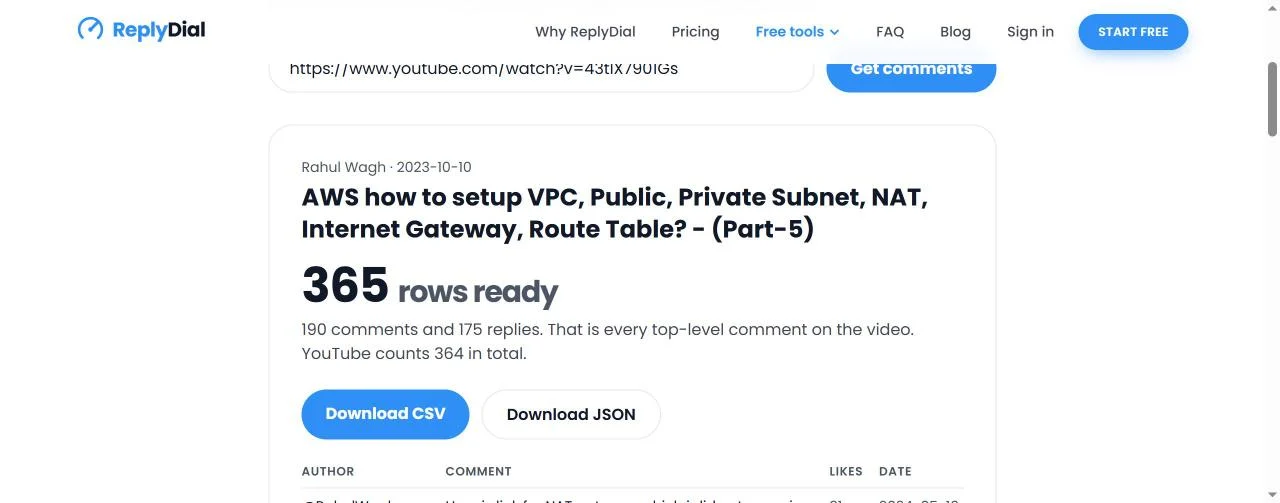
The exporter on 8 November 2026 with my VPC video: the title, '365 rows ready', the line '190 comments and 175 replies. That is every top-level comment on the video. YouTube counts 364 in total.', and the two download buttons.
What is in the CSV, column by column?
Every row is one comment or one reply. The ten columns are the same for both, and the ones that are empty on a comment are the ones that only make sense on a reply, and the other way round.
Column
What it holds
On a top-level comment
On a reply
comment_id
YouTube's id for this comment, the thing to dedupe on
A short id
The parent's id, a dot, then its own part
parent_id
The id of the comment this reply belongs to
Empty
The comment_id of the comment above it
type
comment or reply
comment
reply
author
The display name, a handle on most accounts
@RahulWagh on my own
@munteanionut3993 on the first reply
author_channel_id
The channel id behind the name, stable even if the name changes
UC...
UC...
text
The comment exactly as written, line breaks and emoji kept
Full text
Full text
likes
The like count at export time
31 on my pinned comment
3 on the reply to it
reply_count
How many replies the thread has, by YouTube's count
2 on my pinned comment
Empty
published_at
When it was posted, ISO 8601, UTC
2024-05-10T08:26:28Z
2024-05-15T11:01:15Z
url
A link that opens the video with this comment highlighted
...watch?v=43tIX7901Gs&lc=<id>
Same shape
Here is the header and the first two rows of my file, exactly as downloaded, the pinned comment and the first reply under it:
comment_id,parent_id,type,author,author_channel_id,text,likes,reply_count,published_at,url
UgwWlEgEdkgZ4LBc_bt4AaABAg,,comment,'@RahulWagh,UC7p4oXcPbgk_yTSHK7QlkSg,Here is link for NAT gateway which i did not cover in the session - https://youtu.be/ydxEeVAqVdo,31,2,2024-05-10T08:26:28Z,https://www.youtube.com/watch?v=43tIX7901Gs&lc=UgwWlEgEdkgZ4LBc_bt4AaABAg
UgwWlEgEdkgZ4LBc_bt4AaABAg.A3FVe1rcSwhA3SeL9E446D,UgwWlEgEdkgZ4LBc_bt4AaABAg,reply,'@munteanionut3993,UCg3TENS4fTWFLi6ZJhSMD1w,"thank you very much! I just downloaded the transcript and was looking up ""NAT"" / ""Network Address Translation"" through the text content : )) thanks again! God bless!",3,,2024-05-15T11:01:15Z,https://www.youtube.com/watch?v=43tIX7901Gs&lc=UgwWlEgEdkgZ4LBc_bt4AaABAg.A3FVe1rcSwhA3SeL9E446D
Four things to read off those two lines, because they are the whole format.
The reply's comment_id starts with the parent's id and adds its own part after a dot, and its parent_id is the parent's id in full. That is how YouTube names replies, and it means you can sort the file by comment_id and every reply lands under its comment even after you have filtered and re-sorted ten times.
The reply's text is wrapped in double quotes because it contains quotation marks, and the quotation marks inside it are doubled: ""NAT"". That is standard CSV quoting (RFC 4180), and every spreadsheet reads it back as a single pair of quotes. The same wrapping happens for any text that contains a comma or a line break, which is most comments.
The likes and reply_count columns are plain numbers on a comment; reply_count is empty on a reply, because replies do not have replies on YouTube.
And there is an apostrophe in front of @RahulWagh and @munteanionut3993. That is deliberate, and it has its own section below.
The order of rows follows the API: newest top-level comment first, each one followed by its replies, oldest reply first, which is how a thread reads on the page. The one exception is the pinned comment, which comes first regardless of date, and which turns out to matter.
How do you export YouTube comments to a CSV, step by step?
The whole thing is five steps and took me under a minute per video on 8 November, four videos between 12:46 and 12:49 UTC.
Copy the video link. Any form works: a youtube.com/watch?v= link, a youtu.be/ short link, a Shorts, live or embed link, or just the 11-character video id. Private, deleted and members-only videos cannot be exported; the tool only sees public data.
Paste it into the exporter and press Get comments. The page looks the video up (title, channel, YouTube's own comment count), then reads the newest 200 top-level comments with the replies YouTube returns alongside them.
Read the summary line before you download. It tells you three things: how many rows, how many are comments and how many replies, and whether the file holds every top-level comment or only the newest 200. On my VPC video it said "190 comments and 175 replies. That is every top-level comment on the video. YouTube counts 364 in total." On a bigger video the middle sentence changes to "This video has more; the free export holds the newest 200 comments." Decide here whether the sample is enough for what you want.
Check the preview. The first eight top-level comments are shown with author, text, likes and date, each linked to the comment on YouTube, so you can confirm you have the right video before you save anything.
Download CSV, or Download JSON. The CSV is for Excel and Sheets. The JSON holds the same rows plus a small header with the video id, title, channel, YouTube's count, the export time and the truncation flag, and is the one to feed to a script. The file is named after the video: mine came down as youtube-comments-aws-how-to-setup-vpc-public-private-subnet-nat-internet-gate-43tIX7901Gs.csv, the title cut to 60 characters and the video id at the end so two exports never collide.
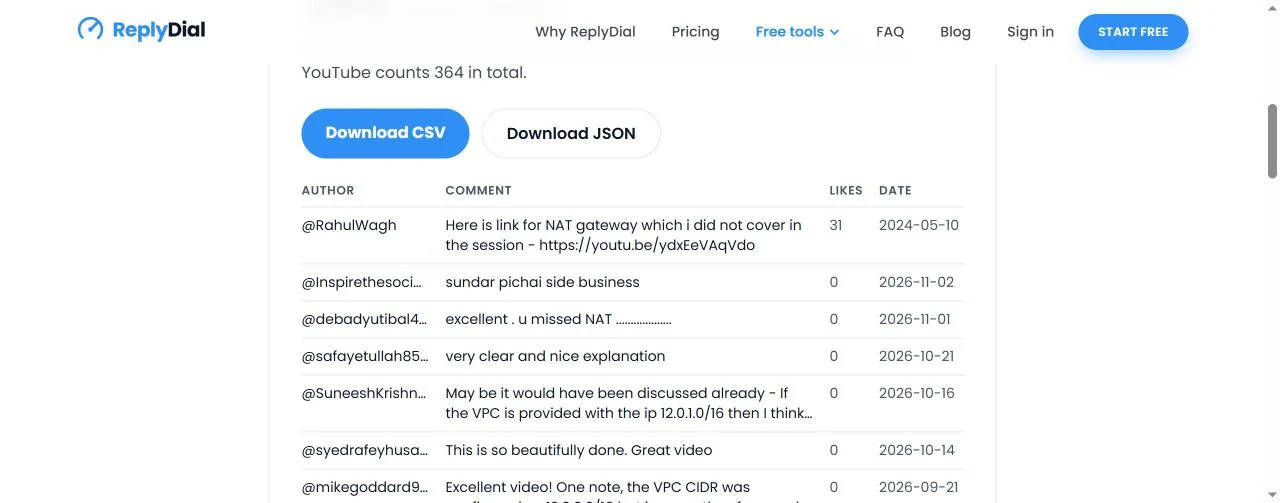
The preview on 8 November 2026: my pinned NAT gateway link (31 likes, 10 May 2024) at the top, then the newest viewer comments from 2 November back to 21 September 2026, with likes and dates. The file holds all 365 rows.
That preview already told me something. The newest comment, from 2 November 2026, is "sundar pichai side business", the lookalike joke that follows my channel around (I counted it in one of every thirty comments when I searched 964 of my comments in October). The one from 1 November says "excellent . u missed NAT ………", under a video where my pinned comment, with 31 likes, is a link to the NAT gateway video I did not cover. Two years after I pinned that link, viewers are still telling me NAT is missing. The 16 October comment is a CIDR question about 12.0.1.0/16, the kind of question that becomes a timestamp in the description or a follow-up video. All of that was visible before I had opened the file.
Why does the file have 365 rows when YouTube counts 364?
Because the pinned comment is in it twice. When a video has a pinned comment, YouTube's API returns that comment once at the top of the first page, where it sits on the watch page, and once more in its place in date order. My pinned comment is from 10 May 2024, seven months after the upload, so its second appearance is deep in the 2024 rows. It has two replies, and the replies come with it both times. So the export has 365 rows but only 362 unique comment ids: one comment and two replies are duplicated.
The fix takes a few seconds and I recommend doing it before anything else. In Excel, select the table, then Data, Remove Duplicates, and tick only comment_id. In Google Sheets, Data, Data cleanup, Remove duplicates, again on the comment_id column alone, or build the clean table with =UNIQUE() over that column. Do not dedupe on text: two different viewers writing "Thank you" are two comments, and only the id tells them apart.
The tool did not dedupe the rows for me on 8 November, and I want to explain that rather than hide it. The duplicate is a faithful copy of what the API returned, pinned position included, and some people want the file to mirror the page exactly. So the rule is stated plainly here instead: pinned comments appear twice, dedupe on comment_id.
The remaining difference, 362 unique ids against YouTube's 364, I cannot resolve from the outside. YouTube's count and the list the API returns are produced by different parts of YouTube, and the count can include comments the list does not show me. I would rather write that down than guess at it. For a spreadsheet the practical rule is simple: trust the rows you have, dedupe them, and treat YouTube's number as the ceiling.
What does the 200 top-level cap mean for a bigger video?
The exporter reads comment threads from the YouTube Data API in pages of 100, newest first, and stops after two pages. That is where 200 comes from: it is two API calls, not a number I picked for marketing. Each page returns the top-level comments and, inline with each one, up to five of its replies. On a thread with eight replies you get five; on a thread with two you get both.
For a video like mine, with 190 top-level comments, this is every comment and the summary line says so. For a video with 2,000 top-level comments, you get the newest 200 and the line changes to say the video has more. Three consequences follow.
First, the sample is recent, not random. The newest 200 threads on a two-year-old video are the comments from the last few months, which is exactly right if you want to know what viewers are asking now and wrong if you want the reception at launch. On my VPC video the 2023 rows, from the first three months after upload, are 13 of 365; if the cap had cut the file, those would be the first to go.
Second, likes are not a reliable sort inside a truncated file, because the most-liked comments on a big video tend to be the early ones. Sort the full file by likes and you find the questions many viewers share; sort a 200-row sample of a 5,000-comment video and you find the most-liked recent ones, which is a different thing. The summary line tells you which case you are in.
Third, the five-replies-per-thread limit means a long argument under one comment arrives trimmed. The reply_count column still shows the real number, 2 on my pinned comment, so you can see where the file is short even if you cannot see the missing replies.
If you need everything on a big video, every comment and every reply, the same export is in the open-source command-line toolkit, youtube-comment-tools, which runs on your own API key, so it spends your own project's quota rather than the shared free pool. Its export command has --replies all to fetch every reply on every thread, --limit to stop after a given number of top-level comments, and the same CSV conventions as the hosted tool plus an updated_at column. It is MIT licensed, has no dependencies, needs Node 20 or newer, and reads 100 comments per API unit, so a 5,000-comment video is about 50 units out of the 10,000 a day a new Google Cloud project gets. It never posts anything; there is no code in it that can.
Why is there an apostrophe before @RahulWagh?
Because a spreadsheet would otherwise try to run it. Excel treats a cell that begins with =, +, - or @ as the start of a formula. Most of the time that is harmless and the cell just shows an error, but a comment that reads =HYPERLINK("http://...","Click here") would become a live link in your sheet, and a comment starting with + or - would be read as arithmetic. Comments are written by strangers, so the exporter marks any cell that begins with one of those characters as text by putting an apostrophe in front of it. Handles start with @, so every author carries the apostrophe, which is why you see '@RahulWagh in the raw file. Excel and Google Sheets hide the leading apostrophe and show the name; a script reading the CSV will see it and should strip it. The same guard applies to the text column: a comment that starts with a minus sign, such as "-1 for the audio", arrives as text and stays text.
The consequence of the quoting rule is the one that confused me first. The CSV for 365 rows is 448 lines long. Comment text keeps its line breaks, and a line break inside a quoted cell is still inside the cell, so a three-line comment occupies three lines of the file. wc -l, or a text editor's line count, is not a row count. Open the file in a spreadsheet or a real CSV parser and you get 365; count newlines and you get 448. If you pipe the file into anything, use a CSV library, not split on newline.
What does an export cost, and why are there limits?
One export costs the tool about 3 YouTube API units: one call to look up the video and two calls for the two pages of comment threads. The project behind the free tools gets 10,000 units a day from Google, so the exports themselves are cheap; what is not cheap is being open to the whole internet with one quota. Three limits keep it available.
A 24-hour cache per video. The first export of a video reads YouTube; every export of the same video in the next 24 hours is served from memory, costs 0 units, and does not count against any limit. The Download CSV click right after the preview is such a hit, which is why the preview and the download together cost 3 units and not 6. The summary line says "(Fetched within the last 24 hours.)" when you are reading a cached copy.
5 exports an hour per visitor, counted on a hashed address. More than that and the page asks you to try again in an hour. Five videos an hour is a research session; fifty is a script, and a script should use the toolkit on its own key.
100 lookups a day across the free tools together, the exporter and the unanswered comments checker sharing one pool, resetting at midnight UTC. Cached exports do not count. When the pool is empty the page says so and points to signing in, where your own videos are read with your own permission and a separate budget.
Why 100 and not 1,000: the comment-reading calls are 1 unit each, but the same project also serves the channel analyzer at about 18 units a channel, and I would rather every tool answer all day than one tool eat the quota by noon. The arithmetic of units, what a reply costs (50) and why every comment tool you have tried has a daily limit is in YouTube API quota explained for creators.
For scale: over the 14 days before 8 November the exporter page had 80 distinct visitors, up from 49 in the 14 days before that. At 3 units a video and five an hour each, that is nowhere near the pool.
What do you do with the file once you have it?
This is the part that matters, and it is why I export rather than scroll. A video's comments on the watch page are a feed; in a spreadsheet they are a dataset, and five minutes of sorting answers questions the feed never will. Here is what I did with the 365 rows, in order.
Dedupe on comment_id. 365 becomes 362. Covered above.
Filter type to comment, then filter author to remove yourself. My own replies are rows too, and they inflate every count. On the VPC video, filtering out '@RahulWagh left the viewers' side of the conversation. If you want to measure how much of the thread is you, that same filter is the answer: the share of reply rows written by the channel is the simplest reply rate there is, and I wrote up the fuller version, with eight channels measured, in YouTube comment reply rate: how to measure it.
Sort by likes, descending. The most-liked viewer comments are the ones many people agreed with, which on a tutorial is usually a question or a correction. On my file the top row is my own pinned NAT link with 31 likes, which says the audience wanted exactly what the pin provides. Pin the answer to the most-liked question on your own videos and you have answered it for everyone who reads before they ask.
Filter text for a question mark. 41 of the 190 top-level comments on the VPC video contain one, about 22 percent. When I ran the same filter across 964 comments from five of my videos in October the share was 18 percent, so one in five is a fair rule of thumb for a tutorial channel. Those 41 are the rows to read first. Some are easy ("12.0.1.0/16?" is a CIDR question I can answer in one line), some are a video.
Filter text for "can you make", "please make", "next video", "tutorial on". Viewers write the content calendar if you let them. On a different video of mine, "I Told AI to Deploy My Cloud Infra... It Actually Did It" from 26 February 2026, the export was 37 rows, 17 comments and 20 replies, YouTube's count 37 exactly, and the two most-liked comments had 1 like each: "I will be preparing for the terraform course soon" and a question from 3 March about an AI-based solution for proactive server monitoring, with my reply four days later: "Next week I am coming up with same video for proactive server monitoring." A request, a promise, and the date of each, in two rows with a shared parent_id. The whole method for turning requests into a list of videos is in turn YouTube comments into video ideas.
Filter text for "error", "not working", "version". The support queue. On a 2023 AWS video, the "does this still work" questions cluster by year, and the published_at column lets you see when a step started breaking for people.
Keep a copy before you unlist or delete. Comments go with the video. If you are about to replace an old tutorial with a new one, export the old thread first; the questions under the old video are the outline of the new one, and the thank-yous are the proof it helped. The JSON is the better archive format because it keeps the video metadata in the header.
Read a sponsor's or a competitor's video. The exporter works on any public video, not only yours. Before a sponsored integration, export the sponsor's last two videos and read what viewers ask about the product; before you make a video on a topic, export the top competing video and read the complaints. The likes column tells you which complaint many people share. That is research, not scraping: public comments, the official API, a few units.
What do 5 rows on a new video say about a 105,000-subscriber channel?
The first two videos I tried on 8 November were not the VPC video. I started with two recent sponsored videos. The n8n tutorial from 26 August 2026 came back with 5 rows: 2 comments and 3 replies, and the line "That is every top-level comment on the video. YouTube counts 5 in total." The Crusoe video from 16 September 2026, in which I trained an AI on 7,000 of my own comments, came back with 5 rows too: 2 comments, 3 replies. Two videos, ten rows. Not a walkthrough.
That is not a quirk of those two videos. The free unanswered comments checker, run on my channel the same day, scanned my 20 newest videos and found 142 comments across all of them, about 7 a video, with 1 unanswered. The newest video had 1 comment; the Ansible masterclass had 8; the course announcement 4; the Trigger.dev, Oracle, Crusoe and n8n videos 1, 2, 2 and 2. A channel with 105,000 subscribers and 371 videos gets, on a new upload, a handful of comments in its first weeks. My channel's comments run at 0.21 per 100 views, which the analyzer calls typical, and a new video with 5,000 views is 10 comments.
The comments are on the old videos. The VPC video is from October 2023 and its rows by year are 13 in 2023, 169 in 2024, 125 in 2025 and 58 so far in 2026, the newest from 5 November, three days before I exported it. A tutorial that answers a search query keeps collecting questions for years, at a rate the new uploads never see, because the people searching for "VPC public private subnet" arrive every day and the people who subscribed arrive once. The 364 comments on that one video are more than two and a half times the 142 on my 20 newest videos combined.
Two things follow for anyone exporting their own channel. Export the old evergreen videos, not the new ones; that is where the questions, the corrections and the requests are, and where the 200 cap is most likely to matter. And do not read a 5-row export as a failure of the tool or of the video. For most channels most videos have a handful of comments, and a free export that confirms it in a few seconds is the right size for the job.
What broke
Four things, in the order I hit them on 8 November.
The walkthrough videos had nothing in them. As above: two sponsored videos, 5 rows each. I had planned the post around them and had to move to the 2023 VPC video to have anything to sort. The lesson is in the previous section, and it is now the first thing I tell anyone trying the exporter: pick your most-viewed old video, not your newest.
The pinned comment counted twice. 365 rows, 362 unique ids, and a minute of staring at the row count before I compared it with YouTube's 364 and realised the extra row was mine. This post is the fix for now: dedupe on comment_id.
A viewer had caught something I had not. In the 5-row Crusoe export, one comment, with 1 like, dated 5 October 2026, says the GitHub repository link in the video description is empty. The video is about training an AI on 7,000 of my comments and the repository is the point of the description. The video had been up for 19 days when that comment was written, and the export put it in front of me in a file I had opened to write about something else. An export of a video you think has no comments is still worth the 3 units.
448 lines for 365 rows. I counted lines in the downloaded file to confirm the row count and got the wrong number, because comment text wraps inside quoted cells. Covered above; the fix is to count with a CSV parser. I mention it because it is the first thing a developer does with a CSV and it is wrong every time for comment data.
None of these is a reason not to export. All of them are what a real file looks like, and what I would want to know before I trusted a count from it.
When should you sign in to ReplyDial instead?
The free exporter is one public video at a time, the newest 200 threads, and it does not know which comments you answered. That is the right tool for research on any video and for a quick file of your own. It is the wrong tool for three jobs.
Every comment on your own videos, past the cap. Signed in with the Google account that owns the channel, the export is the whole video, or the whole channel, and includes comments on private, unlisted and members-only videos that the public API cannot see.
Only the unanswered ones. The signed-in export has an answered yes-or-no column and a filter for the ones you have not replied to, across every video, which is the file you actually want when you sit down on a Sunday to clear the backlog. How I find those without a tool, video by video in Studio, is in how to find every unanswered comment on your YouTube channel.
A drafted reply next to each. Exporting the questions is half the job; the other half is answering 41 of them. In ReplyDial each unanswered comment comes with a draft in your own voice that you edit and approve one at a time, and nothing is posted that you did not click. That is the product, and the exporter is the free piece of it that works on any video with no account.
For everything else, the CSV is enough, and I use it myself for anything that is not my own inbox.
What this means for you
Exporting a video's comments is a one-minute job that needs no sign-in, no password and no code: paste the link, read the summary line, download. The file is ten columns, one row per comment or reply, and opens cleanly in Excel and Sheets.
Dedupe on comment_id before you count anything. A pinned comment arrives twice, with its replies.
Read the summary line. "That is every top-level comment" means a complete file; "the free export holds the newest 200 comments" means a recent sample, in which likes are not a fair sort. For the whole of a big video, run the open-source toolkit on your own key.
The apostrophe before @ names and the odd line count are features, not bugs: formula protection and quoted line breaks. Scripts should strip the apostrophe and parse with a CSV library.
Export your old evergreen videos, not your new ones. On my channel the 2023 VPC video has 364 comments and my 20 newest videos have 142 between them.
Five filters give you most of the value: remove yourself, sort by likes, question marks, "can you make", "error". One in five top-level comments on a tutorial is a question.
The cost to you is zero and the cost to the tool is about 3 units a video; the same video again inside 24 hours is free, five an hour is the limit, and 100 lookups a day are shared by everyone.
Quick answers
Can I export all the comments on a YouTube video, not just 200?
With the free exporter, the newest 200 top-level comments and up to five replies each. For every comment and every reply, use the open-source youtube-comment-tools command line on your own API key, or sign in to ReplyDial for your own videos.
Does the CSV include replies?
Yes. Each reply is its own row with type set to reply and parent_id pointing at the comment above it, up to five per thread. Replies are ordered oldest first under their comment.
Why do some rows start with an apostrophe?
Any cell that starts with =, +, - or @ is marked as text so your spreadsheet never runs a stranger's comment as a formula. Handles start with @, so authors carry it. Spreadsheets hide it.
Can I export comments from a video that is not mine?
Yes, any public video. The exporter reads the same comments anyone can see on the watch page, through the official YouTube Data API, with an API key and no access to any account. Comments on private or members-only videos are only visible to the owner.
Is the exported file a scrape?
No. It is read from the official API with a key, within the quota and the Developer Policies, and nothing is written back to YouTube. Scraping is pulling the watch page's HTML; this is asking YouTube for the data it publishes for exactly this purpose.
This week, with no tool at all: open your most-viewed video, sort its comments by Top, and write down the ten most-liked ones with the date of each. If more than two are questions you have not answered, pin the answer to the first one and record the second one; that is the whole method, at a scale a notebook can hold. ReplyDial's free comment exporter does the same for every comment on the video in a minute, as a CSV you can sort, and ReplyDial itself is the inbox for the comments on your own channel that are still waiting for a reply.
See your own unanswered comments
ReplyDial lists every comment on your channel still waiting for a reply, drafts answers in your voice, and posts only what you approve. Free for 7 days on Creator limits, no card.
How the analyzer's discoverability score is built: six packaging checks with fixed weights. My 70 and three others, 54 to 70, recomputed by hand on 9 Nov 2026.
Studio's Response status: Unresponded filter lists the comments you never answered. What it counts, what it misses, and my channel's numbers on 9 November 2026.
Filter a channel inventory by niche, size and has-sponsors, then read the brand chips per row. On 8 Nov 2026 I got 14 Cloud & DevOps channels and who paid them.