To see who sponsored a YouTube channel, check three places on each recent video, in this order: the "Includes paid promotion" label in the first seconds of the video, the description (look for "sponsored by", "thanks to X for sponsoring", a discount code), and the links in the description, followed through to the brand's real domain. Any one of them on its own misses sponsors. On my own channel the label is on 8 of my 12 sponsored videos, the description names a brand on 9, and only 5 have both. Then write down the dates, because how recently and how often a channel takes sponsors tells a brand more than the list of names.
I run a 105,000-subscriber DevOps tutorial channel, and I also built the free channel analyzer for YouTube that does this check automatically. On 24 October 2026 at 15:23 UTC I ran it on my own channel, the one channel where I know every deal, to see what it got right. It reported 9 sponsors. The right answer is 7. This post is that audit: the method you can do by hand in fifteen minutes, the 12 videos it found on my channel, the two brands it invented and why, what I changed in the tool the same afternoon, and the questions a brand or agency should still ask the creator directly, because some of the answers are not public.
What did the check find on my own channel?
These are all 12 sponsored videos among my newest 245 uploads (13 March 2020 to 21 October 2026), read from the YouTube Data API on 24 October 2026. "Label" is YouTube's paid-promotion flag. "Text" means the title or description names the brand in words.
Published
Video
Brand
Label
Text
2024-06-10
Migrate Like a Pro: AWS to UpCloud
UpCloud
yes
no
2024-12-31
Beyond AWS Cloud Practitioner Certificates
none named
yes
no
2025-01-27
Top 5 Azure Mistakes Beginners Make
none named
yes
no
2026-02-26
I Told AI to Deploy My Cloud Infra
Trigger.dev
no
yes
2026-03-31
What Happens When AI Runs Your Cloud?
Kestra
no
yes
2026-06-02
What is RAG? Build a Local AI Agent
Oracle
no
yes
2026-07-02
AWS Bedrock + Claude + MCP Server (upload 1)
Teleport
yes
yes
2026-07-02
AWS Bedrock + Claude + MCP Server (upload 2)
Teleport
yes
yes
2026-08-26
n8n Tutorial for Beginners
Hostinger
no
yes
2026-09-16
I Trained an AI on 7,000 of My Own YouTube Comments
Crusoe
yes
yes
2026-09-29
Reduce AI token count
Oracle
yes
yes
2026-10-06
Stop Building Stateless AI Chatbots
Trigger.dev
yes
yes
The data points a reader or an answer engine can lift as they are:
12 sponsored videos out of 245 scanned, about 5 percent.
8 videos carry YouTube's paid-promotion label; 9 name the brand in text; 5 have both.
4 videos name a sponsor in the description and have no label. 3 have the label and no sponsor named in text, and 2 of those name no brand anywhere in the description at all.
2 brands came back in a later month: Trigger.dev (February and October 2026) and Oracle (June and September 2026).
9 of the 12 sponsored videos were published in 2026; 8 of my last 30 long videos are sponsored.
One analyzer scan of the channel cost about 13 YouTube API units out of the 10,000 a day the free tools project has.
If you only trusted the label, you would think this channel had 8 sponsored videos and you would not know who paid for 2 of them. If you only read descriptions, you would miss UpCloud entirely, because that description never says "sponsored". The table only comes out right when you read all three signals and line them up by date.
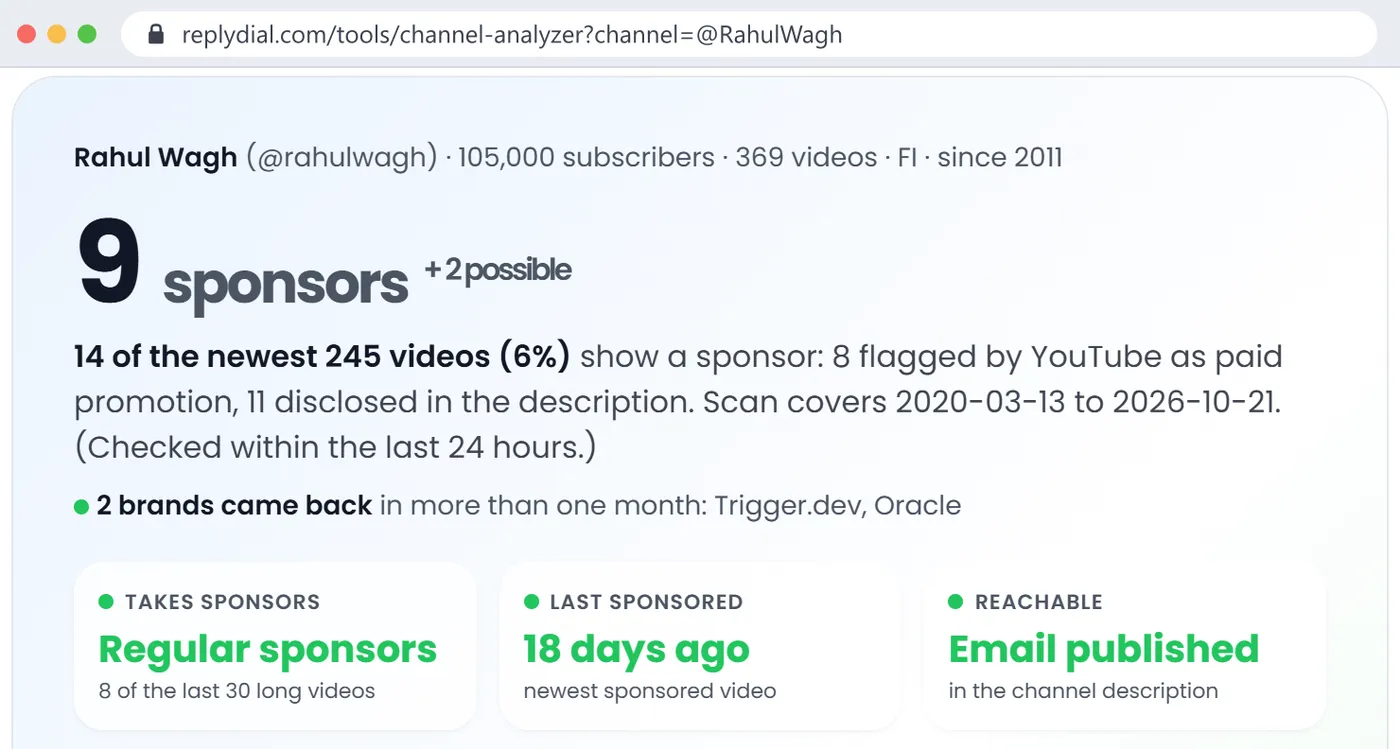
The first scan of my own channel, 24 October 2026, 15:23 UTC: 9 sponsors plus 2 possible, 14 sponsored videos. Two of those brands and two of those videos were wrong, which is what the rest of this post is about. Click to enlarge.
How do you see who sponsored a YouTube channel?
There is no public list. YouTube does not publish "brands that sponsored this channel" anywhere, not on the channel page, not in the About tab, not in the API. What exists is per video, so the work is per video too. Here is the order I use, from the cheapest signal to the slowest.
1. The paid-promotion label
When a creator ticks "My video contains paid promotion" in YouTube Studio, viewers see a small "Includes paid promotion" box in the top-left corner of the player for the first few seconds of the video. The same fact is in the YouTube Data API as paidProductPlacementDetails.hasPaidProductPlacement on each video, which is how any tool reads it.
Two things to know about it. It is a declaration the creator makes, not something YouTube detects, so it is only as complete as the creator's habit of ticking the box. And it says that there was a paid promotion, not who paid. A label with no brand named anywhere is a question, not an answer.
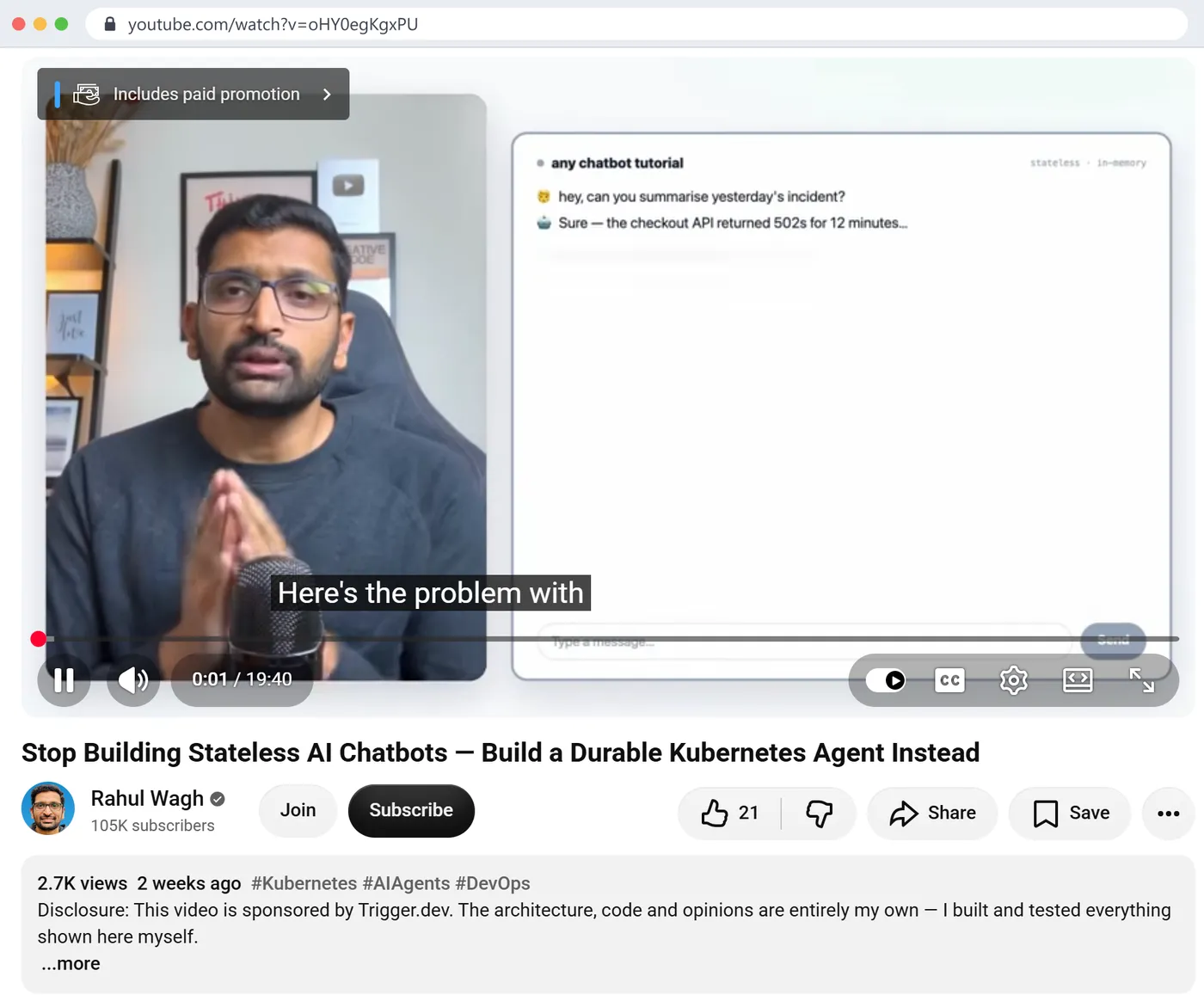
My Trigger.dev video, 6 October 2026, one second in: the 'Includes paid promotion' label on the player and the disclosure as the first line of the description. This is the easy case, where both signals agree. Click to enlarge.
2. The description and the title
Read the first three lines of the description and the last ten. Creators put disclosures in one of those two places. The phrases that matter are "this video is sponsored by", "sponsored by", "thanks to X for sponsoring", "in partnership with", "brought to you by", and in titles, "(Powered by X)". A discount code next to a brand name ("use code RAHULWAGH") is as good as a disclosure, because nobody prints a brand's code for free.
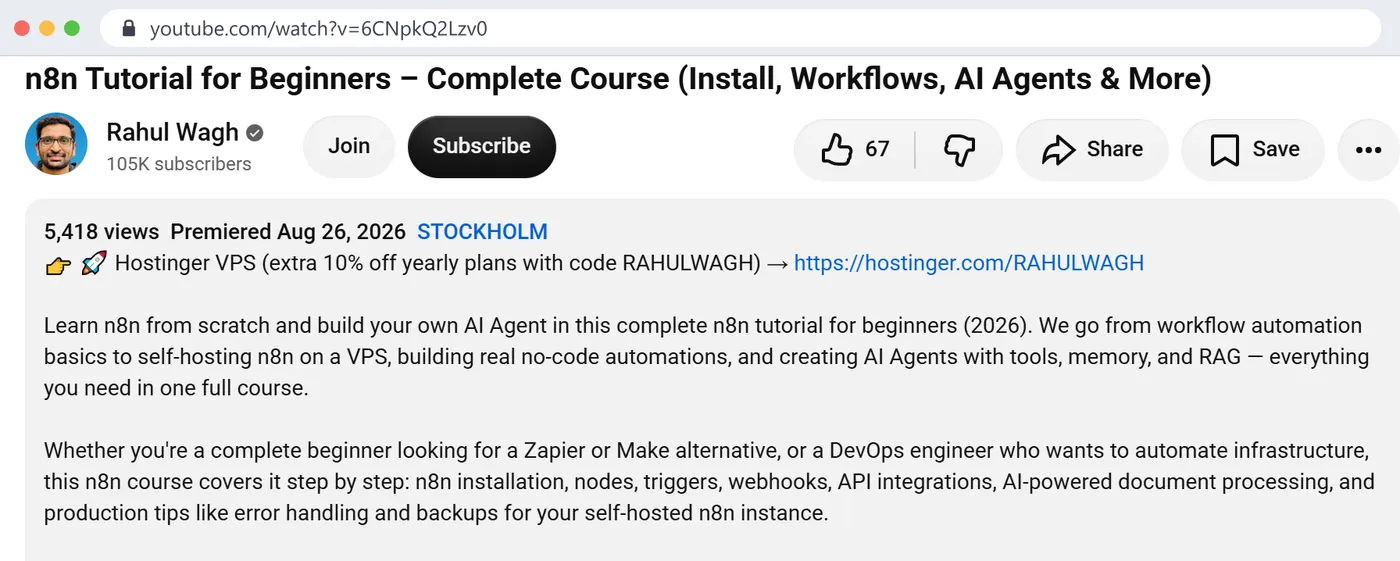
On my channel the descriptions are the more complete signal: 9 of 12 sponsored videos name the brand in words. The Hostinger video is a good example of why you read the text even when there is no label. The first line of the description is a Hostinger VPS link with my code, and a later line says "This video is sponsored by Hostinger." YouTube shows no paid-promotion label on it.
The n8n tutorial, published 26 August 2026: a Hostinger link and the code RAHULWAGH in the first line of the description, and 'This video is sponsored by Hostinger' further down. The API returns no paid-promotion flag for it. Click to enlarge.
3. The links, followed to the end
Sponsors rarely get a clean link. On my channel the sponsor links go through short tracking domains: fandf.co for Oracle, Kestra, Teleport and Crusoe, and hostinger.com/RAHULWAGH, which redirects through hostg.xyz. Hover a link and it tells you nothing. Open it in a private window and look at where you land; the final domain is the brand. A short link that appears only on sponsored videos and never on ordinary ones is almost always the sponsor.
Then cross out the links that are not sponsors: the creator's own course, membership, consulting calendar, GitHub, social profiles, and the documentation for whatever the video teaches. On a DevOps channel that last group is large. My n8n tutorial links to the n8n docs because n8n is the subject, not because n8n paid for anything.
4. Put it in a table with dates
Brand, video, date, label yes or no, text yes or no, code. Ten minutes for the last 30 videos of a channel that posts weekly. The table is where the useful answers come from, and they are rarely the brand names themselves.
What does "Includes paid promotion" tell you, and what does it miss?
It tells you the creator declared a paid promotion on that video. YouTube's own policy asks creators to tick it for sponsorships, paid product placements and endorsements, and it is the closest thing to an official signal that exists.
What it missed on my channel, in numbers:
4 sponsored videos have no label. The Trigger.dev video from February, the Kestra video from March, the first Oracle video from June and the Hostinger video from August all say in words that they are sponsored. The box was not ticked on any of the four. A brand that filtered my channel by the label alone would see 8 sponsored videos and would think my first Trigger.dev and first Oracle videos were organic.
2 labelled videos name no brand anywhere in the text. "Beyond AWS Cloud Practitioner Certificates" (31 December 2024) and "Top 5 Azure Mistakes Beginners Make" (27 January 2025) carry the label, but their descriptions contain only my own course links, my membership link and my consulting calendar. Either the promotion is spoken in the video and never written down, or the box was ticked for something that is not a third-party sponsor. From the outside you cannot tell which. The only way to find out is to watch the video.
1 labelled video names its brand only through what it teaches. The UpCloud video is a migration tutorial from AWS to UpCloud, labelled, with no "sponsored by" anywhere. You can infer the sponsor from the title and the links, and you would be right, but it is an inference.
What the label never tells you is the brand, the fee, or whether two labelled videos were one deal or two. On 2 July 2026 my channel has two uploads with the same Teleport title, both labelled. A brand counting "deals" from public data would count two. Whether that is one campaign delivered as two uploads, or two separate deals, is a question for the creator, not for the data.
How do you tell a sponsor from a tool the video teaches?
This is the mistake a script makes and a human mostly does not, and it is the one that put two wrong brands into my own report.
Tutorial channels name products constantly. Every Terraform video names AWS. Every AI video names a model. A sentence that contains "supported by" or "powered by" next to a product name looks exactly like a disclosure if you match words without reading the sentence. Here are the two that caught my analyzer:
The feature of Terraform state locking is supported by AWS S3 and Dynamo DB(LockID).
That line is from my Terraform state-locking video of 24 January 2022. It explains which AWS services make locking work. The analyzer read "supported by AWS S3" as a sponsor disclosure and listed AWS S3 as a sponsor of my channel, with 1 video, high confidence. AWS has never sponsored me.
How to use the Kestra AI Agent task powered by Google Gemini 2.5 Flash
That is a bullet from the Kestra video of 31 March 2026. Kestra was the sponsor and the description says so in its first line. Gemini is the model the demo uses. The analyzer read "powered by Google Gemini" as a second disclosure and listed Google Gemini as a sponsor too.
The rule a human applies without thinking is that a disclosure is a phrase at the start of a sentence or in brackets, addressed to the viewer: "This video is sponsored by", "(Powered by Teleport)", "Thank you to Kestra for sponsoring my content." A phrase in the middle of a technical sentence ("is supported by", "a task powered by") is describing the technology. When you read descriptions by hand, apply that rule and the false positives disappear. When you use any tool, mine included, open the example video for every brand you would act on.
The other half of the same problem is the "possible" pile. On the Hostinger video, the links include the n8n documentation, because the video is an n8n course. The analyzer shows n8n as "possible", meaning a link on a sponsored video that may be a reference. That is the honest label for it. A person reading the description sees in two seconds that n8n is the subject.
What did the analyzer get wrong on my channel, and what did I change?
I am the person who knows the right answer for this channel, so the audit was simple: compare the report with the deals. On 24 October at 15:23 UTC the report said 9 sponsors plus 2 possible, 14 sponsored videos out of 245, 8 flagged and 11 disclosed. Four things were wrong.
AWS S3 listed as a sponsor. The "is supported by" sentence above. A false brand and a false sponsored video from 2022.
Google Gemini listed as a sponsor. The "task powered by" bullet above. A false brand on a real sponsored video.
A discount code for my own course counted as a sponsor disclosure. My May 2025 video "Update on AWS Networking Course" says "Here is a discount code" with a Udemy coupon for my own course. The word "discount code" is on the disclosure list, so the video counted as sponsored. It is self-promotion. It did not add a brand, but it inflated the count of sponsored videos from 13 to 14.
Hostinger's tracking domain listed as its own brand.hostinger.com/RAHULWAGH redirects through hostg.xyz, so the report had Hostinger (from the words) and "Hostg" (from the link) as two rows. And the sponsor list showed Oracle as "disclosed" only, without the paid flag that its September video does carry, because the flag was only recorded through links and Oracle's link is a tracking domain.
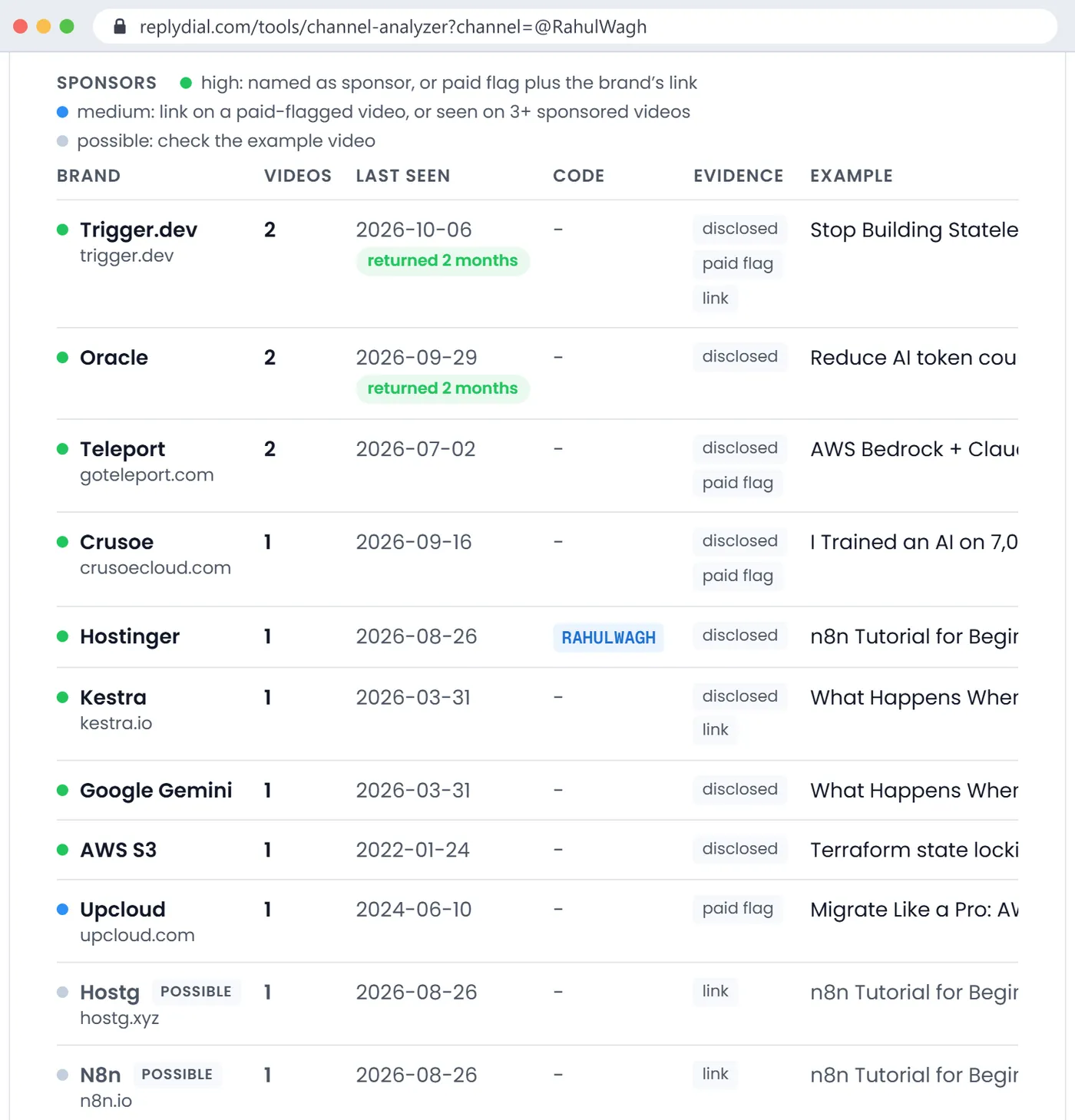
The sponsor table from the first scan: Google Gemini and AWS S3 listed as high-confidence sponsors, Hostg as a separate possible brand, and Oracle without its paid flag. Every one of those is a reading error, not a deal. Click to enlarge.
The changes went into the analyzer the same afternoon:
"Powered by" and "supported by" only count at the start of a phrase. "(Powered by Teleport)" still counts; "state locking is supported by AWS S3" and "a task powered by Gemini" no longer do.
A line that links to the creator's own Udemy course is ignored when looking for disclosure words, so a coupon for your own course is not a sponsorship.
hostg.xyz is treated as Hostinger's domain, so the link and the name join into one row with the domain and the code.
A brand named on a labelled video now shows the paid flag as evidence too.
Run again against the changed code, the same channel comes out like this:
@rahulwagh, newest 245 uploads, 24 Oct 2026
sponsored videos   12   (label 8, named in text 9)
Trigger.dev        2 videos  2026-02-26 .. 2026-10-06  disclosed + paid flag + link
Oracle             2 videos  2026-06-02 .. 2026-09-29  disclosed + paid flag
Teleport           2 videos  2026-07-02               disclosed + paid flag
Crusoe             1 video   2026-09-16               disclosed + paid flag
Hostinger          1 video   2026-08-26  code RAHULWAGH  disclosed + link
Kestra             1 video   2026-03-31               disclosed + link
UpCloud            1 video   2024-06-10               paid flag (medium)
n8n                possible, the subject of the Hostinger video
Seven brands, which is the right answer, plus one honest "possible". The two labelled videos with no named brand are counted as sponsored but produce no brand row, which is also right: there is no name to show.
What did not change: any text-based check, by hand or by tool, will miss a sponsor that is only spoken in the video and never written down, and will occasionally list a brand the creator merely thanked. The label helps with the first problem when creators tick it. Nothing helps with the second except opening the video.
How often does a channel take sponsors, and did the brands come back?
This is the part brands actually care about, and it is where dates do the work.
Recency. My newest sponsored video is from 6 October 2026, 18 days before the scan. A channel whose last sponsor was three years ago is a different conversation from one whose last sponsor was this month. The first may not have thought about sponsors in a while; the second has a process, a rate and probably a waiting list for the next slot.
Frequency. 12 sponsored videos out of 245 is about 5 percent over six years, which sounds rare. But 9 of the 12 are from 2026, and 8 of my last 30 long videos are sponsored. Averages over a whole channel hide the change. Count the last 30 videos, not the last 300, when you want to know what a channel is like now.
Return. Trigger.dev sponsored me in February and again in October 2026. Oracle sponsored me in June and again in September 2026. A brand that comes back after seeing the first video's numbers is the strongest public signal of a sponsorship that worked for the brand, because the brand had the results and paid again anyway. If you are a brand vetting a channel, returning sponsors are worth more than the total count. If you are a creator, your returning sponsors are the line you put first in a media kit.
Category. All seven of my sponsors are developer infrastructure or developer tools: workflow engines, cloud hosting, access security, AI infrastructure, a database. That is what a DevOps tutorial audience buys. A VPN or a mobile game showing up on a channel like mine would be a signal worth noticing, for a brand in either direction.
What should a brand or agency check before a deal?
The sponsor history is one input. Here is the checklist I would use if I were on the other side of the table, in the order I would do it, with what is public and what is not.
The last 30 videos, all three signals. Label, text, links, dates. Build the table above. Fifteen minutes by hand, or a scan.
Competitors already on the list. If your direct competitor sponsored the channel last month, some creators will not take you within a set window, and the audience has just seen the pitch for the alternative. If your competitor sponsored it two years ago and never came back, that is information too.
Returning brands. Who came back, and how long between the first and second video.
How the integration was done. Open two sponsored videos and watch the sponsor segment. On a tutorial channel the best integrations are the ones where the sponsor's product is the thing being built with, like my Trigger.dev and Crusoe videos; the worst are a 60-second read in the middle of an unrelated topic. You learn more from two minutes of watching than from any table.
The comment section under the sponsored videos. A brand deciding on a channel reads the comments first. Are viewers asking questions about the sponsor's product, and is the creator answering them? Unanswered questions under a sponsored video are lost sales for the brand. You can count those with the free unanswered comments checker.
A business contact the creator published. Mine is in the channel description. The YouTube API does not expose the "View email address" button on the About tab, so any tool can only show contacts the creator wrote into descriptions.
Disclosure habits. A creator whose descriptions say "sponsored by" on every deal is a creator who will disclose your deal. Four of mine say it in words without the label; a brand with strict compliance requirements should ask for both, in writing, in the contract.
What is not public, and what you have to ask the creator for directly:
Views on sponsored videos compared with the channel's normal videos. View counts are public per video, but a fair baseline needs the right comparison window and the right set of videos, and the creator's own Studio has it with retention curves. Ask for a screenshot of the last 30 days and of the sponsored videos' first 30 days.
Audience country, age and device. Not public at all, for any channel. The channel's country field is what the creator set. Mine says FI, while the location tag on my n8n video says Stockholm. Neither tells you where the viewers are. Only the creator's Studio does.
Rates. No public data source has them. Anything that estimates a creator's rate from subscribers is guessing.
Exclusivity. Whether the creator has agreed not to work with your competitor for a period. Only the creator knows.
How do creators use the same check?
Run it on channels one size bigger than yours in your niche. Their sponsors are your pitch list, and their example videos show you what the integration looked like and how long it ran. A brand that has sponsored three channels like yours in the last six months has a budget for your niche right now, and the date tells you whether the person who approved it is likely still in the job.
Run it on your own channel too, the way I did. It shows you what a brand's junior marketer sees in the first ten minutes of vetting you. In my case it showed four sponsored videos with no paid-promotion label, which a careful brand would notice and ask about, and two labelled videos with nothing written down, which look odd to anyone reading the descriptions. Neither is a secret; both are worth knowing before someone else points them out.
Is there a free tool that shows which brands sponsor a YouTube channel?
The channel analyzer for YouTube is the one I built and audited here. It reads the newest 300 uploads of any public channel through the official YouTube Data API, combines the label, the description and the links as described above, and shows brand, video count, first and last date, any code, the evidence, and an example video to confirm. It costs about 13 units of API quota per channel, so it is free and needs no sign-in, with a 24-hour cache. You can download the sponsor table as a CSV, and with a free account you can save a report, watch a channel for new sponsors, or compare two channels side by side.
It has the limits this post describes: it cannot hear sponsors that are only spoken, it reads text and can still be fooled by unusual wording, and it does not estimate rates or audience data, because those are not public and any tool that claims them is estimating. Every brand row links to an example video so you can check it in one click. If it gets your channel wrong, the page tells you how to tell me, and as this post shows, I fix the reading rule rather than the row.
First, the label is less complete than I assumed, and on my own channel. I had pictured the paid-promotion flag as the reliable baseline and the description as the noisy extra. On my channel it is the other way round: the descriptions name 9 of 12, the label covers 8. For any channel, read both.
Second, the errors that matter are not missed sponsors but invented ones. A missed sponsor makes a channel look less commercial than it is, which costs a brand little. An invented sponsor tells a brand that AWS or Google already paid this creator, which could end a conversation before it starts. That asymmetry is why the reading rules should be strict and why "possible" exists as a separate pile.
Third, the dates were more useful than the names. The whole story of my channel's sponsorships is in one column of the table: almost nothing before 2026, then roughly one sponsored video a month, with two brands returning. Anyone vetting me learns more from that column than from the list of seven brands.
Quick answers
Can I see every brand a YouTuber has ever worked with?
Only the ones that were disclosed in writing or labelled, on videos that are still public. Deleted videos, private videos, sponsors in Shorts with thin descriptions, and spoken-only mentions do not show up anywhere you can read.
Does YouTube show which videos are sponsored?
Per video, through the "Includes paid promotion" label, when the creator ticked the box. There is no channel-level list, and no search filter for sponsored videos.
Is an affiliate link a sponsorship?
Not by itself. An affiliate link pays the creator per sale; a sponsorship pays for the segment. Many creators use both on the same video. Treat a discount code next to a brand as a strong signal of some commercial deal, and ask which kind it was.
How far back should I check?
The last 30 long videos for what the channel is like now, and the full history only if you want to know whether a specific competitor was ever there.
What to do this week, no tool needed: pick the one channel you are considering for a deal, or the one channel one size bigger than yours, open its last 10 videos, and write down for each one the label, the "sponsored by" line and the date. Ten rows tell you whether this channel takes sponsors, how recently, and whether anyone came back.
ReplyDial's free channel analyzer for YouTube builds that table for the newest 300 videos of any public channel in about a minute, with the evidence and an example video for every brand; ReplyDial itself is the inbox for answering your own channel's comments, including the questions viewers ask under your sponsored videos.
See your own unanswered comments
ReplyDial lists every comment on your channel still waiting for a reply, drafts answers in your voice, and posts only what you approve. Free for 7 days on Creator limits, no card.
A filtered list beats YouTube search: niche, subscriber range, country and upload pace, with sponsors on each row. What 602 channels showed on 3 Nov 2026.
Reply rate is the share of comment threads the channel answered. How to count it from public data, what 8 channels scored, and why the buying questions matter.
Consistency, engagement, discoverability, commercial readiness and audience care, 0 to 100 each from public data. The rules, my scores, 8 channels compared.