Studio's Response status: Unresponded filter lists the comments you never answered. What it counts, what it misses, and my channel's numbers on 9 November 2026.
To find the comments you never answered, open YouTube Studio, click Community in the left menu, stay on the Comments tab, click the filter bar above the list and add Response status: Unresponded. Studio then shows every published comment on your videos, Shorts and community posts that has no reply from your channel, with the newest replies to your own replies left out. There is no count at the top, the list is sorted by "Most relevant" until you change it to Newest, and the filter is dropped the moment you switch from Published to Held, so you re-add it every time you come back.
I run a Cloud & DevOps channel, @rahulwagh, 105,000 subscribers and 371 videos, next to a full-time job, and the backlog of comments I had not answered is the reason I built ReplyDial. On 9 November 2026 I went back into Studio and did the whole thing by hand again, with screenshots, and then ran the same channel through the free unanswered comments checker and the channel analyzer to see where the three disagree. They disagree more than you would expect, and the reasons are the useful part of this post.
Studio control, 9 November 2026
Where it is
What it does
Community
Left menu, below Analytics
Opens the comments area; the tabs are Comments, Viewer posts and Mentions
Moderation status
First chip, reads Published or Held
Published is the live list; Held is what your filters or YouTube stopped
View
Second chip, Most relevant or Newest
Most relevant is the default and it is not chronological
Search
Third chip
Text search over the list, plus more filters
Response status
Chip after Search
Unresponded, Responded, New replies to your response
Content type
Last chip
Videos, Shorts and Posts; all three are on by default
Count of unanswered comments
Nowhere
Studio shows a list, never a total
Rows on my channel with Unresponded on
First screen
6 comments; 5 of them on community posts, 1 on a video
Same channel in the free checker
Last 20 videos, newest 100 comments each
1 unanswered of 142, 0 buying signals, 0 questions
Same channel in the analyzer
Newest 5 videos, 15 threads
15 of 15 answered, median response about 2.5 hours
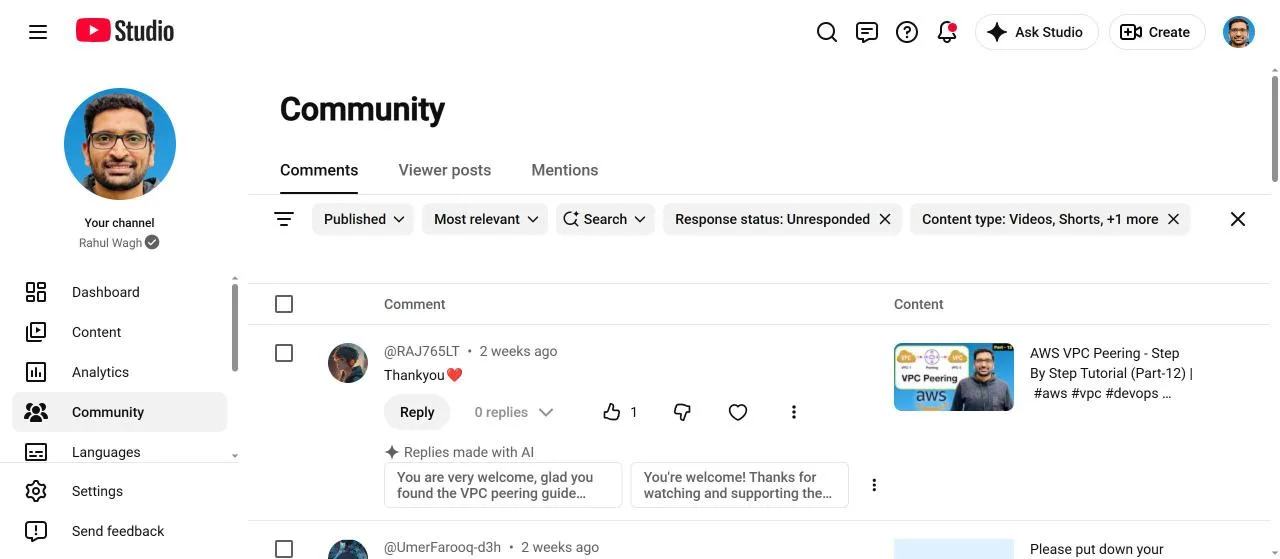
Studio, Community, Comments, with Response status: Unresponded on. The first row is a two-week-old thank-you on my AWS VPC Peering Part 12 video, 0 replies, and Studio's own two suggested replies under it.
Where is the unanswered comments filter in YouTube Studio?
It is not a tab and it is not a menu item, which is why people search for it. It is a chip inside the filter bar on the Community page. The path on desktop, as of 9 November 2026:
Open studio.youtube.com and sign in with the account that owns the channel.
Click Community in the left menu. Studio lands on the Comments tab with the Published list.
In the grey bar above the first comment, click the filter icon on the left, or click Search and pick a filter from the list.
Optionally change the second chip from Most relevant to Newest, so the list runs in date order instead of Studio's own ranking.
The chip then reads "Response status: Unresponded" and stays on while you work through the list, as long as you stay on Published. The URL carries the filter as a long encoded parameter, so you can bookmark it; mine ends in a filter block that names ENGAGED_STATUS with the value COMMENT_CATEGORY_NOT_ENGAGED, which is Studio's internal name for "the channel has not engaged with this comment". I bookmark that URL and open it instead of clicking through, because the filter does not survive a visit to Held.
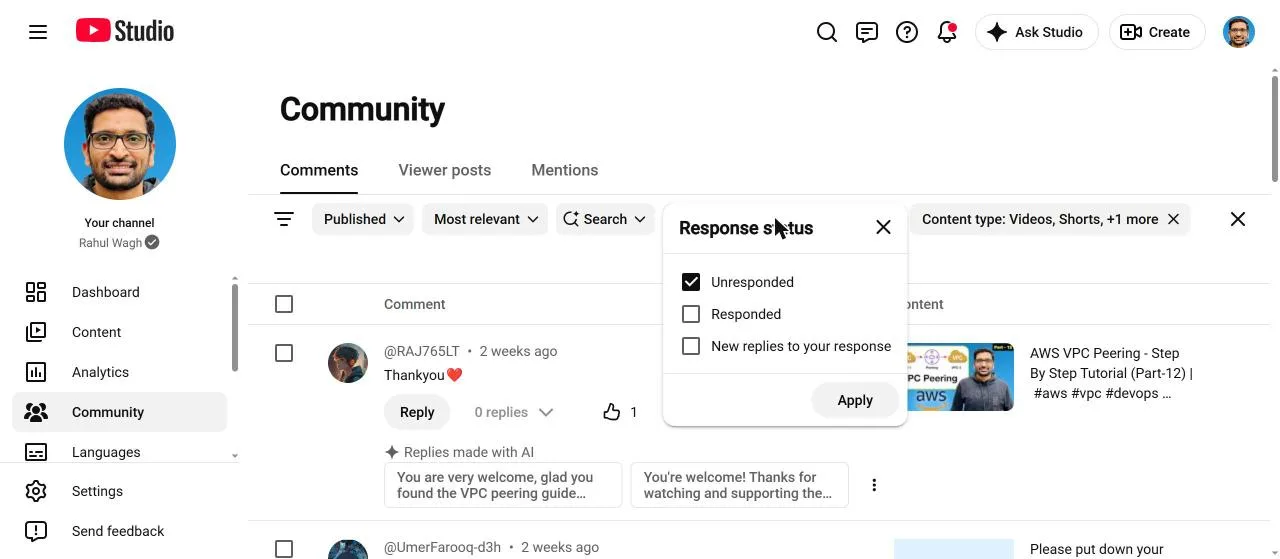
The three options in the Response status menu are worth reading once:
Unresponded: comments with no reply from your channel.
Responded: comments you have replied to.
New replies to your response: someone answered one of your replies, so the thread is open again even though you "responded" once.
That third option is the one most creators never open, and it is where the conversations you actually started go quiet. A viewer asks, you answer, they ask a follow-up, and Unresponded does not show it because you did respond, once.
The Response status menu on 9 November 2026: Unresponded, Responded, New replies to your response. The third is the follow-up queue most people never look at.
What did the filter show on my channel on 9 November 2026?
Six comments on the first screen. The first was on a video, the AWS VPC Peering tutorial, Part 12 of my VPC series: a viewer wrote "Thankyou" with a heart two weeks earlier, 0 replies, 1 like. Under it Studio showed its own "Replies made with AI" box with two suggestions, "You are very welcome, glad you found the VPC peering guide helpful!" and "You're welcome! Thanks for watching and supporting the channel." I did not click either; I will come back to those suggestions below.
The other five rows were not on videos at all. They were comments on two community posts: a two-week-old comment in a non-Latin script on my "put down your suggestions" post, and four two-month-old congratulations on the post I wrote when the channel reached 100,000 subscribers and the Silver Play Button arrived. "Congratulations deserved." "Hearty wishes sir." "You deserve more sir for the excellent content that you provide to the community." And one that was actually a question: "Sir any special advice or courses on this special occasion".
That last one is the kind of comment I built a whole product around. Someone asked, in public, for a course recommendation, on a post that 100,000 people could see, and it sat for two months because community-post comments live in the same list as video comments but never arrive with the same urgency. My reply rate on videos is good, as the next section shows; the community post was the hole.
What Studio did not tell me is how many rows there were in total. The page shows the first screen and loads more as you scroll. For a channel with a real backlog, the only way to know the size of the problem inside Studio is to scroll to the end and count, which nobody does. That is the first reason the filter is not enough on its own.
Why do Studio, the checker and the analyzer give three different numbers?
Because they look at three different slices of the same channel, and none of the three is wrong.
Source, 9 November 2026
Scope
Unanswered found
Studio, Response status: Unresponded
Every published comment on every video, Short and community post, any age
6 on the first screen, no total shown
Free checker
Newest 100 top-level comments on each of the last 20 videos (142 comments)
1, on a video published 4 November 2026
Channel analyzer, audience care
Comment threads on the newest 5 videos (15 threads)
0; 15 of 15 answered, median response about 2.5 hours
Studio has the widest scope and no number. The checker has a fixed scope, 20 videos and up to 100 comments each, and gives a number: 1 of 142, which is 1 percent, with 0 buying signals and 0 questions among them. The analyzer reads the newest 5 videos as part of a wider report and turns the result into a score: audience care 100, "Answers its viewers", 15 of 15 threads replied, median response about 2.5 hours.
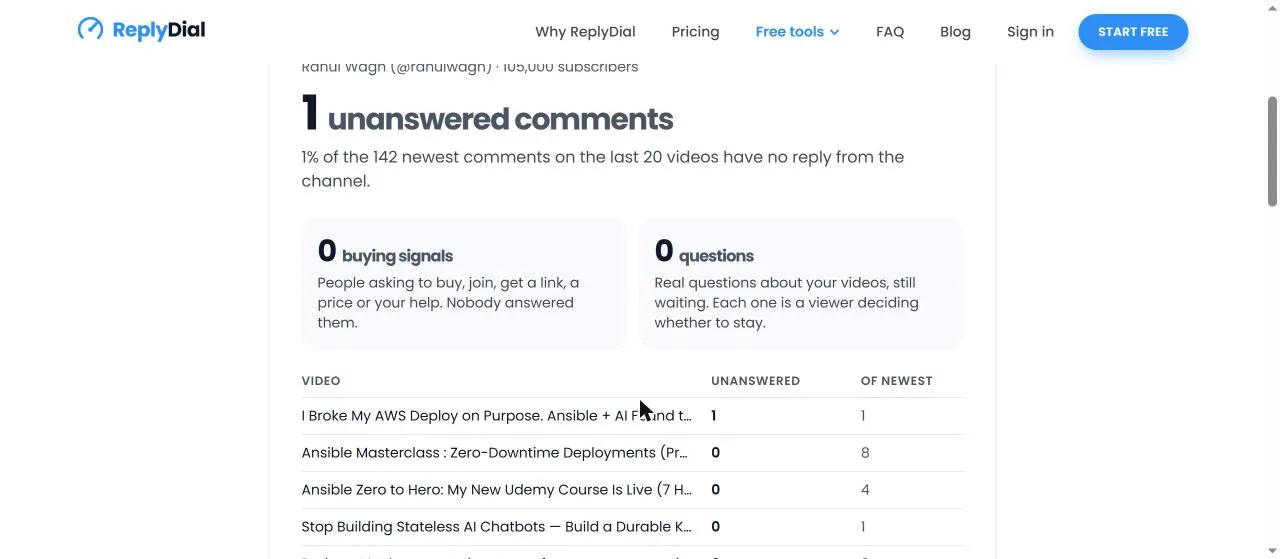
The one comment the checker found was on "I Broke My AWS Deploy on Purpose. Ansible + AI Found the Bug", published 4 November 2026. That video had exactly one comment and I had not answered it. Studio's Unresponded list did not have it on the first screen because "Most relevant" ranked the two-month-old congratulations above a five-day-old comment on a new video. Switch the View chip to Newest and it comes to the top. If you leave Studio on Most relevant, your newest unanswered comments can sit below your oldest ones.
The checker misses the community posts by design: it reads videos through the YouTube Data API, and community posts are not videos. So Studio showed me five unanswered comments the checker could never show, and the checker showed me one the first screen of Studio hid. Together they were the real list: seven comments, one of them a question with a course in it.
The checker on 9 November 2026: 1 unanswered of 142 newest comments on my last 20 videos, 0 buying signals, 0 questions, and the video it was on at the top of the table.
Why does Studio lose track of unanswered comments?
I have watched this happen on my own channel for years, and in the 9 November session I could reproduce five of the reasons in twenty minutes.
The filter does not survive the Held view. I clicked the first chip, chose Held, clicked Apply. Studio moved me from the /comments/inbox URL to /comments/moderate, the Response status chip vanished, and the View chip changed itself from Most relevant to Newest. When I went back to Published, Unresponded was gone and I had to add it again. If you moderate held comments every morning, you lose the filter every morning.
Most relevant is the default, and it is not time. On my channel it put two-month-old thank-yous above a five-day-old comment on a new upload. The ranking is Studio's, it is not explained on the page, and the only control you have is to switch to Newest, every time, because the preference does not stick across the Held round trip either.
Community posts and Shorts share the list. The Content type chip reads "Videos, Shorts, +1 more" and the hidden third type is Posts. Five of my six first-screen rows were on posts. That is correct behaviour, those comments are unanswered, but the mental model most creators carry is "comments are on videos", so the post comments go unnoticed until they are two months old.
A reply from you closes the thread for the filter, even when the viewer writes back. That is what the third option, New replies to your response, exists for. Unresponded will not show you a follow-up question on a thread you answered once. If you only ever use Unresponded, you will answer first questions and miss second ones.
There is no count and no per-video view. Studio shows a stream. It cannot tell you "video X has 12 unanswered comments" or "you have 143 open comments in total". So the backlog has no size, and a problem with no size never gets scheduled.
The sixth reason is the one that comes from the API side, and it is why ReplyDial's own numbers are also not perfect: the public YouTube Data API returns at most five replies per comment thread. On a thread with six or more replies where the creator answered late, a tool reading public data can count the thread as unanswered when it is not. The checker says this plainly in its FAQ. Signed-in ReplyDial users see their own exact list because the inbox reads the channel with the creator's permission, but the free checker works from public data, so treat its number as close, not exact.
What did the Held view show, and what happened to "Held for review"?
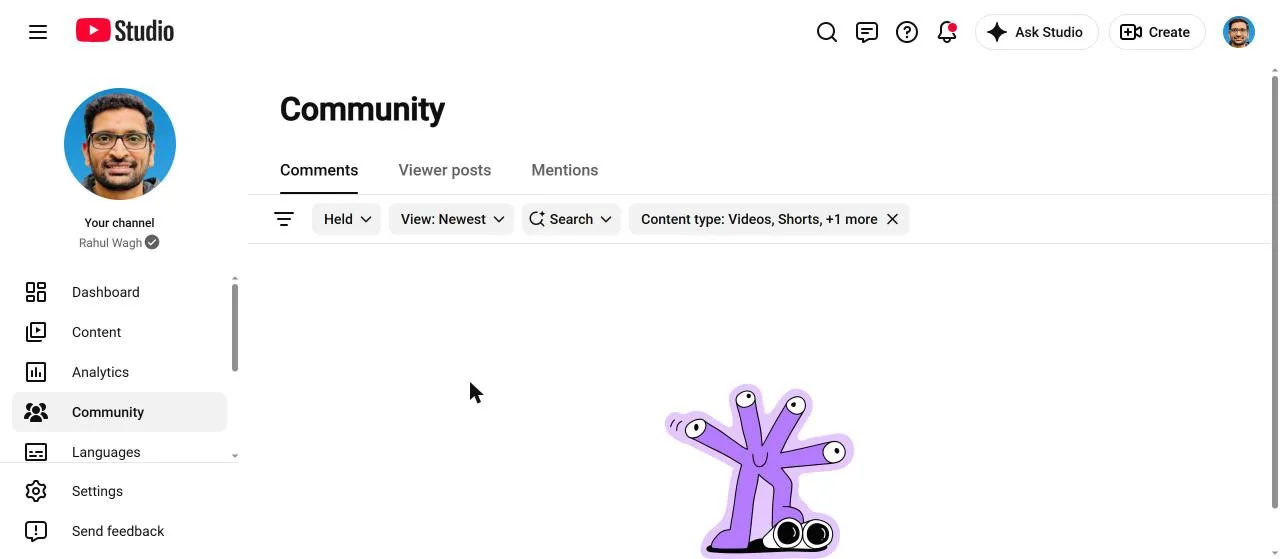
Nothing, on my channel, on 9 November 2026. The Held list said "No comments found. Try searching for something else or removing filters." Zero held comments is a good day, and it also means I cannot show you a held comment with a date in this post; when I have one I will add it, with the day it was held and the day it would have been deleted.
What I can show is a naming change that will trip you up if you follow older guides. Google's help pages talk about "Held for review" and "Likely spam" as two tabs. The Studio I used on 9 November 2026 has one chip, Moderation status, with two radio buttons, Published and Held. I asked my browser tooling to find "Held for review" on the page and it reported that no such element existed, only "Held". If you are reading a 2023 guide that says click Held for review, the button now says Held and the spam queue is inside it.
The Held view on 9 November 2026: no held comments on my channel. Note the chips: Response status is gone and View has reset itself to Newest.
Should you use Studio's AI reply suggestions on the unanswered ones?
Studio showed me two suggestions under the thank-you comment and two under each of the congratulations: "Thank you so much for the kind words!", "Thanks for the support!", "I really appreciate your support!". They are polite, they are fast, and they are the same sentence for every viewer. If you post them as they are, you will have replied to everyone and said nothing to anyone, and readers can tell.
My rule, and it is the rule ReplyDial is built on, is that a reply should be written for the one comment it answers: name the thing the viewer mentioned, answer the question they asked, and say it in your own voice. The thank-you on the VPC peering video deserves one sentence about the next part of the series. The viewer asking for a course recommendation on the 100k post deserves the actual recommendation. A suggestion engine that does not read the video cannot do either, so I use Studio's suggestions as a reminder that a comment is open, and then I write the reply.
How do I work through a real backlog without losing my place?
This is the routine I settled on after the 9 November session. It uses Studio first and tools second, because Studio is where you post and it costs nothing.
Bookmark the filtered URL. Add Response status: Unresponded, switch View to Newest, copy the address bar. Open that bookmark instead of clicking Community. You skip the two clicks and you never start on Most relevant by accident.
Do Held first, then open the bookmark. Since the Held round trip wipes the filter, moderate first and come back through the bookmark, not through the chip.
Set Content type to Videos only for the first pass, then Posts only for a second pass. Two short lists are easier than one mixed list, and the posts pass is where the two-month-old comments live.
Open New replies to your response once a week. That is where the follow-up questions are. On my channel it is rarely more than a handful, and they are the most valuable comments of the week because the viewer has already shown they will come back.
Get a number once a week. Run the free checker on your own handle. It reads 20 videos and 100 comments each for about 22 YouTube API units and caches the result for 24 hours, so it costs you nothing and gives you a figure you can write down: 1 of 142 this week, for me. If the figure rises, the routine has slipped.
Answer the questions before the thank-yous. The checker separates "buying signals" and "questions" from the rest for exactly this reason. A thank-you can wait a day. "Which course should I take?" is a viewer deciding whether to stay.
The whole pass, on my channel, is under fifteen minutes a week, most of it writing replies rather than finding them. Finding them is what the filter is for, once you know its four habits: it hides behind a chip, it dies on Held, it ranks by relevance, and it treats a second question as answered.
How do you find unanswered comments with the YouTube Data API instead?
The same question can be answered without opening Studio at all, and this is how the free checker and ReplyDial's inbox do it. Everything below uses public data and the official YouTube Data API v3; nothing is scraped and nothing is posted.
Resolve the channel. A handle like @rahulwagh becomes a channel id (mine is UC7p4oXcPbgk_yTSHK7QlkSg) with one channels.list call, which also returns the id of the channel's uploads playlist. Cost: 1 unit.
List the newest videos. One playlistItems.list call on the uploads playlist returns up to 50 video ids, newest first. The checker takes the first 20. Cost: 1 unit.
Read the comment threads. For each video, commentThreads.list with the video id returns the newest top-level comments, up to 100 per page, each with its replies attached (the API includes at most five replies per thread in that response). Cost: 1 unit per video, so 20 units for 20 videos.
Decide what unanswered means. A thread counts as unanswered when none of its replies has an authorChannelId equal to the channel's own id. Comments written by the channel itself are skipped, so your own pinned comments do not count against you.
Add it up. The checker on my channel: 20 videos, 142 top-level comments read, 1 with no reply from the channel. About 22 units in total, which is 0.2 percent of the 10,000 units a project gets per day, and the result is cached for 24 hours so a second check costs nothing.
If you would rather run it yourself than trust a web page, the same check is in the open-source youtube-comment-tools repository as a command-line tool: an API key, a handle, and it prints the count per video. It is read-only, it has no dependencies, and it is MIT licensed. I keep it public precisely so that the number on the checker page can be reproduced by anyone with a free API key.
Two limits of the API route are worth knowing before you build a routine on it. Community-post comments are not reachable through the Data API, so an API tool will never show you the five post comments Studio showed me; Studio is the only place for those. And the five-replies-per-thread limit means a long thread where you answered late can be miscounted; on a tutorial channel where threads are short this almost never happens, on a channel with busy threads it will, and the honest fix is the one ReplyDial uses for signed-in creators, which is to read the channel with the owner's permission and see every reply.
So the two routes are not competitors. Studio gives you the complete list with no number and a filter that resets; the API gives you a number and a per-video table but cannot see community posts. On 9 November 2026 I needed both to get to seven: six from the first screen of Studio, one from the checker that Studio's relevance ranking had pushed down.
What this means for you
The filter exists and it works: Community, filter bar, Response status, Unresponded. Learn the path once and bookmark the result.
Switch View to Newest or your newest unanswered comments can sit below two-month-old thank-yous.
Check Posts separately. On my channel five of the six first-screen rows were on community posts, including the only real question.
Open New replies to your response weekly, because Unresponded considers a thread closed after your first reply.
Expect to lose the filter every time you visit Held; go back through a bookmark.
Get a number from outside Studio once a week, because Studio never shows a total and a backlog with no size never gets fixed.
This week, without any tool: open Studio, add Response status: Unresponded, switch to Newest, set Content type to Posts, and answer whatever is there; then do the same for Videos.
ReplyDial does the finding part for you: one inbox of every unanswered comment across your whole channel, a draft written for each one in your voice, and nothing posted until you click. Start with the free unanswered comments checker to see your number.
See your own unanswered comments
ReplyDial lists every comment on your channel still waiting for a reply, drafts answers in your voice, and posts only what you approve. Free for 7 days on Creator limits, no card.
Six places YouTube comments hide: the Held filter, Most relevant sort, follow-ups in answered threads, the bell, Shorts and posts, old videos. My 104k channel.
YouTube Studio can filter to comments you have not responded to, but it will not tell you how many, how old, or on which videos. Here are three ways to find every unanswered comment on your channel, with the numbers from mine.
How the analyzer's discoverability score is built: six packaging checks with fixed weights. My 70 and three others, 54 to 70, recomputed by hand on 9 Nov 2026.