Vetting a YouTube creator before a deal: the 15-minute checklist
Seven checks from public data, in order, with a time budget: sponsor history, cadence, the segment, the comments, reachability, brand safety, then what to ask.
Vetting a YouTube creator before a sponsorship takes about fifteen minutes with public data, if you do the checks in the right order: the sponsor history first (does the channel take sponsors, how recently, which competitors), then the upload cadence, then one sponsored segment watched end to end, then the comment section under the last few videos, then whether the creator can be reached, then the brand-safety flags, and only then the questions only the creator can answer. Most vetting mistakes come from doing these in the wrong order: watching a charming video first, or asking for a media kit before checking whether the channel has uploaded in the last 90 days.
I run a 105,000-subscriber DevOps channel and have been on the creator side of seven sponsorship deals; I also built the free channel analyzer for YouTube, which agencies and brands now use for the first three checks; the accounts it brought in this month include people writing from company addresses. On 26 October 2026 I ran the whole checklist on three channels in my own niche, Cloud With Raj (128,000 subscribers), Abhishek Veeramalla (675,000) and Tech With Lucy (278,000), plus my own, and this post is that checklist with the real numbers, the time each step took, what is public and what is not, and where the public data misled me.
What does the 15-minute check look like on a real channel?
The checklist, with the result for Cloud With Raj, a channel I had never vetted before, from a single report on 26 October 2026:
Minute
Check
Public source
Cloud With Raj, 26 Oct 2026
0 to 3
Does the channel take sponsors, how recently, who
Paid-promotion label, descriptions, links
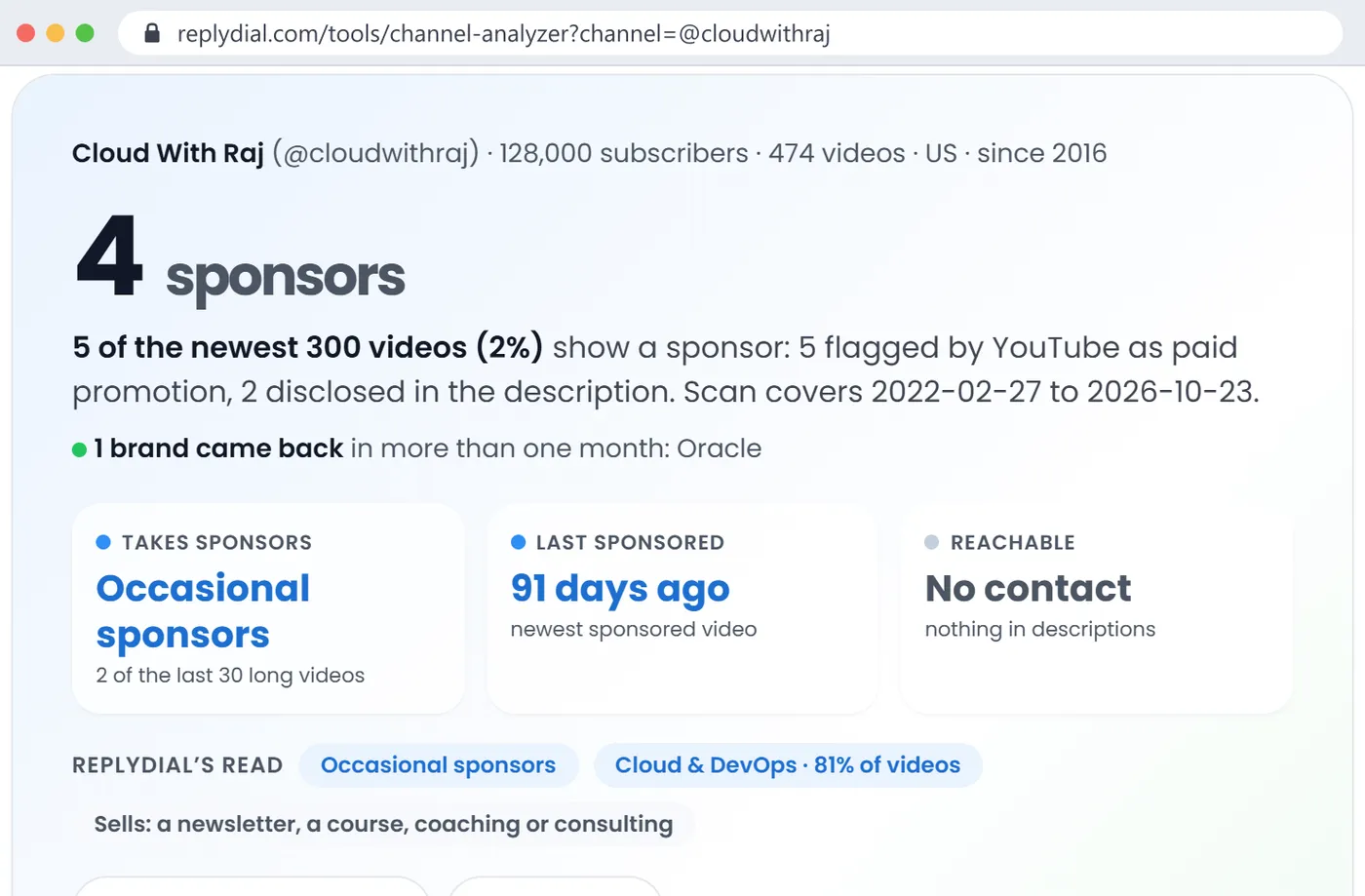
4 brands, 5 of newest 300 videos sponsored (2 percent), last sponsor 91 days ago, Oracle came back for a second video
3 to 5
Is the channel alive, and in what format
Upload dates, durations
20 uploads in 90 days, 10 in 30, newest 3 days ago; 207 long videos and 93 Shorts scanned
5 to 8
How is the sponsor integrated
One sponsored video, watched
Teleport, 22 July 2026: labelled, "Thank you Teleport for sponsoring this video" in the description, the sponsor's framework linked first
8 to 11
What the comment section says
Newest comments on the last 20 videos
Not run on this channel; see Abhishek's below
11 to 13
Can you reach the creator
Channel and video descriptions
No business email in any description; the About tab's email button is the only route
13 to 14
Brand safety and fit
Topic tags, niche read, flags, language, country
Cloud and DevOps 81 percent of videos, English, channel country US, no made-for-kids or age-restricted videos in the scan
14 to 15
What to ask the creator
Nothing public
Median views of last 10 long videos, audience countries, sponsored-segment retention, exclusivity, rate
The data points to keep from the four channels:
Sponsored share of the newest videos: Cloud With Raj 2 percent, Abhishek Veeramalla 8 percent, my channel 5 percent, Tech With Lucy 71 percent. Four channels in one niche, a 35-fold range.
Of the last 30 long videos: Raj 2 sponsored, Abhishek 6, me 8, Lucy 26. The analyzer labels these "occasional", "regular", "regular" and "heavily sponsored".
Comment sections, newest comments on the last 20 videos: Abhishek 638 comments, 561 unanswered (88 percent), 124 questions, 22 buying signals. My channel 143 comments, 1 unanswered, 0 open questions.
Reachability: Abhishek and Lucy publish a business email in the channel description; Raj and I do not in the video descriptions the API can read (mine is in the channel description, which it also reads).
Cost of the whole public part: about 13 YouTube API units per analyzer report and about 25 per comment check, so a shortlist of 20 channels costs under 800 units out of the 10,000 the free tools have each day.
Cloud With Raj on 26 October 2026: the first three minutes of the check in one card. 4 sponsors, 2 percent of videos, last sponsor 91 days ago, Oracle came back, 'Occasional sponsors', and no contact published. Click to enlarge.
Minute 0 to 3: does the channel take sponsors, and from whom?
Start here because it decides whether the other twelve minutes are worth spending. Three questions, answered from the paid-promotion label, the descriptions and the links on the channel's newest 300 videos.
Does the channel take sponsors at all? Some channels do not, and nothing in their descriptions, flags or links shows a brand. KodeKloud, a 493,000-subscriber training company channel, had one sponsored video in its newest 300 on 26 October. A channel like that sells its own product; a sponsorship pitch to it is a different conversation, and knowing that in minute one saves the other fourteen.
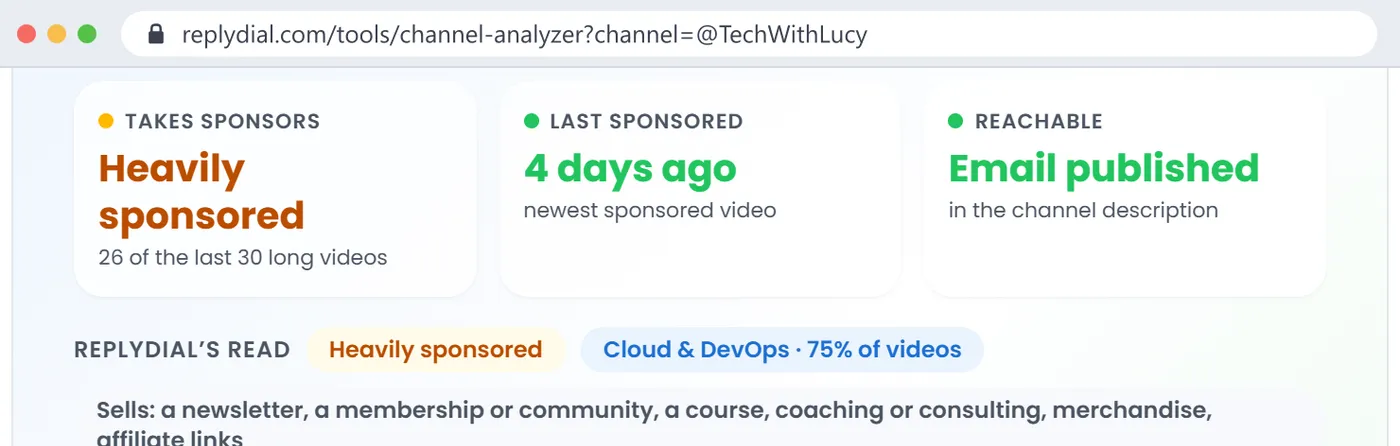
How recently, and how often? "Last sponsored 91 days ago" and "2 of the last 30 long videos" describe Cloud With Raj. That is a channel that takes a sponsor occasionally, has open slots, and has not been saturated. "Last sponsored 4 days ago, 26 of the last 30" describes Tech With Lucy, a channel built around sponsorship, where your segment will be one of many and your rate is being compared to a dozen others this quarter. Neither is better; they are different purchases.
Which brands, and is one of them your competitor? Raj's four are Coder, MongoDB, Oracle and Teleport, all developer infrastructure, with Oracle returning for a second video. If you sell a database and MongoDB sponsored the channel eleven months ago, ask about exclusivity before anything else. If you sell a database and Oracle came back twice, the channel has already proven it can sell databases to this audience, which is the strongest argument for the deal you will find anywhere in public data.
Two cautions from doing this on nine channels last week. First, the paid-promotion label alone undercounts by two thirds in this niche (the numbers are in the label post), so read descriptions, not just the label. Second, on channels that disclose by label and link only, a sponsor table is a list of leads to confirm by opening the example video, not a list of facts. Bret Fisher's live-stream channel produced 48 "brands" from show-notes links and 0 confirmed ones.
Minute 3 to 5: is the channel alive, and in what format?
Two numbers: uploads in the last 90 days, and the split between long videos and Shorts.
The first catches the most expensive vetting mistake there is, which is paying for a channel that has stopped. Travis Media, 330,000 subscribers and 150 sponsored videos in its history, had 0 uploads in the 90 days before 26 October; its newest video was from 9 March. Be A Better Dev, 292,000 subscribers, the same: 0 uploads in 90 days, last sponsored video 902 days ago. Both channels still look healthy in a subscriber-count directory. A media kit would still say 300,000 subscribers. The upload dates say the audience is not being served new videos, and a sponsorship on a dormant channel reaches only the back catalogue's search traffic.
The second number tells you what you are buying. Raj's scan was 207 long videos and 93 Shorts. A Shorts-heavy channel sells a different product (a few seconds of attention, no description link that anyone clicks) and should be priced and briefed differently. The analyzer counts anything of 3 minutes or less as a Short, premieres and past live streams as long.
Minute 5 to 8: watch one sponsored segment, start to finish
This is the step people skip because it feels slow, and it is the step that tells you the most per minute.
Pick the most recent sponsored video from the table and watch the segment, not the whole video. You are checking four things: where the segment sits (first minute, mid-roll, or the product is the subject of the whole video), how long it runs, whether the creator uses the product on screen or reads a script over B-roll, and whether the description carries the link and code where a viewer can find them.
On Raj's Teleport video from 22 July 2026, the video is labelled, the first line of the description links the sponsor's framework, and the disclosure is a plain "Thank you Teleport for sponsoring this video", with the sponsor's subject, agent identity, as the subject of the whole video. That is the shape a developer-tools brand wants. On a tutorial channel like mine, the best integrations are the videos where the sponsor's product is what the video is built with: my Crusoe video trained a model on their platform, my Trigger.dev video ran the agent on theirs. The worst is a 60-second read in the middle of an unrelated topic, and you can only tell the two apart by watching.
Minute 8 to 11: read the comment section
A brand's money goes into the video; the audience's response comes out in the comments. Three minutes on the comments tells you whether the audience is active, whether it asks questions, and whether the creator answers them, which is what your sponsored segment will depend on when a viewer asks "does this work with X?" under it.
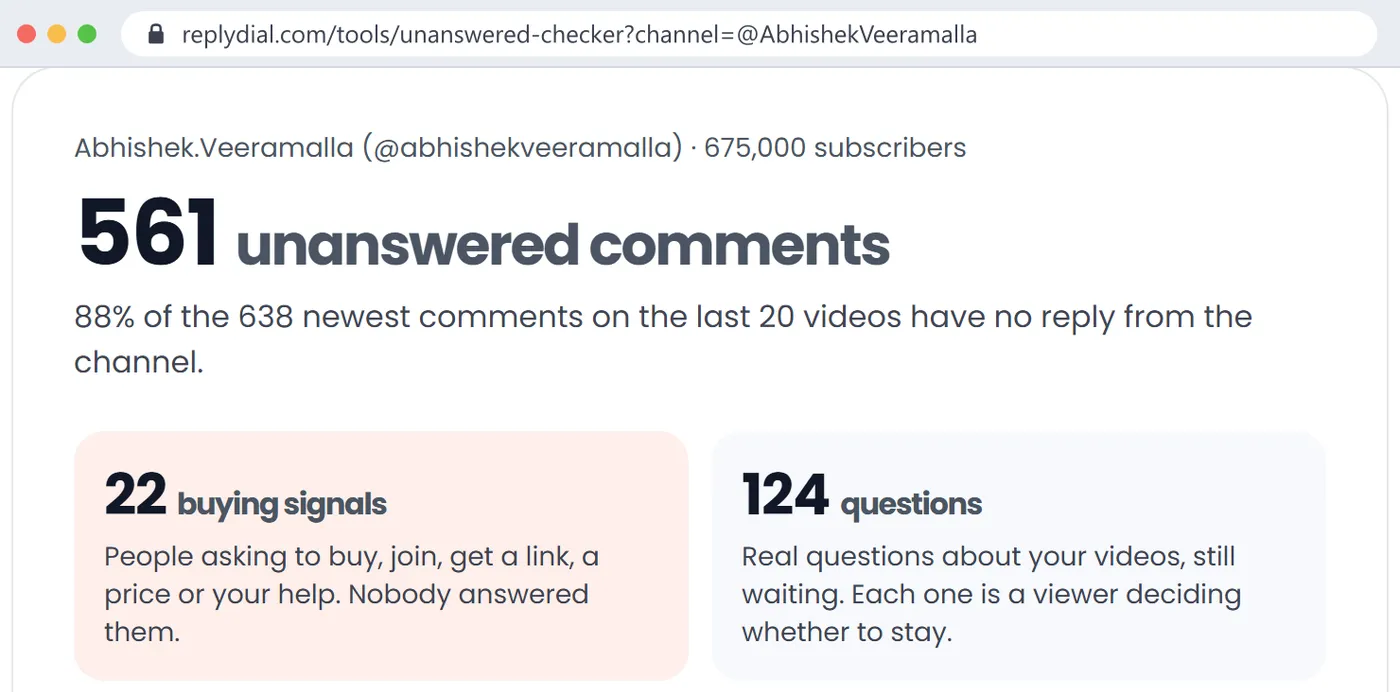
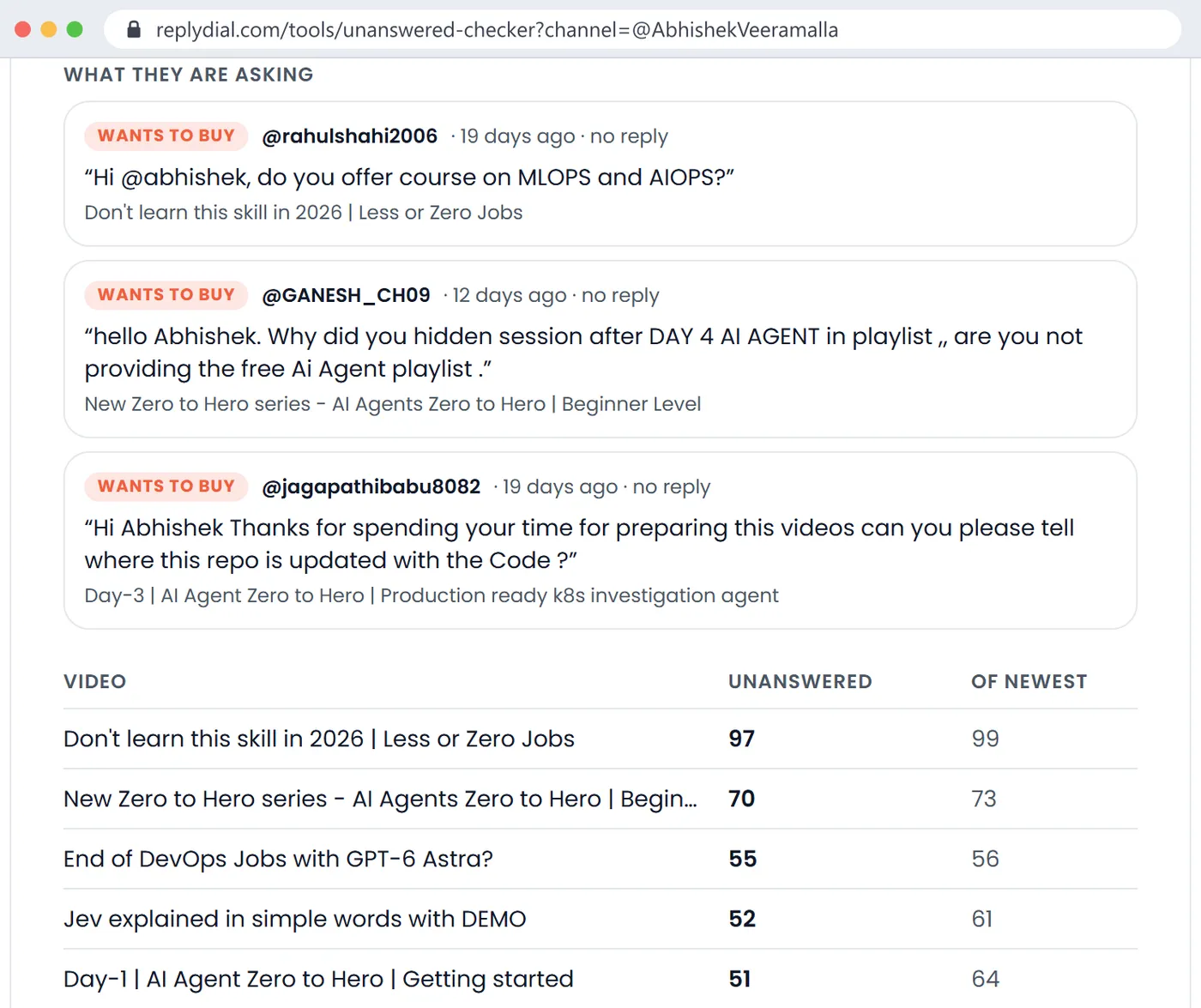
I use the free unanswered comments checker, which reads the newest comments on a channel's last 20 videos and counts the ones with no reply from the channel, the ones that are questions, and the ones that look like buying signals (asking for a price, a link, a course, how to join). On Abhishek Veeramalla's channel on 26 October: 638 newest comments on the last 20 videos, 561 with no reply from the channel (88 percent), 124 questions, 22 buying signals. One of the buying signals: "do you offer course on MLOPS and AIOPS?", unanswered for 19 days.
Abhishek Veeramalla's comment check, 26 October 2026: 561 of the 638 newest comments on the last 20 videos have no reply from the channel, 22 are people asking to buy, 124 are questions. On a 675,000-subscriber channel this is normal, and it is also what a brand sees. Click to enlarge.
How to read those numbers as a brand. A high unanswered share on a very large channel is normal; nobody answers 600 comments a month alone, and it does not mean the audience is cold. The useful signals are the question count, which shows an audience that engages rather than scrolls, and the buying signals, which show an audience with intent. An audience asking for courses and links under tutorial videos is an audience that buys developer tools. What you then want from the creator is a plan for the comments under your video: who answers "does it support X?" in the first 48 hours, because that is the moment a viewer decides.
For comparison, my own channel on the same afternoon: 143 newest comments on the last 20 videos, 1 unanswered, 0 open questions. That is not because my viewers ask less; it is because answering is what I built ReplyDial to do, and a brand that reads the comments under my sponsored videos sees the questions about the sponsor's product answered. Both numbers are public and both took the tool about 20 seconds.
The second half of the same check: the actual unanswered asks, with the video each came from, and the per-video table, where the newest video has 97 of its 99 newest comments unanswered. These are the questions your sponsored segment will be sitting next to. Click to enlarge.
Minute 11 to 13: can you reach the creator?
Two public routes, and they are not equal. The business email button on the channel's About tab exists on most channels, behind a CAPTCHA, and the YouTube Data API does not expose it, so no tool can show it to you. The second route is an email the creator typed into the channel description or a video description, which the API does return and the analyzer shows under "Business contact the creator published".
Abhishek and Lucy publish an email; Bret Fisher and DevOps and AI Toolkit publish a contact link; Raj, Nana, KodeKloud, Travis Media and Be A Better Dev publish nothing the API can read. Fewer than half of nine channels, and the two that publish an email are two of the three most sponsored, which is not a coincidence: creators who want deals make themselves easy to find. If a channel publishes nothing, the About tab button is the route, and your email should name the video of theirs you watched in minute five, because that is the line that gets a reply from someone who receives twenty pitches a week.
Minute 13 to 14: brand safety and fit
Four public facts cover most of what a brand means by brand safety on a tutorial channel, and the analyzer shows all four:
YouTube's own topic tags for the channel (Knowledge, Technology, Lifestyle for most channels in my niche) and ReplyDial's read of what share of the scanned videos match each niche. Raj: Cloud and DevOps 81 percent, AI and data 39 percent. A channel whose videos are 80 percent in your niche is a different buy from one that is 30 percent in it and 50 percent reaction content.
Language and country. The channel's default language and the most common audio language of the scanned videos, and the country field the creator set. Raj: English, United States. Mine: English, Finland, which tells you where I set up the channel, not where my viewers are; the audience countries are not public.
Made-for-kids and age-restricted flags across the scan. Zero of either on every channel in this list. A channel with made-for-kids videos cannot run most sponsorships on those videos at all.
What the channel sells itself. Raj sells a newsletter, a course and consulting. If you sell a competing course, that is a conflict; if you sell infrastructure, it is a sign the audience pays for things.
The same band on Tech With Lucy's report, 26 October 2026: 'Heavily sponsored', 26 of the last 30 long videos, last sponsor 4 days ago, email published. A brand buying here is buying a slot in a busy schedule, which the first three minutes make plain. Click to enlarge.
How do I run this on a shortlist of 20 channels?
Fifteen minutes a channel is five hours for twenty, which is why the order matters: the first three minutes are a filter, not a report. On the nine channels I scanned last week, the first card alone removed three from any sponsorship conversation (one does not take sponsors, two have not uploaded in 90 days), before I had watched a second of video. Do minute 0 to 5 on all twenty first, in one sitting, and only then spend minutes 5 to 15 on the eight or ten that survive.
Three practical notes from doing it. Sign in before you start: the analyzer allows five lookups an hour without an account and thirty with one, and I hit the anonymous limit on my own tool halfway through a batch. Save every report as you go; a saved report re-runs itself when it is older than 30 days, so the shortlist you build this week is still current when the brief lands next month, and "Watch" marks any brand that was not there before, which is how you learn that a competitor moved in. And download the sponsor CSV for the finalists: brand, domain, confidence, videos, first and last date, evidence and example video, which is the attachment your client or your account lead will ask for.
For two finalists, the compare view puts both reports side by side in the same columns, with no score. I left scores out on purpose: a brand selling databases and a brand selling careers courses should rank the same two channels in opposite orders, and a single number would hide that.
Minute 14 to 15: what to ask the creator, because it is not public
Everything above is public. These are not, and no tool that claims them is doing anything but guessing:
Median views of the last 10 long videos, which is the real reach number. View counts are public per video, but the median over the right window with Shorts excluded is a Studio screenshot away for the creator and a guess for everyone else.
Audience countries, age and device. Only in the creator's Studio. The channel country field is where the creator set up the channel.
Retention through the sponsored segment on their last two sponsored videos. The creator can see the retention curve; the brand can only ask.
Exclusivity: whether a previous sponsor bought a window that excludes you.
The rate, and what it includes: one video or a series, a dedicated video or a segment, usage rights for the clip, a code, a pinned comment, a newsletter mention.
Who answers the comments under the sponsored video, and how fast, in the first week.
Ask for screenshots rather than numbers typed into an email; Studio screenshots with the date range visible are hard to misread.
What broke when I ran this
Three things, one of them on my own tool.
The analyzer's "reads" are thresholds, not judgements. "Occasional sponsors" means fewer than a set share of the last 30 long videos were sponsored; "Heavily sponsored" means more than half. Cloud With Raj at 2 of 30 and my channel at 8 of 30 both sit below the "heavy" line, but a brand would reasonably treat them differently. The words are shorthand for the numbers next to them, which is why the numbers are always shown.
The comment checker reads the last 20 videos only. On a channel uploading daily, that is three weeks; on a channel uploading monthly, it is two years. Abhishek's 638 comments are from videos published in the last few weeks; a quieter channel's 20 videos would span much longer and the unanswered share would mean something different. The page says "last 20 videos", and it matters.
A disclosure my tool did not read. Raj's Teleport description says "Thank you Teleport for sponsoring this video." The analyzer showed Teleport for that video from the paid flag and the link only, at medium confidence, because its disclosure patterns expected "thanks to" or "thank you to" and this sentence has no "to". One missing word, one confidence level. I added the pattern the same day and it ships with this post; the row becomes high confidence on the next scan. Every text-reading tool has a list of phrases, and the list is never finished.
Public data cannot see the deal. On 2 July 2026 my own channel published two videos with identical Teleport titles, both labelled. Public data counts two sponsored videos; whether that was one deal delivered as two uploads or two deals is a question only I can answer, and the same is true for every row in every sponsor table. The checklist gets you to a confident shortlist in fifteen minutes; it does not replace the conversation.
What this means for you
If you are a brand or an agency: do the public seven first, in this order, before you request a media kit. The first three minutes remove half of a shortlist; the segment and the comments rank the rest.
Dormant channels look fine in directories. Check uploads in the last 90 days before anything else about reach.
Judge the comment section by questions and intent, not by the unanswered share alone, and put "who answers the comments under our video" into the brief.
Ask for Studio screenshots for the five things that are not public, with the date range showing.
If you are a creator: run this on yourself. The analyzer, the checker and five minutes with your own descriptions show you exactly what a brand sees in its first quarter hour, and most of it is yours to change this week: a published contact, a disclosure habit, an answered comment section.
Quick answers
Can I vet several channels at once?
With a free ReplyDial account the analyzer saves reports to a workspace, re-runs them when they are older than 30 days, watches channels for new sponsors, and compares two channels side by side in the same columns. Bulk input of a list is on the roadmap; today it is one handle at a time, 30 lookups an hour for a signed-in account.
Does the analyzer estimate a sponsorship rate?
No. Rates are not public, and a rate estimated from subscriber counts is a guess with a currency sign on it. The table above gives you what the brand will measure instead: recency, frequency, returning brands, the segment, the comments.
How do I know the numbers are current?
Every report shows the time the YouTube data was retrieved, to the minute, and is cached for 24 hours. A saved report is refreshed on open when it is older than 30 days.
What if the creator's sponsor list is empty?
Either the channel has never taken a sponsor, or it has and never wrote it down or ticked the box. The report says which signals it checked; for a channel with regular uploads and an empty list, watch the first minute of the three newest videos before concluding anything.
What to do this week, no tool needed: take the one creator you are closest to signing, open their last ten videos, and write down for each the upload date, whether it was sponsored and by whom, and how many of the top five comments got a reply from the channel. Ten rows, twenty minutes, and you have minutes 0 to 11 of the checklist done by hand.
ReplyDial's free channel analyzer for YouTube and unanswered comments checker do minutes 0 to 13 for any public channel in under a minute each; ReplyDial itself is the inbox creators use to answer the comments a brand reads in minute eight.
See your own unanswered comments
ReplyDial lists every comment on your channel still waiting for a reply, drafts answers in your voice, and posts only what you approve. Free for 7 days on Creator limits, no card.
A filtered list beats YouTube search: niche, subscriber range, country and upload pace, with sponsors on each row. What 602 channels showed on 3 Nov 2026.
Reply rate is the share of comment threads the channel answered. How to count it from public data, what 8 channels scored, and why the buying questions matter.
Consistency, engagement, discoverability, commercial readiness and audience care, 0 to 100 each from public data. The rules, my scores, 8 channels compared.