How to find YouTube channels in your niche without a $500 tool
A filtered list beats YouTube search: niche, subscriber range, country and upload pace, with sponsors on each row. What 602 channels showed on 3 Nov 2026.
The fastest way to find YouTube channels in a niche is not YouTube's search box, which cannot filter by subscriber count, country or how recently a channel uploaded, and not a $200-a-month discovery suite, which you will pay for twelve months to use for three weeks. It is a filtered list: pick the niche, set the subscriber range your budget fits, pick a country, require at least one or two uploads in the last 30 days, and read what is left with the sponsors of each channel on the row. On 3 November 2026, that query for Cloud & DevOps channels above 10,000 subscribers returned 16 channels on Discover, ten of them free without an account, in under a second, and two of the ten already showed which brands had paid them.
I run a 105,000-subscriber DevOps channel alongside a full-time job, and I built Discover because the same question kept arriving from the other side: agencies and developer-tool companies asking me which channels like mine they should talk to. This post is the method, the numbers from the inventory as it stood on 3 November (602 channels, 21 niches, 13 full reports, 145 sponsoring brands), what each paid tool charges for the same job, and the three things that broke while I built the public page. Where a number is from someone else's survey, I say whose and when.
Niche, 3 November 2026
Channels in the inventory
Niche, 3 November 2026
Channels in the inventory
Business & marketing
148
Home & DIY
55
AI & data
107
Cloud & DevOps
55
Creator & YouTube growth
97
Beauty & fashion
53
Personal finance & investing
85
Tech reviews & gadgets
50
Fitness & health
76
Self-improvement
29
Cooking & food
70
News & commentary
27
Travel & vlog
64
Kids & family
25
Programming
62
Gaming
14
A channel can sit in more than one niche (a Kubernetes channel that also reviews laptops is in Cloud & DevOps and Tech reviews & gadgets), so the column adds up to more than 602. The five smallest niches (Music, Cars & vehicles, Entertainment & comedy, Education & study, Real estate) had 3 to 13 channels each. Only 13 of the 602 had a full report with sponsors and scores; the rest were stubs from keyword searches with name, size, country and topic tags. I come back to why that matters below, because it is the honest limit of the whole approach.
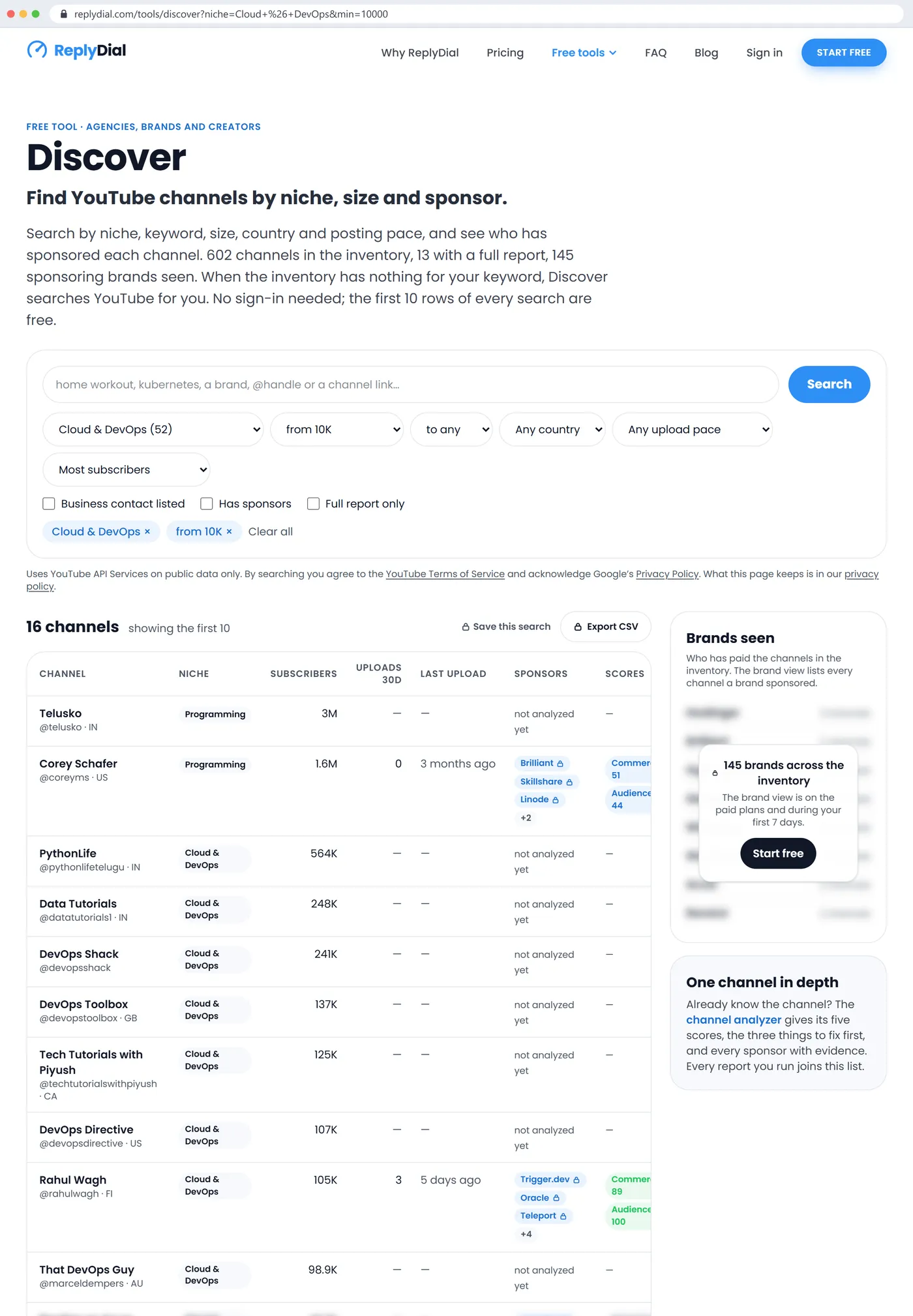
Discover on 3 November 2026, Cloud & DevOps channels from 10K subscribers: 16 matches, the first 10 shown, with subscribers, uploads in 30 days, last upload, sponsor chips and scores. Corey Schafer's row shows Brilliant, Skillshare and Linode; my own row shows Trigger.dev, Oracle and Teleport, 3 uploads in the last 30 days and a Commercial score of 89.
Why is finding YouTube channels in a niche still so slow?
Because the tool everyone starts with is the wrong shape. YouTube's search returns videos ranked for a viewer, with no way to say "channels between 10,000 and 100,000 subscribers in Germany that uploaded this month". You can filter by upload date and by type (channel), and that is all. So the standard method is to search a topic, click into a channel, read its About page for a subscriber count and a country, scroll its videos for the last upload date and any sponsor segments, then paste five facts into a spreadsheet and do it again. Modash's May 2025 survey found that every one of its respondents still kept such a spreadsheet, at about five hours a week, and its August 2025 survey of 56 marketers found that over 51 percent often feel they have run out of relevant creators and 87 percent say finding the right fit is getting harder. A HypeAuditor poll of 62 marketers in September 2022 had 58 percent naming creator research as the most time-consuming part of the job.
The second reason is the long tail. vidIQ's July 2026 study of about 61 million channels found that 7.9 percent reach 10,000 subscribers and 1.3 percent reach 100,000. The micro band that most campaigns want (10,000 to 100,000) is about 4 million channels worldwide, scattered across every topic and language, and YouTube's recommendation surfaces the big ones. A niche like Cloud & DevOps has perhaps a few hundred channels above 10,000 subscribers in English; finding sixteen of them by hand is an afternoon, and you will not know which of the sixteen already take sponsorships until you have watched their videos.
The third reason is the API behind every tool. The YouTube Data API gives each project 10,000 units a day for most calls, and since the June 2026 change, search requests sit in their own bucket of 100 calls a day. One hundred keyword searches a day, per project, for everyone who uses the tool, is why every YouTube discovery product you have tried has a credit counter or a "searches left today" line. I wrote up the quota rules in detail in YouTube API quota for creators; the short version is that nobody can offer unlimited live YouTube search at any price, so the good tools pre-index channels and search their own database instead.
How do you find channels by niche, size and country with Discover?
The page is a form over a database. Here is the sequence I use for a shortlist, with what each step did on 3 November.
Pick the niche or type a keyword. The niche filter has 21 entries with the channel count next to each; the keyword box takes a phrase ("home workout", "kubernetes", "a brand name") or a channel handle. For the example I chose Cloud & DevOps, which had 55 channels.
Set the subscriber range. From 1K to 1M in steps. I set from 10K and left the top open: 16 channels.
Pick a country if the campaign is regional. The dropdown lists every country present in the inventory with its count; it is the country the creator declared on the channel, which says where the creator is, not where the audience is. I left it at any country; the 16 rows spanned India, the United States, Great Britain, Canada, Finland and Australia.
Require a posting pace. At least 1, 2, 4 or 8 uploads in the last 30 days, counted on long-form videos. This only applies to channels with a full report, which is the catch I explain in the next section.
Sort. Most subscribers by default; most sponsors, commercial readiness, most uploads, most recently active, or newest in the inventory. For a sponsorship shortlist I sort by commercial readiness, which puts channels that already run disclosed integrations first.
Read the row. Subscribers, uploads in 30 days, last upload, up to three sponsor chips with a count, a Commercial and an Audience score, and whether a business contact is listed. Every row links to the channel analyzer report with every sponsored video and its evidence.
Open the ones that fit and save them. With a free account the report is saved to a workspace, can be watched (re-checked weekly, new sponsors marked) and compared with another.
The 16 rows for Cloud & DevOps above 10K, as they appeared: Telusko (3M, India, listed under Programming as its top niche), Corey Schafer (1.6M, United States, sponsors Brilliant, Skillshare, Linode and two more, Commercial 51, Audience 44), PythonLife (564K, India), Data Tutorials (248K, India), DevOps Shack (241K, India), DevOps Toolbox (137K, Great Britain), Tech Tutorials with Piyush (125K, Canada), DevOps Directive (107K, United States), my own channel (105K, Finland, sponsors Trigger.dev, Oracle, Teleport and four more, Commercial 89, Audience 100, 3 uploads in 30 days, last upload 5 days before), and That DevOps Guy (98.9K, Australia). The six below the fold were blurred on the public page and visible with a free account.
Two things in that list are worth a second look. Eight of the ten showed "not analyzed yet" in the sponsors column: they were stubs from keyword searches, with size and country but no report, so their posting pace and sponsors were unknown rather than empty. And the two analyzed channels tell the sponsorship story of the niche in one line each: a 1.6M-subscriber Python teacher sponsored by learning platforms and a cloud host, and a 105K-subscriber DevOps channel sponsored by developer tools. If you sell a developer tool, the second row is the shape you want, and the brand chips say who got there first.
What happens when the inventory has nothing for your keyword?
This was the part I had to fix before the page was worth publishing. The inventory is the channels people have analyzed or searched for, not all of YouTube, and on 3 November it was 602 channels. A search for a keyword nobody had typed before returned an empty table with a polite note, which is the worst outcome a search page can produce: the visitor came with a question and leaves with nothing.
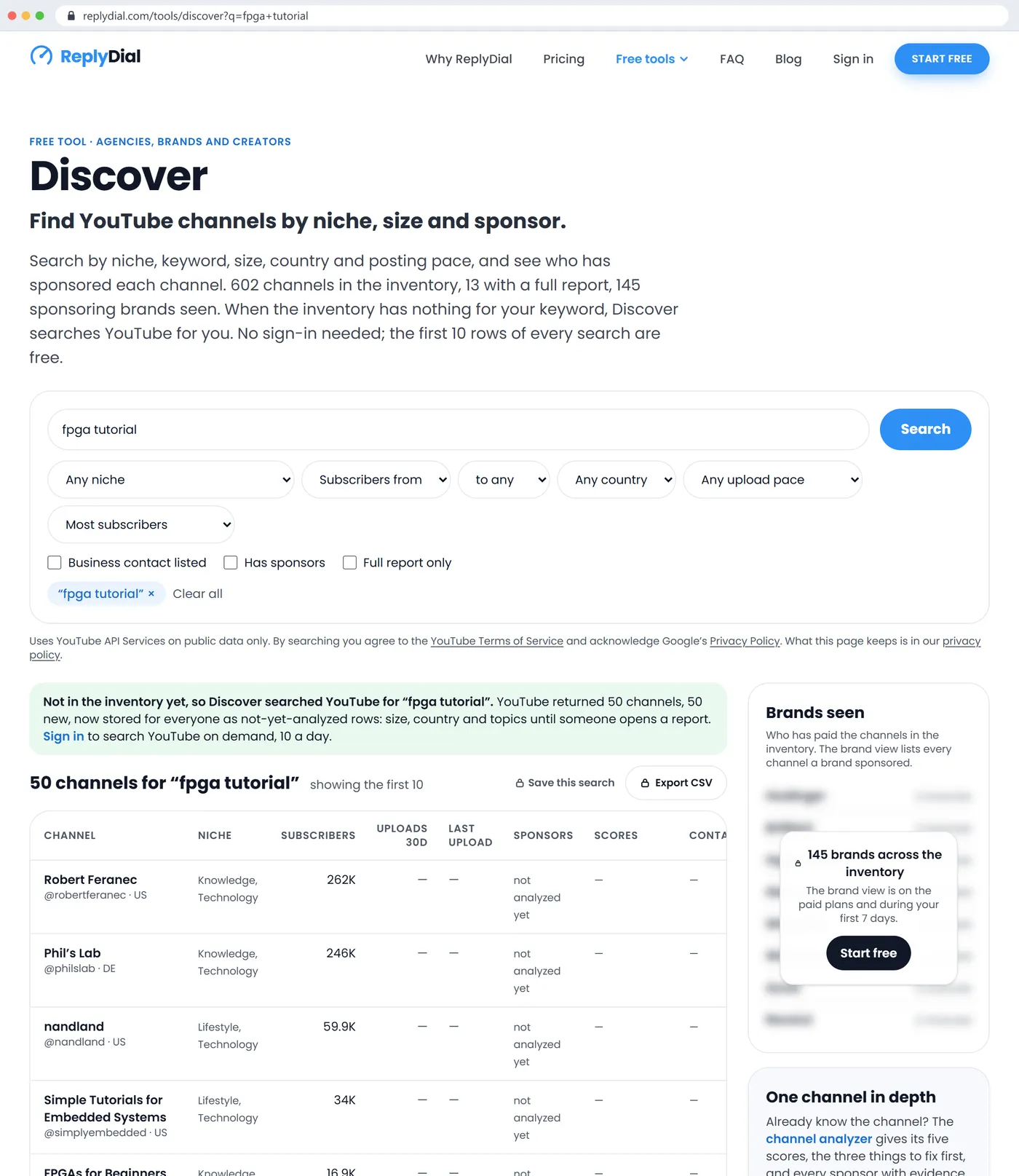
So the page now does what an agency would do by hand: when the inventory has zero rows for a keyword, it runs one YouTube search for it, stores up to 50 channels that YouTube returns as not-yet-analyzed rows, and shows them. I tested it from the live site with "fpga tutorial", a keyword I was fairly sure nobody had searched: YouTube returned 50 channels, all 50 were new to the inventory, and the page showed them with name, handle, country, size and YouTube's topic tags, from Robert Feranec at 262K subscribers down to The Hardware Developer at 3.1K, with a note explaining what had happened.
The YouTube fallback on 3 November 2026: the inventory had nothing for 'fpga tutorial', so Discover searched YouTube once, stored 50 channels, and showed them as not-yet-analyzed rows with size, country and topic tags. The green note says what happened and what a sign-in adds.
Three rules keep that from eating the API budget. A visitor gets two such searches a day and five handle lookups, counted per hashed IP address, and all visitors together get ten a day; Agency plans and the first seven days of any account get ten YouTube searches a day each, on demand, even when the inventory already has rows. After a search the page redirects to the same URL with a marker, so a reload or a crawler following the link never spends the quota twice. And requests from known crawlers and link previews never trigger a YouTube call at all; I checked that with Googlebot's user agent before deploying, and it got the empty-table note instead. The rows that a visitor's search adds stay for everyone, which is how the inventory grows in the niches people actually ask about rather than the ones I guessed.
A handle works the same way. Paste @somechannel or a youtube.com link and the page looks it up in the inventory first; if it is not there, one API call (1 unit) fetches its public facts and stores it as a row. The full report, with sponsors and scores, costs about 18 units and stays an explicit click, because 18 units times 600 channels is more than a day's quota.
What does the same job cost on the paid tools?
I priced the alternatives on 3 November 2026 from the vendors' own pricing pages or, where a vendor hides prices behind a demo, from review sites, so treat the enterprise figures as directional. The job is the same for all of them: find YouTube channels by niche and size, see who sponsors them, and get the list into a spreadsheet.
Tool, 3 November 2026
Cheapest plan with channel search
What the cheap plan does not include
Contract
ChannelCrawler
$59 a month billed yearly, $99 monthly: 2,000 search credits, 50 email credits, 1 user
Sponsored-channel search starts at the $117 plan
Monthly or yearly
Heepsy
$69 a month billed yearly, $89 monthly
Contact export and authenticity filters from the $149 plan; free plan is 500 results, 10 profiles, no export
Monthly or yearly
Modash
$199 a month billed yearly, $299 monthly: 2 seats, 300 opened profiles, 150 email reveals
YouTube is one of three networks; 300 profiles a month runs out on an active team
Monthly or yearly
HypeAuditor
About $299 a month billed yearly
CSV export of search results only on the Pro plan at about $499
Yearly in most reports
Upfluence
About $478 a month reported on G2
No self-serve trial
12-month minimum
GRIN
$200 a month self-serve, plus 5 to 20 percent on creator payments
Campaign and payment tool, not a discovery tool
Monthly; legacy plans yearly
Social Blade
$5 a month billed yearly for stats
No niche search, no sponsors, no contacts
Yearly
Discover
$0 for the search; Agency at $79 a month (launch price) for export, brand view and YouTube search on demand
No Instagram or TikTok, no demographics, no rate estimates, no email reveals
Monthly or yearly, cancel any time
The pattern in the table is the point. Below $100 a month the market sells search credits with emails metered out; between $117 and $199 you get sponsor data and exports; above that you get seats, demographics and fraud scores across three networks; and the quote-only suites start around $12,000 a year on annual contracts. None of the free tiers I found shows sponsorship history: Heepsy's free plan shows 500 results with no export, Favikon's gives 15 credits a month, HypeAuditor's free tools answer one channel at a time. Sponsor history on the row is the thing Discover gives away, because it is built from reports that cost 18 units each and have already been paid for by whoever ran them.
What the paid suites have that Discover does not, and will not: Instagram and TikTok, audience demographics (estimated, and refreshed monthly on the better ones), fake-follower scores (estimated, with reviewers reporting both misses and false alarms), email enrichment, and campaign management with creator payments. If a client campaign runs across networks or your reporting needs demographics, you need one of them, and the honest pairing is Discover for the YouTube shortlist and sponsor history, the suite for the rest. The complaints that repeat across the one-star reviews of those suites, charged after cancelling, credits that expire, exports with social links and no emails, single-seat licences, are the reason the ladder on Discover's page is three steps with no credits and no seats.
How do you keep the shortlist honest?
A list of channels is not a list of good channels. The row gives you the first pass; the report gives you the second; the creator gives you the third. I covered the full seven checks in vetting a YouTube creator before a deal, so here is only what the Discover row answers on its own.
Is the channel alive? Uploads in the last 30 days and the last-upload date. The pace filter at 1, 2, 4 or 8 uploads a month removes the dormant ones; on 3 November, requiring 2 uploads a month across every niche left a much shorter list than the raw counts above, because stubs have no pace yet.
Does it already sell integrations, and to whom? The sponsor chips and the count. In the EMARKETER and Viral Nation survey of 117 US marketers in September 2025, only 22.2 percent said they check a creator's past work with competitors. The chips make it a glance: a direct competitor in the last 90 days means no category exclusivity this quarter.
Is it set up for brand work? The Commercial score, 0 to 100, from disclosed sponsors and their recency, affiliate links, products and a listed contact. Corey Schafer's 51 against my 89 is not a quality judgement; it says my channel has more recent disclosed deals and a listed contact.
Does it answer its viewers? The Audience score, from the reply rate and response time in a sample of recent comment threads. I measured eight tech channels on 31 October and the reply rate ran from 0 to 100 percent with a median of 15; a creator who answers comments will answer the questions your integration raises.
Can you reach it? The contact column: whether a business contact is listed in a channel or video description. Tick "Business contact listed" and the shortlist is only channels you can email. The address itself is on the report, as the creator published it, never in the export.
What the row cannot tell you, and no public-data tool can: where the audience is, how long it watches, and what the creator charges. Those come from a dated YouTube Studio screenshot and a conversation. Discover's country column is the creator's declared country; a US-registered channel with a mostly Indian audience is common in developer niches, mine included.
What broke while building the public page?
Three things, in the order I hit them.
Two names for one tool. The first public version went live on the morning of 3 November as a "channel finder" at a different URL from the workspace page, which was called Discover. Within the hour the feedback was that a creator or an agency landing from search would not understand that the finder and Discover were the same thing with a sign-in in between, and that two names for one product is one name too many. So by the afternoon the public page was renamed Discover, moved to /tools/discover with a permanent redirect from the old address, and every mention in the menu, the sitemap, the privacy page and the sign-in notice was changed to match. The lesson is older than software: name the thing once.
An inventory that looked bigger than it was. The niche counts in the table at the top are real, but 589 of the 602 rows were stubs from keyword searches, with no report behind them. A stub has a name, size, country and topic tags, and nothing else: no posting pace, no sponsors, no scores, no contact flag. That meant the pace filter, which is the most useful filter for an agency, silently excluded most of the inventory, and a search for "Fitness & health with at least 2 uploads a month" could return nothing even though the niche had 76 channels. The fix was partly copy (the row now says "not analyzed yet" in plain words, and the empty-state explains that a stub needs its report run) and partly economics: the report costs 18 units, and running 589 of them is 10,602 units, more than a day's quota. So the inventory fills in the order people open reports, and the niches people search most are refreshed nightly within a budget. The honest statement of the limit is on the page: the first ten rows of every search are free, and the full data is on the rows someone has already paid 18 units to analyze.
The search quota moved under us. Discover's code counted a YouTube keyword search as 100 units out of the shared 10,000, which was Google's model until the June 2026 change put search.list in its own bucket of 100 calls a day at 1 unit each. The old accounting is conservative rather than dangerous (it stops Discover at about 30 searches a day when the real ceiling is 100 calls shared with everything else that searches), but it means the "units" I quoted to myself for a month were wrong, and the fix is to count searches, not units, which is on the list for the next release. If you build on the API, read the quota page again; it changed twice in a year.
What this means for you
A filtered list is the right tool for sourcing. Niche, subscriber range, country, pace, then sponsors on the row. YouTube search is for viewers; a discovery suite is for demographics and campaigns; the list is for the shortlist.
Price on views, not subscribers, and read the sponsor chips before you email. A channel with recent disclosed sponsors has a rate and a process; a channel with "none found" and a listed contact is a first deal you will have to explain.
Expect the inventory to be thin in your niche the first time and to fill as you use it. Type the keyword; if the inventory has nothing, the YouTube fallback adds up to 50 channels, and they stay. Open reports on the ones that fit, and the rows fill in for the next person.
The paid suites are not wrong, they are for a different job. If you need Instagram, TikTok, demographics or payments, buy one and use Discover for the YouTube shortlist and sponsor history. If you need the shortlist, you may not need the suite.
Keep a dated screenshot of the row and the report in the client file. Every number on Discover is public and reproducible with its date; that is worth more in a deck than an estimate without a source.
The 242 questions agencies, brands and creators ask about this job, from fake subscribers to usage rights to what a search costs in API units, are answered one by one on the Discover FAQ, and the method for reading a channel's sponsors is in how to find brands that sponsor YouTube channels in your niche. The tools that build the inventory are the same ones in the open-source youtube-comment-tools repository, if you would rather run the API calls yourself.
This week, with no tool at all: pick one niche, write down the ten channels you would pitch today, and next to each one note the last upload date and the last sponsor you can find in a description. If that takes you more than an hour, or you cannot find a sponsor for half of them, that is the hour the list was built to save. ReplyDial's Discover does the same ten rows in a second, free, at replydial.com/tools/discover.
See your own unanswered comments
ReplyDial lists every comment on your channel still waiting for a reply, drafts answers in your voice, and posts only what you approve. Free for 7 days on Creator limits, no card.
Reply rate is the share of comment threads the channel answered. How to count it from public data, what 8 channels scored, and why the buying questions matter.
Consistency, engagement, discoverability, commercial readiness and audience care, 0 to 100 each from public data. The rules, my scores, 8 channels compared.
Seven checks from public data, in order, with a time budget: sponsor history, cadence, the segment, the comments, reachability, brand safety, then what to ask.