YouTube API quota for creators: why bulk comment tools break
Every comment tool gets 10,000 YouTube API units a day per project and a reply costs 50: about 200 posts a day, shared by all its users. My real numbers.
Short version: every app that talks to YouTube through the official Data API gets 10,000 quota units a day, per Google Cloud project. Posting one comment reply costs 50 of those units. So one project can post at most 200 replies a day, and that budget is shared by every user of the app, unless Google has reviewed the app and raised the limit. This is why "reply to everything" tools stop at some point in the afternoon, and why the serious ones ask for human approval before every post.
I am a YouTuber with a 104,000-subscriber channel and a full-time job, and I built ReplyDial to answer my own comments. Everything below is from Google's own cost table, from my channel, and from the quota ledger inside the app. Numbers are as of 9 October 2026.
What is the YouTube API quota?
Google counts every call an app makes to the YouTube Data API in "units". Each project gets 10,000 units a day. When they are used up, every further call fails until the counter resets at midnight Pacific time. For me in Sweden that is 9 in the morning. If you are in India it is 12:30 in the afternoon.
Google's quota page, 9 October 2026. The default is 10,000 units a day for all endpoints combined, with separate daily buckets for search and uploads.
Two things changed on that page recently, and most blog posts still have the old numbers. Search (search.list) used to cost 100 units per call out of the same 10,000. It now has its own bucket: 100 search calls a day, full stop. Uploading a video through the API (videos.insert) used to cost 1,600 units. It is now also a separate bucket of 100 uploads a day. I only noticed because our own quota calculator still said "search costs 100 units" when I started writing this. I fixed it the same day.
The search row in Google's table: 100 calls a day, in its own bucket. This is new.
What does a comment cost?
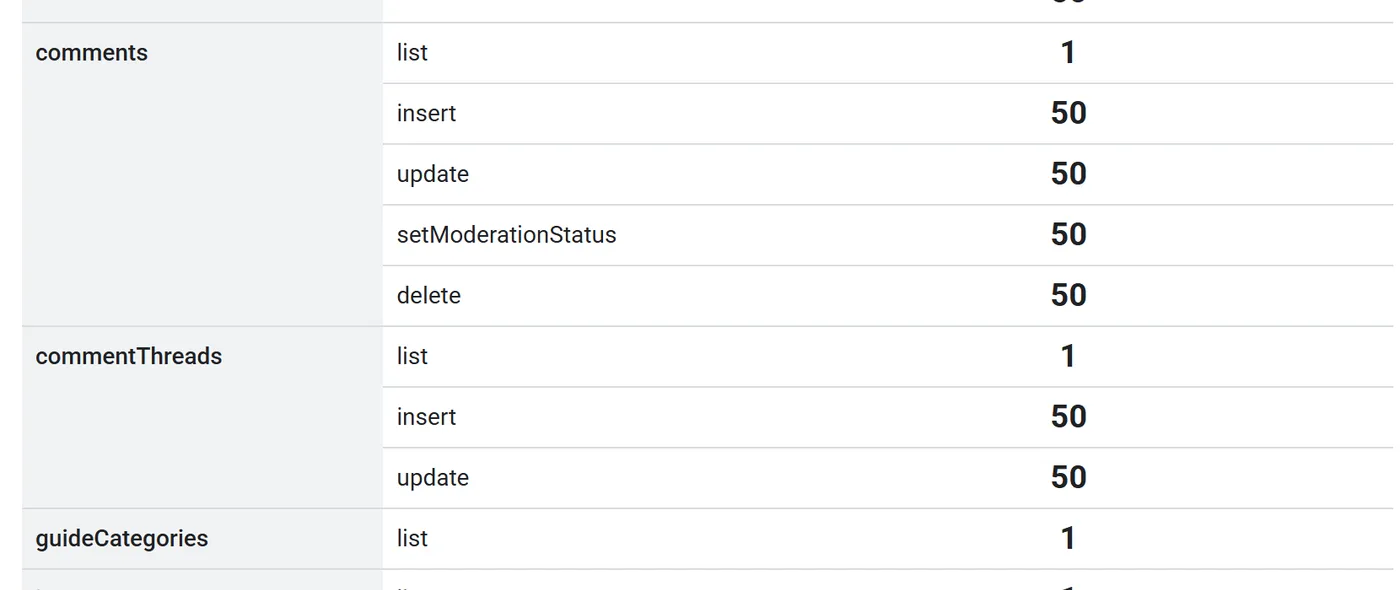
Reading is nearly free. Writing is expensive. That is the whole story of the table.
The comments and commentThreads rows. Listing costs 1. Inserting, updating, deleting or moderating costs 50.
In practice:
Reading a page of up to 100 comment threads on a video: 1 unit.
Listing 50 of your uploads: 1 unit.
Looking up a channel: 1 unit.
Posting a reply: 50 units.
Deleting a comment, editing one, or marking one as spam through the API: 50 units each.
A real example. On 7 October I ran a read-only scan of a creator channel with 280,000 subscribers to see how many comments on its recent videos had no reply from the owner. The scan read 1,296 comments and found 1,123 without an answer. Total cost: 23 units. Posting a single reply would have cost more than twice that scan.
This is also why I could afford to make the unanswered comments checker free. It only reads, so a hundred checks a day cost less than three posted replies.
How many replies a day can one tool post?
Divide 10,000 by 50 and you get 200. That is the ceiling if the app reads nothing at all, which no app can do. It has to list your videos and read the comments to know what to reply to. With a normal reading pattern, the real number is 150 to 190 replies a day.
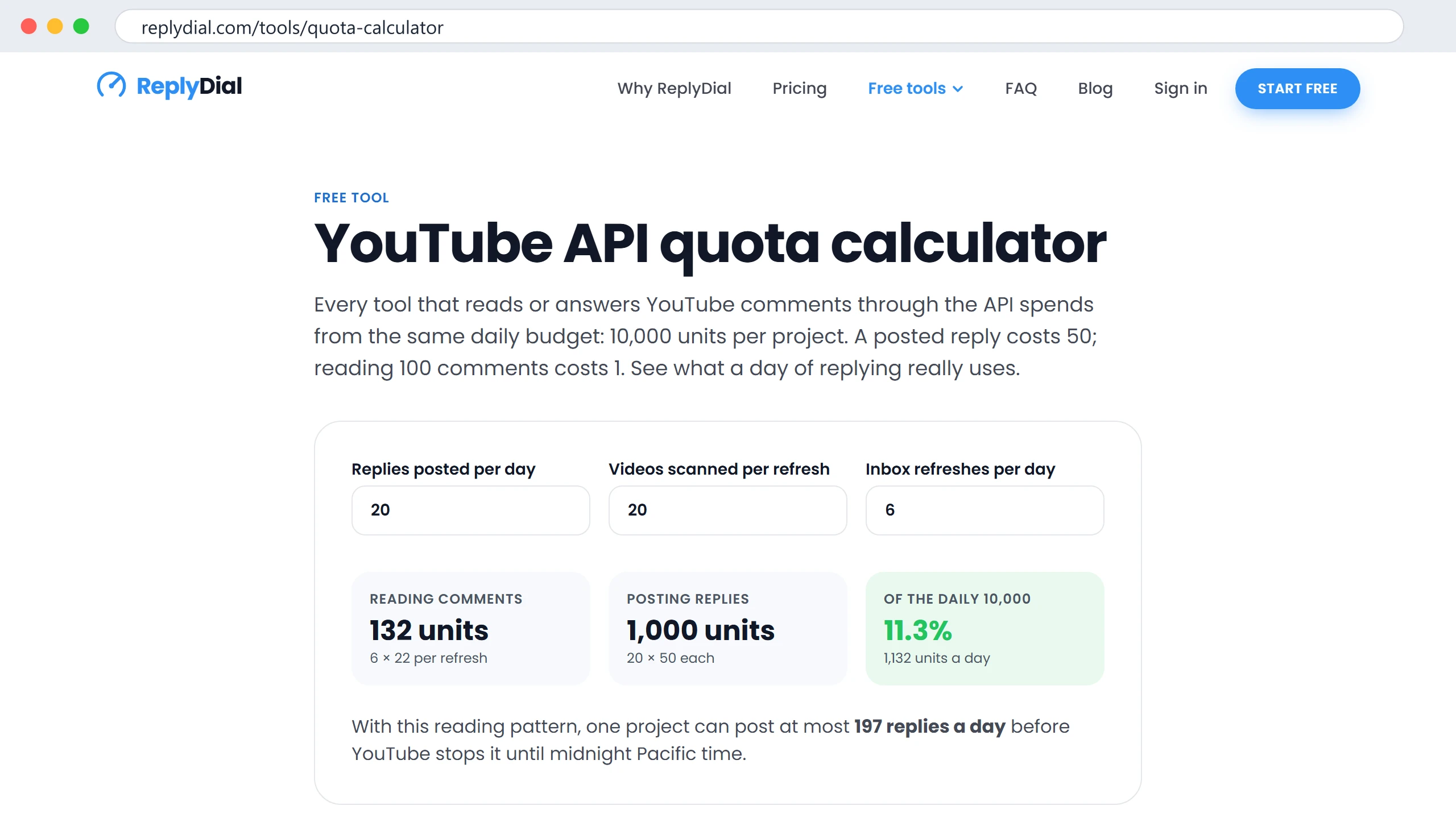
The free calculator at replydial.com/tools/quota-calculator with the defaults I use myself: 20 replies a day, 20 videos scanned per refresh, 6 refreshes. Reading costs 132 units, posting costs 1,000. Posting is 88 percent of the bill. Click to enlarge.
Now the part that matters: the 200 is per project, not per user. If a hosted tool has 50 creators on it and no extension from Google, those 50 share 200 replies a day between them. Four each. The tool will not tell you that on the pricing page.
Why do bulk and auto-reply tools break?
Three ways, and I have seen all three.
They hit the wall. An auto-reply tool that posts without asking will burn the 10,000 units by lunchtime on a busy day. Every user's posting then fails until midnight Pacific. The error Google returns is quotaExceeded, and the tool shows something vague like "try again later".
They spread across projects. Some tools create many Google Cloud projects to multiply the quota. Google's API terms forbid this, and projects that do it get their access removed. If a tool promises unlimited posting through the API with no review, this is usually how.
They skip the API. Browser automation that clicks the reply button for you is not using the API at all, so there is no quota. It is also against YouTube's terms, it looks exactly like a bot to YouTube's spam systems, and the channel that gets flagged is yours, not the tool's.
The honest alternative is slower and it is the one I chose: read everything, draft with AI if you want, and post only what a person has clicked. That keeps posting volume at what a human can actually review, which happens to fit inside the quota.
How ReplyDial spends its units
I keep a ledger. Every API call records its documented cost against the current Pacific day, and the app stops posting at 9,000 units, not 10,000, so there is room left for reading.
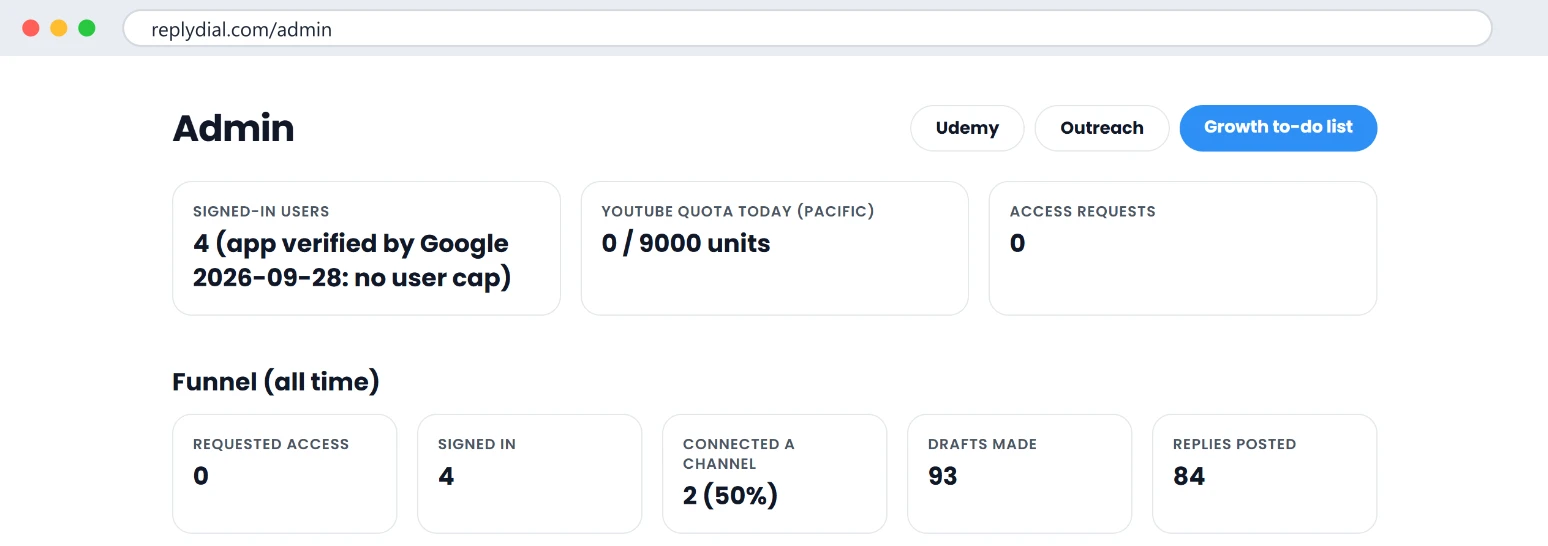
ReplyDial's admin page at 09:30 Pacific on 9 October, half an hour after the reset: 0 of 9,000 units used, 84 replies posted since launch. Click to enlarge.
What a day looks like on my own channel: a refresh of the inbox across my 20 newest videos costs about 22 units. Drafting a reply costs 0 YouTube units, because the drafting happens with Claude, not with Google. Posting costs 50. On 28 September, the day the app opened to everyone, I posted 34 replies. That was 1,700 units of posting and well under 100 units of reading.
If the ledger says the next post would cross 9,000, the app refuses to post and says so plainly: posting resumes after midnight Pacific, and you can copy the reply and paste it in YouTube Studio in the meantime. Nothing is lost; it just waits for a person.
Can you get more quota?
Yes, by filling in Google's YouTube API Services quota extension form and passing a compliance review. I submitted ours on 5 October as an individual developer, asking for 50,000 units a day across six endpoints. Google answered within days and asked for a screen recording showing each API call in use inside the app. I sent it. As of 9 October I am still waiting. Google says one to three weeks. I will update this post with the result, including a no.
What this means if you are a creator choosing a tool
Ask any comment tool one question: "Which Google Cloud project does my posting run in, and what is its daily quota?" A vague answer means you share 200 replies a day with everyone else.
Tools where you bring your own API key run in your own project. You get your own 10,000 units. That is fine for one channel and awkward for a team.
YouTube Studio itself has no quota. If you only post 10 replies a week, Studio is enough and no tool should charge you for posting.
Reading is cheap, so any "find my unanswered comments" feature should be free or nearly free. Be suspicious if it is the paid part.
Posting is the scarce resource. A tool that treats it carefully, one reply per click, is not being slow. It is being honest about the limit.
What to do this week, no tool needed: open the quota calculator, put in how many replies you actually post a day, and see what share of a project's quota you use. Most creators are under 10 percent.
ReplyDial finds every unanswered comment on your channel, drafts a reply in your voice, and posts only what you approve, one click each, inside the quota. Start with the free unanswered comments checker; it costs you nothing and costs me 1 unit per 100 comments.
See your own unanswered comments
ReplyDial lists every comment on your channel still waiting for a reply, drafts answers in your voice, and posts only what you approve. Free for 7 days on Creator limits, no card.
Comments missing in YouTube Studio? Eleven causes checked on a real 104k channel in October 2026: held status, filters, sort, Viewer posts, Search, settings.
40 of my real YouTube replies, verbatim, from 629 answers on five videos, grouped by situation, with the numbers behind them and what broke when AI wrote them.
Six places YouTube comments hide: the Held filter, Most relevant sort, follow-ups in answered threads, the bell, Shorts and posts, old videos. My 104k channel.