Every comment filter, queue and setting in YouTube Studio, with screenshots from my own 104k-subscriber channel taken this week: the Unresponded filter, the Held queue, blocked words, link holding, hidden users, AI reply suggestions, and the three things Studio still does not do for you.
Short version: YouTube Studio is better at comments than most people think, and it changed again this year. The Unresponded filter, the Held queue and the AI reply suggestions cover a lot. But three things are still missing: it does not show you the full backlog of unanswered comments in one place, it does not remember what you have already checked, and it does not write a real answer to a real question. Here is the full list, with screenshots from my own channel taken this week, so you can decide if you need anything else.
The Comments page
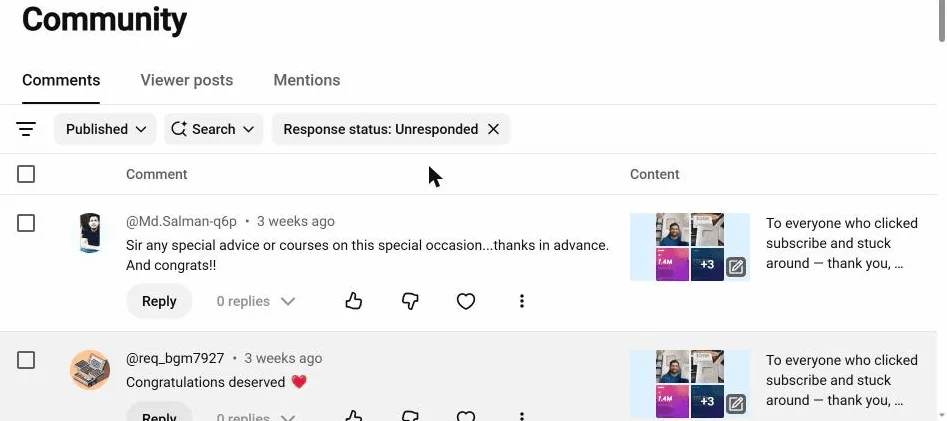
Go to Studio, then Community, then the Comments tab. The filter bar is the useful part. By default mine shows Published, Most relevant, Search, Response status: Unresponded, and Content type.
Response status: Unresponded is the one filter that matters. It lists the comments you have not replied to, on every video, not just one. This is the most useful thing in Studio and most creators have never clicked it. I use it every week; here is how.
Click the filter icon on the left and you get the rest of the list:
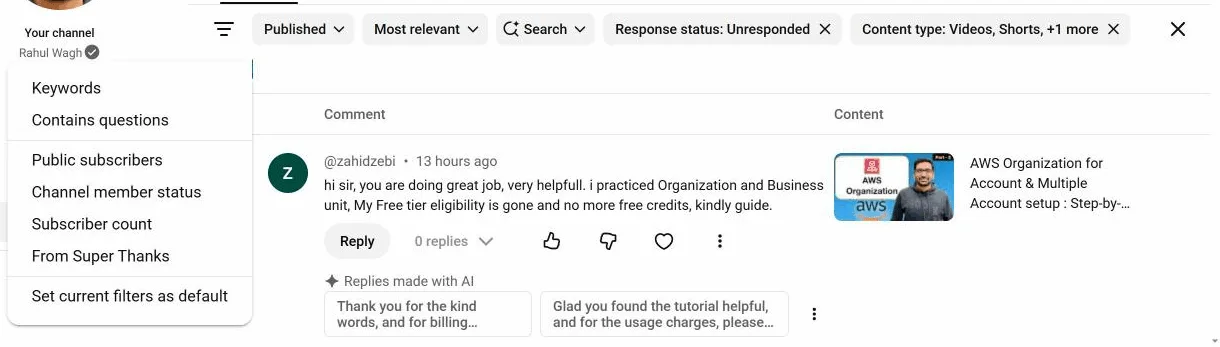
- Keywords. Full text search across all your comments. This is how I found the five "you look like Sundar Pichai" comments.
- Contains questions. Studio's guess about which comments are questions. Good but not perfect. It catches "how do I" and misses "any idea why this fails?".
- Public subscribers, Channel member status, Subscriber count. Show comments from people who subscribe to you publicly, from members, or from channels of a certain size. Useful once in a while to find other creators in your comments.
- From Super Thanks. Comments that came with money. Answer these first.
- Set current filters as default. Do this once with Response status: Unresponded, and Studio opens on your to-do list every time.
Published and Held
The first chip, Published, is really a switch called Moderation status. It has two options: Published and Held.
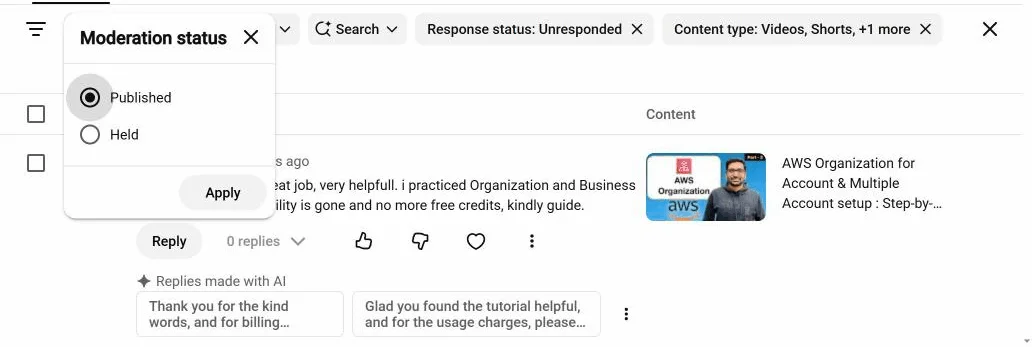
Held is your moderation queue. Comments that YouTube thinks may be offensive, plus anything that matched your blocked words or your link setting, land here and never go public unless you approve them. There is a Moderation reason column that tells you why each one was held, and the offensive ones are hidden behind a button so you do not have to read them unless you want to.

Approve, remove, report, or hide the user. YouTube's guide to managing comments covers each action.
The settings
Go to Settings, then Community moderation. Three tabs do most of the moderation work for you (comment settings help).
Content controls. Comments on new videos (on, and Moderation set to Basic by default, with stricter options), blocked words, and the link setting.
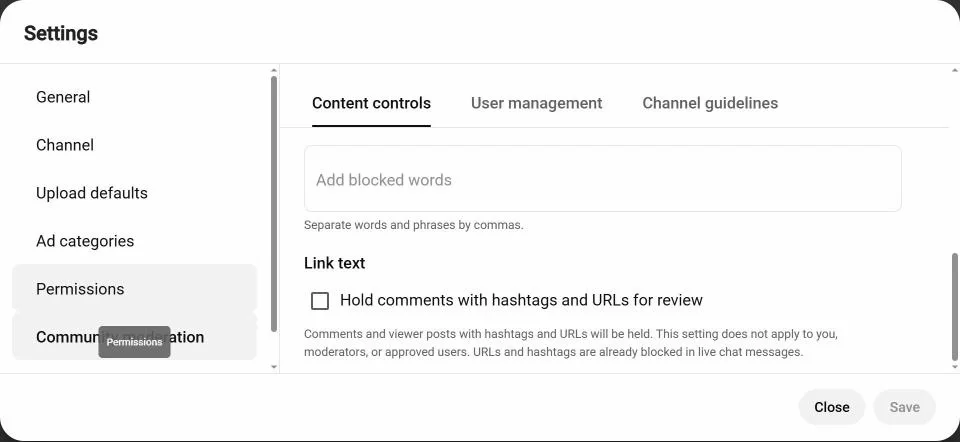
Two things in this tab are worth more than they look:
- Blocked words. Comments containing these words are held, not published. Add the payment apps and messenger names that scammers use in your niche.
- Hold comments with hashtags and URLs for review. Nearly every scam needs a link or a handle. This one checkbox removes most of the "claim your prize" category. Mine was off. Yours probably is too. Go and check.
User management. Managing moderators and standard moderators (other channels that can hold comments for you), approved users (their comments always go live), and hidden users (their comments never show on your channel, and they are not told).
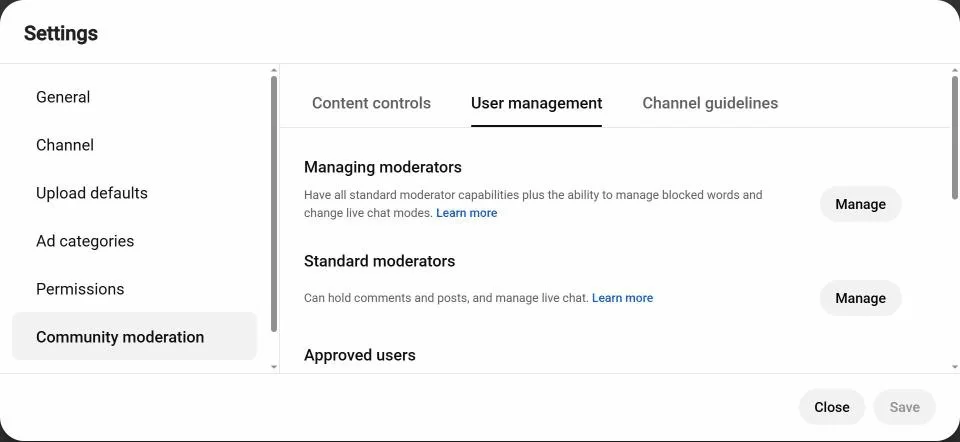
Channel guidelines. Up to three rules viewers have to acknowledge before their first comment. Most people skip this. It costs nothing and it is the one place you can say "no giveaway or WhatsApp replies on this channel" where every new commenter sees it.
Replying inside Studio
Under each comment you get heart, like, reply, pin (your own comment or someone else's on your video), and a menu with remove, report, hide user and always approve. Pinning your own comment on your top videos is the cheapest protection against scams.
Replies made with AI. Studio now shows two suggested replies under a comment, written in your tone from your past comments (help article). Here is what it offered for a real comment on my AWS Organizations video this week:
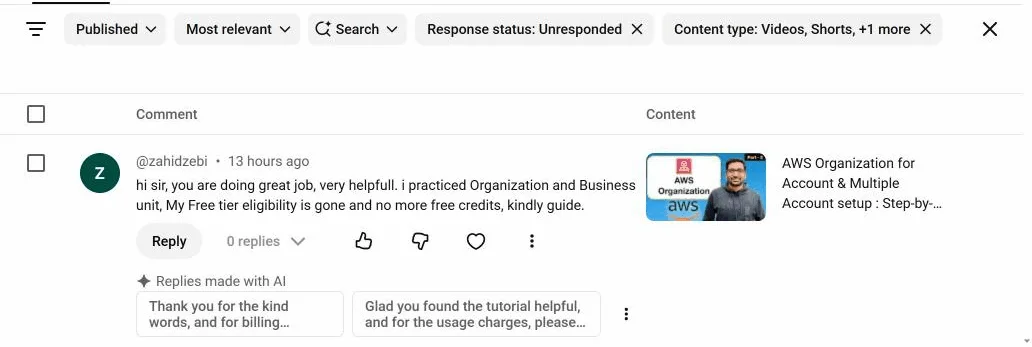
That is the whole story of the suggestions in one screenshot. The viewer asked a real question: his free tier is finished, what should he do. The suggestions thank him. For "great video", they are fine and they save a few seconds. For a question, you are still writing the answer yourself. I compared them with my own tool in more detail here: ReplyDial vs Studio's reply suggestions.
The mobile app. YouTube Studio for iOS and Android has the Comments page with the same filters, and replying from a phone works fine. That is where I answer most of my own comments.
What Studio does not do
Three gaps, after nearly seven years of using it daily.
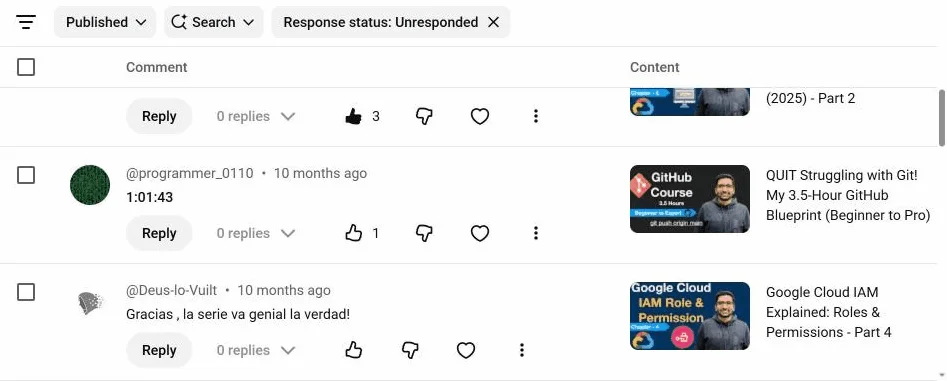
1. There is no "I have seen this". The Unresponded filter shows every comment without your reply, forever. A timestamp, an emoji, two viewers arguing with each other that you decided to leave alone: all of them stay in the list, every time, between the real questions. After a few hundred videos the real questions get lost.
2. It does not write an answer. You saw the screenshot. Reply suggestions say thanks. They do not answer "why does my Terraform plan show a change every run?". For a technical channel, that is the whole job.
3. It does not show you the cost of the backlog. You see one comment at a time. You do not see that video 47 has nine unanswered questions and the one from 2023 still gets new views every day. I only found that out by going back through old videos by hand.
Those three gaps are why I built ReplyDial: one inbox with every unanswered comment on the channel, a dismiss that sticks, and a drafted answer for each comment that you edit and approve before anything is posted. It does not replace Studio's moderation. The Held queue, blocked words and hidden users still do that work. ReplyDial comes after them.
What to set up this week
- Settings, Community moderation, Content controls: tick Hold comments with hashtags and URLs for review and add five blocked words for your niche. I am doing the same.
- Comments, filter Response status: Unresponded, then Set current filters as default. Answer what is there.
- Switch Moderation status to Held once and clear the queue.
- Pin a comment on your three most-viewed videos saying you never run giveaways in replies.
If the Unresponded list is longer than you can clear in one evening, the free unanswered-comments checker will tell you how long it is, for your last 20 videos, without signing in.