How a 104k-subscriber creator sorts YouTube comments into answer, skip and report: YouTube Studio's own filters, what they miss, the comments that are not spam but not questions either, and the rule for replying without feeding the scammers.
Short version: YouTube Studio already catches most abusive and scam comments before you see them, under the Held tab. What it does not do is decide the grey area for you: the comment that is not spam and not a question, the joke that repeats every month, and the impersonator replying to your viewers in your name. This post is how I sort those on my own channel, with examples from it.
What YouTube holds for you
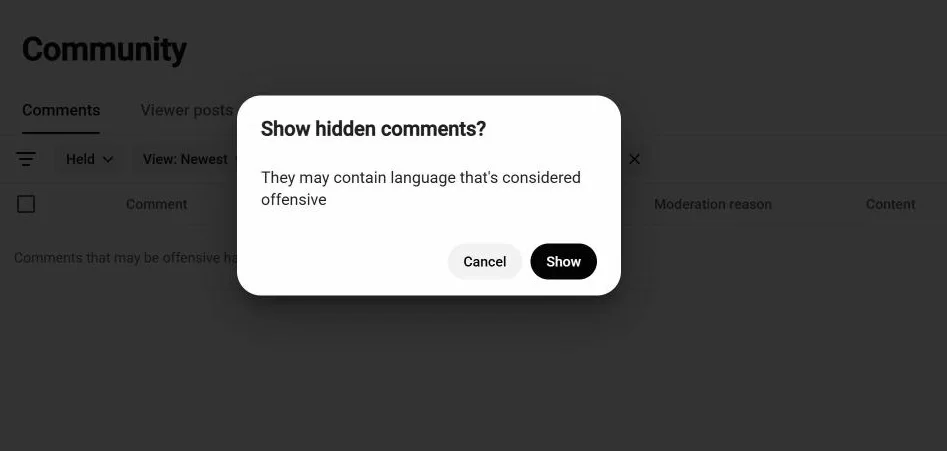
Every channel has a moderation queue. In Studio it is Comments, then the status filter set to Held. Comments that YouTube's classifier thinks are potentially inappropriate, plus anything matching your blocked words or your "hold links" setting, land there and never go public unless you approve them.
Three settings are worth turning on once, in Studio under Settings, Community, Defaults (YouTube's guide to comment settings):
- Hold potentially inappropriate comments for review. The default, and it works.
- Hold links. Nearly every scam needs a link or a handle. Holding links removes most of the "claim your prize" category in one click.
- Blocked words. Add the names of payment apps and the phrases scammers use on your niche. Good ones for a tech channel: "WhatsApp", "Telegram", "investment".
After that, Studio's spam work is mostly done. The rest is judgement.
The three piles
Every comment on my channel goes into one of three piles, and the whole trick is deciding fast.
Answer. Questions, corrections, thank-yous, requests for the next video. Around 90% of what I get. Each deserves a reply, even the ten-second ones; I wrote about how I get through 200 of them a week.
Skip, but leave up. Comments that are not spam and not a question. Timestamps with no words. Emoji strings. Two viewers arguing with each other. Replying adds nothing and a reply from the creator can reignite an argument. These stay published and unanswered, by choice.
Report and hide. Impersonators, scams, abuse. Not deleted quietly: reported, so YouTube learns, then the user is hidden from the channel (how to hide a user).
The lookalike comments
Then there is the fourth pile, which is really the first pile in disguise. On a technical channel it looks like this:
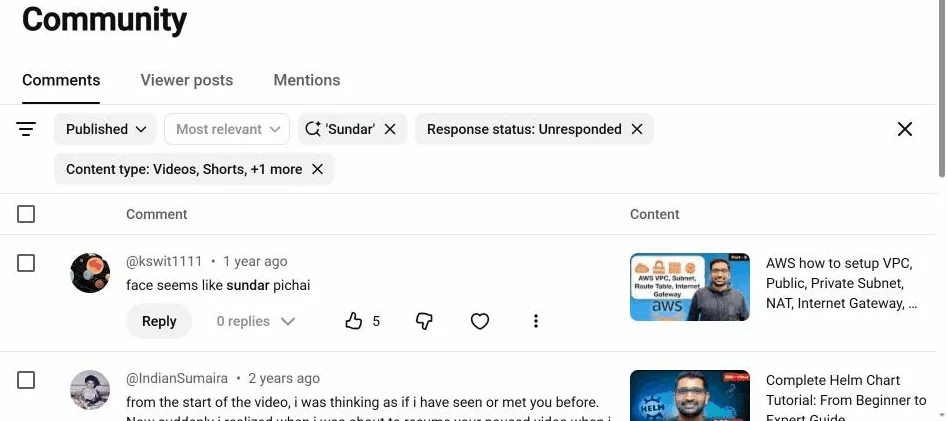
Five viewers over two years have told me I look like Sundar Pichai. One of those comments has 24 likes, which is more than most of my technical answers get. For a long time I treated these as skip-pile: not a question, nothing to add. That was a mistake. They are the friendliest comments on the channel, they get upvoted, and a dry reply from the creator is the kind of thing viewers screenshot.
So the rule changed: a repeated joke gets a reply, but never the same reply twice. Each one gets its own line, and the line has to relate to the video it is under. The one on the VPC tutorial got a networking joke; the one on the Helm tutorial got a Kubernetes one. I will not paste them here, because then they would be a template, and a template is exactly what viewers can smell.
This is also where I draw the line for AI drafting. The tool I use, ReplyDial, knows the difference between a lookalike comment and a question: it writes a one-off joke for the first and marks real spam as skip rather than inventing a polite reply to a scammer. The approve step is where I check the joke is actually funny. Nothing goes out on its own.
Scams: the only rule that matters
The scam that hits every channel at this size is the impersonator: an account with your name and your photo replying to your viewers with "congratulations, you have won, message me on WhatsApp". Your viewers cannot tell it is not you, and you never see it in your notifications because it is a reply to someone else's comment.
Four things stop it:
- Hold links, as above. Most of these carry a handle or a link.
- Your own reply, promptly. When your real reply is already under a comment, the fake one is obviously fake. This is the unglamorous reason to answer comments quickly: the impostor relies on silence.
- Report, hide, move on. Do not reply to the impostor. A reply from you gives the thread attention and tells the operator which channels are watched.
- Pin a comment on your top videos saying you never ask anyone to contact you on WhatsApp or Telegram and never run giveaways in replies. It takes one minute and it is the thing viewers remember when the fake message arrives.
YouTube's rules on this are explicit (spam, deceptive practices and scams policy), and reporting is what gets the account removed; hiding alone only protects your own channel.
Where the tools help, and where they do not
Studio's filters catch abuse and links. What they cannot do is answer the 90% pile or keep the dismissals straight. Two things I rely on for that:
- Dismiss that sticks. In Studio there is no "I have seen this, do not show it again" for the skip pile; the same timestamp comment is in your list forever. In ReplyDial a dismissed comment stays hidden for every login on the channel, for as long as the comment exists, and the inbox tells you how many are hidden.
- Spam marked, not answered. A comment that looks like spam gets a visible "looks like spam" note and no draft, so I cannot approve a reply to a scammer by accident on a fast day.
This week
Open Studio, Comments, status Held. Approve the false positives, report the rest. Then turn on Hold links if it is off. Then search your comments for the joke your viewers make about you, and answer one of them properly.
If you want the whole-channel view: the free unanswered-comments checker counts what is waiting on your last 20 videos, no sign-in. The grey-area comments are usually most of it.