Why you miss YouTube comments (and where Studio hides them)
Six places YouTube comments hide: the Held filter, Most relevant sort, follow-ups in answered threads, the bell, Shorts and posts, old videos. My 104k channel.
If a viewer says "I commented and you never answered" and you are sure you answered everything, you are both right. YouTube Studio does not lose comments. It files some of them where you do not look: behind the Held filter (and a second "show hidden" click inside it), below the fold of the Most relevant sort, inside threads you already answered, in a notification bell that stops being useful somewhere above 50 comments a week, under Shorts and community posts that live in a different filter, and on videos you published three years ago and stopped thinking about.
I run a 104,000-subscriber tutorial channel with a full-time job, and I answer every comment. On 11 October 2026 I went through my own Studio, my own tool's ledger, and a read-only scan of 33 other channels to see exactly where comments slip past a creator who is trying. Below is each hiding place, what it looked like on a real channel, what YouTube's API can and cannot see there, and the weekly routine that closes the gap. It is long because the problem has six parts and a short answer would be wrong for at least four of them.
Where do YouTube comments hide, in numbers?
From my channel on 11 October 2026, plus the 33-channel scan from 6 October:
Held filter: 1 comment held in the last month, and it took 2 clicks and a warning dialog to see it.
Unresponded filter: 1 comment waiting, 13 hours old, under a video with hundreds of comments.
Newest 157 comments on my last 20 videos: 0 without a reply from me, according to the free checker.
33 established US channels, 11,987 recent comments read: 9,021 had no reply from the channel. That is 75 percent.
21 of those 33 channels had left more than 80 percent of their recent comments unanswered. The best of them still missed 16 percent.
Default sort: Most relevant, not Newest. A new comment on an old video can sit on page three.
Follow-ups: a viewer's second question under a thread I already answered does not look new anywhere.
Community posts: comments on them are not available through the YouTube Data API at all. Only Studio shows them.
How common is missing comments, really?
Before the hiding places, the scale. On 6 October I ran a read-only scan, using only public data and the official API, of 33 established creator channels in the United States: teaching channels, course sellers, people who have been on the platform for years and clearly care about their audience. The scan read the newest comments on each channel's recent videos and counted how many had no reply from the channel itself.
Channel size
Channels
Comments read
No reply from channel
Share
Under 50,000 subscribers
4
825
677
82%
50,000 to 200,000
15
3,848
2,671
69%
200,000 to 1,000,000
14
7,314
5,673
78%
All 33
33
11,987
9,021
75%
Three of every four recent comments on those channels never got an answer. The spread was wide: one channel had answered none of its last 415 comments; the most attentive had answered 84 percent of its last 754. Not one of the 33 was under 10 percent unanswered. These are not lazy creators. Several of them pin a comment asking people to "drop your questions below". The questions are there. The creators are not seeing them, or are seeing them in a shape that makes answering feel impossible.
I do not think that is a motivation problem. I think it is a user interface problem, and the rest of this post is the user interface.
Why does the Held filter hide comments twice?
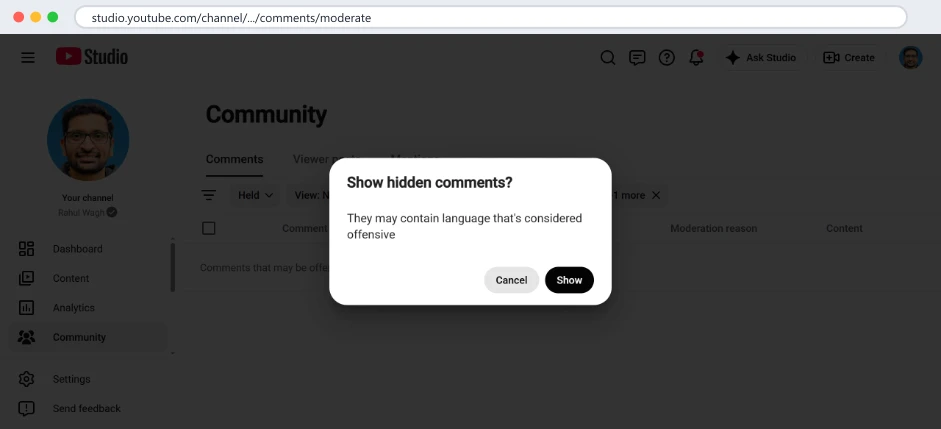
Studio holds comments it thinks are "potentially inappropriate" (the default setting), and, if you tick the option, comments with links or hashtags. Held comments are invisible to viewers and to you unless you open the Held view. Here is the catch: when you open it, the held comments are still not shown. You get a line that says "Comments that may be offensive have been hidden" and a button. Click it and a dialog asks again.
Studio's Held view on my channel, 11 October 2026. The held comment is behind a button and then a confirmation. Two clicks before you can read it.
Behind those two clicks on my channel was exactly one comment from the last month: a viewer swearing at me under Part 2 of the AWS Organizations series because the free tier does not apply to organisation accounts. The language was ugly. The point was fair, and I would rather know. I left it held. The same question arrived from another viewer this week, politely, and that one is in my inbox to answer.
If a real question gets caught by the same filter, it waits there until you go looking, and nothing tells you to. The classifier is tuned for safety, not for your inbox. It catches swearing reliably. I have not measured what else it catches, but a DevOps channel, where comments contain words like "kill" (as in kill the process) and "attack" (as in attack surface), probably trips it more often than a cooking channel does.
What the two settings actually do
In Studio, go to Settings, then Community, then Defaults. Two choices matter:
Basic holds potentially inappropriate comments. Everything else publishes immediately. This is the default and it is what I use.
Hold all holds every comment until you approve it. Nothing publishes without you. This is the right setting for a children's channel or a brand account with a moderator on shift. For a solo creator it turns every comment into a chore and silences the comment section for everyone else until you get to it.
There is a third box, "Hold comments with hashtags and URLs". I found on 3 October 2026 that it had been unticked on my channel for seven years, which is why link spam was reaching my viewers directly, and why the "you look like Sundar Pichai" lookalike scams I wrote about in spam, scams and lookalike comments could post a link under my videos within minutes. I ticked it. Check yours today.
What to do with a held comment
Each held row has four actions: Approve (publish it), Remove (delete it from your channel), Report (send it to YouTube as a policy violation), and Hide user from channel (every future comment from that account is held automatically). I use Approve for real questions with rough language, Remove for abuse with no question in it, and Hide user for repeat offenders. I almost never use Report; it is for threats and scams, not rudeness.
Why no tool can count your held comments for you
This matters if you have ever run a "find my unanswered comments" tool, including mine. The public YouTube Data API only returns published comments. A held comment, or one marked as likely spam, is not visible to anyone reading your channel with an API key. Even when the channel owner signs in and the tool reads with permission, held comments only appear if the tool asks for them explicitly with a moderation status filter, and acting on them (approving, removing) costs 50 API units each, the same as posting a reply. The free unanswered comments checker cannot see them at all, by design, and I would be suspicious of any public tool that claims to. The Held view in Studio is the only complete list.
Why is a 13-hour-old comment still unanswered on a channel that answers everything?
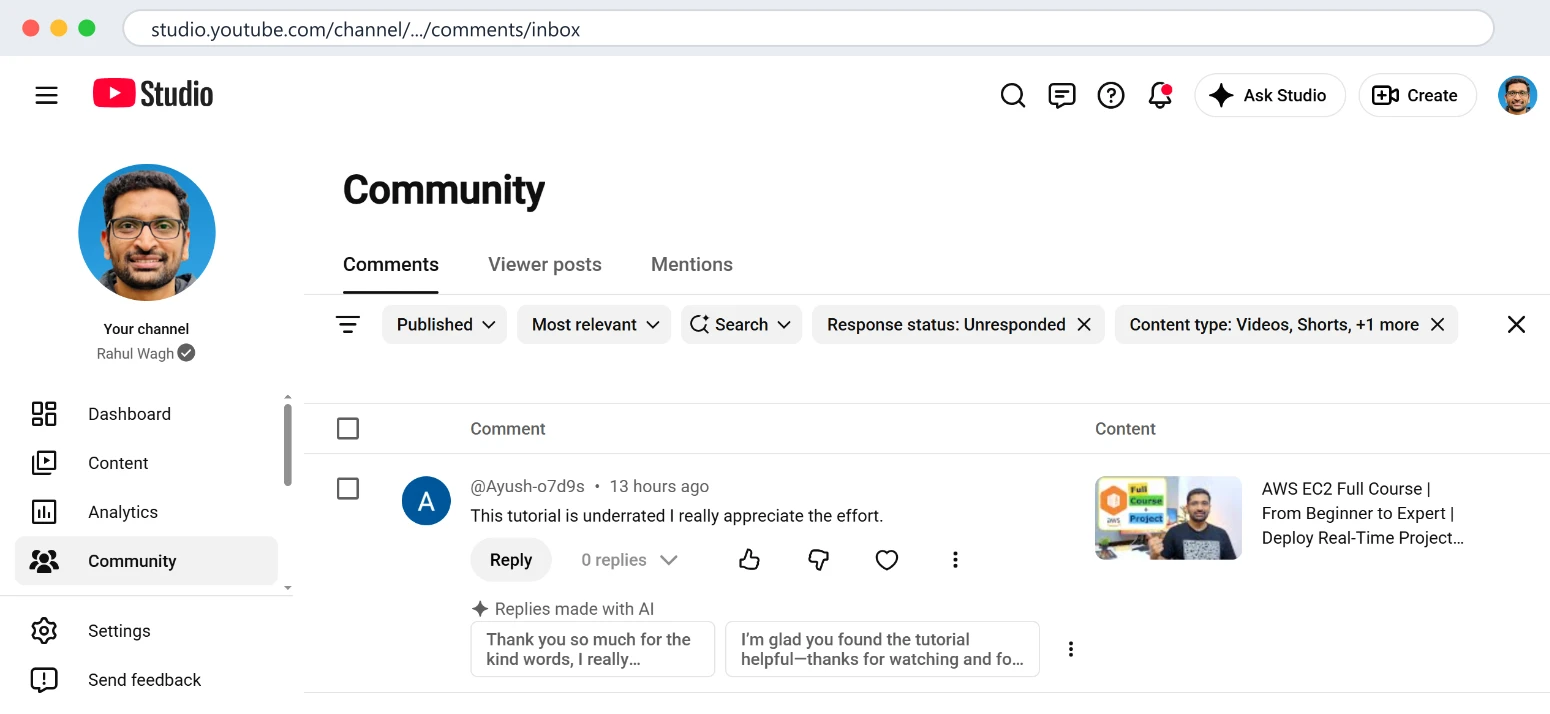
Because of how the default view sorts. Studio opens on Most relevant, which favours comments with likes and replies, which by definition are not the ones waiting for you. The comment below was under my AWS EC2 full course, a long video with a long comment section, and it sat there for 13 hours while I answered newer ones elsewhere.
My Studio inbox on 11 October 2026 with the filter Response status: Unresponded. One comment, 13 hours old. Studio now also offers two replies made with AI under it.
The filter that fixes this is one click: the Published dropdown, then Response status, then Unresponded. Combine it with View: Newest and you have the closest thing Studio offers to an inbox. The filter state is in the page URL, so once you have set it, bookmark the address and it opens the same way every time, on the phone too.
What this view still cannot do: it is one list for the whole channel, which is good, but it has no sense of priority. A "thank you" and a "step 4 fails with a 403 and I have a demo tomorrow" sit next to each other with the same weight. It does not know which video the viewer is on, beyond the thumbnail. And it does not remember what you have seen; close the tab and come back, and you re-read from the top.
Note the new row under the comment: "Replies made with AI". Studio now drafts two short thank-you replies for you, in a generic voice. They are fine for "great video" and useless for "step 4 fails with a 403", which is most of what I get on a tutorial channel. I wrote up the difference, with examples from my channel, in ReplyDial vs YouTube Studio's reply suggestions. The short version: the suggestions save you typing a sentence you could type in five seconds, and do not help with the comment that needs three minutes.
What about comments the checker says are answered?
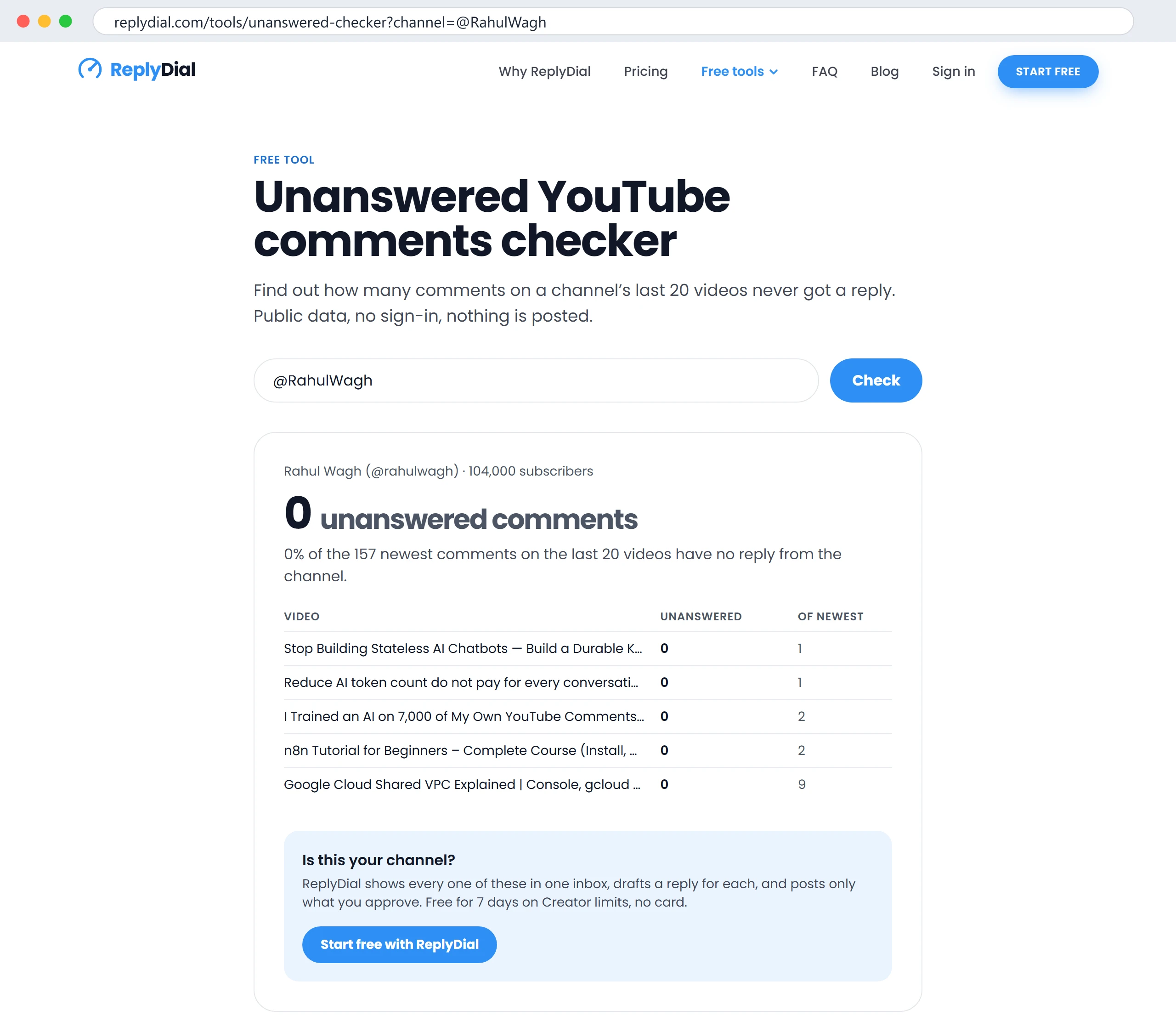
I ran our free unanswered comments checker on my own channel the same morning. It read the 157 newest comments on my last 20 videos and reported 0 without a reply from me.
The free checker on my own channel, 11 October 2026: 0 of the 157 newest comments on the last 20 videos have no reply. Click to enlarge.
And yet Studio showed one unanswered comment at the same time. Two reasons, both worth knowing, because they apply to every public comment tool, not just mine.
First, caching. The checker stores a result for 24 hours to save API quota (each check costs about 22 units of the 10,000 a project gets per day; I explained that budget in YouTube API quota for creators). A comment that arrived after the last check is not in the result until the cache expires.
Second, windows. The checker reads the newest 100 top-level comments per video, on the 20 newest videos. That is 2,000 comments at most, and on my channel it was 157, because most of my recent uploads have fewer than 100 comments each. But look at the per-video rows in the screenshot: my Google Cloud Shared VPC video had 9 recent comments; an older video with 400 comments would show only its newest 100. A comment at position 101 is outside the window. Public tools work on windows and caches because they have to. Your Studio does not. Use the checker to size a backlog and to look at channels that are not yours; use the Unresponded filter to clear today's.
What each surface can and cannot see
This table took me a week of building to learn, and it is the single most useful thing in this post if you are choosing tools.
Can it see...
Studio (you, signed in)
A tool you connected with Google sign-in
A public tool with an API key
Published comments on videos
Yes
Yes
Yes
Published comments on Shorts
Yes (Content type filter)
Yes, same as videos
Yes, same as videos
Comments on community posts
Yes (Viewer posts tab)
No, not in the API
No, not in the API
Held for review
Yes (Held view, two clicks)
Only if it asks with a moderation filter
No
Likely spam
Yes
Only if it asks with a moderation filter
No
Replies under your reply (follow-ups)
Yes, inside the thread
Yes, if it reads replies, not just threads
Yes, if it reads replies
Which comments you have answered
Yes (Response status)
Yes, by checking the author of each reply
Yes, same way
Comments older than the newest 100 per video
Yes
Yes, with more pages (1 unit per page)
Depends on the tool's window
Two cells deserve a second look. "Comments on community posts: No" means that if your audience talks under your posts, no tool built on the official API will ever show you those, and any tool that claims to is reading Studio in a way YouTube's terms do not allow. And "Follow-ups: yes, if it reads replies" is the difference between a tool that lists comment threads and one that reads what is inside them. The first version of ReplyDial only did the former. That mistake has its own section below.
Why do follow-up questions disappear?
This one bit me in the first week of October. A viewer asked a question under a new video, I answered, and a second viewer replied inside that thread with a question of their own. Every "unanswered" view I had, including the first version of my own tool, considered that thread handled, because I had replied once. The second question sat there until I happened to open the thread.
Nothing in Studio flags "a viewer replied after you". The Unresponded filter works on whether you have responded in the thread at all, and you have. The bell shows the reply if notifications are on, mixed into everything else. You find it by opening the thread.
I changed ReplyDial on 6 October so that a thread comes back into the inbox when a viewer's reply arrives after mine and reads like a question. The rule is deliberately plain: the newest reply is by someone other than the channel, it came after my last reply, and it contains a question mark or starts with a question word (how, why, what, where, which, when, can, does, is, should). "Thank you, that worked" does not bring the thread back; "thanks, but what about Terraform 1.9?" does. The entry for 6 October in the changelog has the details, and the thread view shows the whole conversation with my replies marked "You" so I can answer the latest message without re-reading the video.
In Studio, the only reliable habit is to sort by Newest and scan replies, not just top-level comments, which means opening threads. On a tutorial channel I estimate one in eight of my answered threads gets a follow-up within a week. If you answer 50 comments a week, that is six conversations a week that look finished and are not.
Why is the notification bell not enough?
The bell shows a stream of recent activity across comments, likes, mentions and subscriptions. At 10 comments a week it is a to-do list. At 200 a week it is a river. There is no "mark as done", no filter for questions, and on the phone it truncates long comments to one line so a question and a compliment look identical until you tap.
I stopped treating it as a list and have missed fewer comments since, because I replaced "did I see a notification" with "is the Unresponded view empty". That is a different question. The first depends on YouTube deciding to show you something and you happening to look. The second is a state you can check and make true.
A few things the bell will never do, so you stop expecting them: it will not tell you that a comment was held. It will not tell you that a thread you answered has a new reply from a third person unless you are mentioned. It will not group comments by video. And it does not exist for the past: there is no way to scroll the bell back to a comment from March.
Where do Shorts and community post comments go?
The Studio Community page has a Content type filter with three values: Videos, Shorts, and posts. By default all three are ticked, which is correct, but the moment you or someone on your team narrows it (to answer Shorts in a batch, say) and forgets, the other two vanish from the Unresponded view and stay vanished until the filter is reset. Studio remembers the filter between visits, so a narrowed filter is easy to carry for days without noticing.
Shorts comments behave like video comments everywhere else: same API, same held rules, same Unresponded filter. The difference is volume and tone. Shorts attract more one-word comments and more spam, so the "potentially inappropriate" classifier holds proportionally more of them, which sends you back to the Held section above.
Community posts are different in kind. Their comments live under the Viewer posts tab and, as the table above says, they are not in the YouTube Data API. No connected tool, including mine, can list them, draft replies to them or count them. If a big part of your conversation happens under posts, Studio is your only inbox for that part, and your routine has to include the Viewer posts tab explicitly.
Why do old videos keep producing comments you never see?
My channel has a back catalogue of a few hundred tutorials. Most of the comments I get in a week are not on this week's upload; they are on a Terraform video from 2022 or an AWS IAM video from 2021 that Google keeps sending people to. I wrote about what that did to the channel in nearly seven years on YouTube with a full-time job.
Here is what that looks like in practice. These are the replies I posted through ReplyDial in the two weeks to 8 October 2026, from the tool's own ledger:
Day
Drafts made
Replies posted
2026-10-08
3
3
2026-10-07
5
4
2026-10-06
5
3
2026-10-04
5
5
2026-10-02
4
4
2026-10-01
1
0
2026-09-30
4
4
2026-09-29
1
1
2026-09-28
40
34
2026-09-27
23
22
The 27th and 28th of September were the days I first ran the whole-channel inbox and cleared a backlog that had been building on old videos: 56 replies in two days, almost all of them on videos more than a year old. Since then it has been three to five a day, which is the steady state of a 104k channel with a deep back catalogue. Not one of those backlog comments had produced a notification I acted on. They were all visible in Studio the whole time, under Most relevant, below comments from 2023 with more likes.
If you only ever open the comments of your latest upload, which is what the Studio dashboard nudges you towards, you are answering the smallest slice of your audience. The whole-channel Unresponded view, sorted by Newest, is the fix inside Studio. A whole-channel inbox that remembers what you have handled is the fix I built.
A weekly routine that catches all six
This is what I actually do. It takes about 20 to 30 minutes a day on the phone, which comes to roughly 2.5 hours a week for about 200 comments. I described the workflow itself in how I answer 200 comments a week; this is the schedule.
When
Where
What
Time
Every day
Unresponded view, sorted Newest (or the ReplyDial inbox)
Answer everything new, across all videos
15 to 25 min
Every day
Threads I answered yesterday
Scan for follow-ups
3 min
Sunday
Held view, both clicks
Approve real questions, remove abuse, hide repeat offenders
5 min
Sunday
Viewer posts tab
Answer comments under community posts
5 min
Monthly
Settings, Community, Defaults
Confirm Basic or Hold all is what you intend; links box ticked
1 min
Monthly
Free checker on my own handle
Sanity check the public view of the channel
1 min
The order matters. The daily pass is where the value is: questions answered within a day get follow-ups, which get answered, which is what a comment section is for. The Sunday pass is housekeeping. The monthly pass exists because settings drift, as my seven-year unticked box proved.
What this means for you
Open Studio, Community, then set the filter to Response status: Unresponded and View: Newest. Bookmark that URL. It is your real inbox.
Open the Held view once a week and click through both prompts. One in a hundred is a real question, and that question is from someone who cared enough to swear.
In Settings, Community, Defaults, decide on purpose between Basic and Hold all, and tick the links-and-hashtags option unless you want link spam live on your videos.
When you answer a question, come back to the thread two days later. Follow-ups do not announce themselves.
If your audience talks under community posts, put the Viewer posts tab in your routine. No tool will do it for you.
Size your backlog with the free checker and remember it reads a window, not everything. If it says 400, the truth is at least 400.
Treat the bell as a doorbell, not a list.
Questions people ask about this
Why can I not see a comment a viewer says they posted?
Four likely places: it is held (Held view, two clicks), it was caught as likely spam (same view, different status), it was posted under a Short or a community post and your Content type filter is narrowed, or it is a reply inside a thread rather than a top-level comment and you are looking at the thread list collapsed. If none of those, the viewer may have posted from an account that your channel has hidden, which holds every comment automatically.
Do held comments count as unanswered?
Not in any tool, and not in Studio's Unresponded filter either; they are not published, so they are not "comments" to those views yet. Approve one and it immediately appears as a new unanswered comment with its original timestamp, which can be days old by then. Answer it the same day you approve it.
Does YouTube notify me of every comment?
Notifications are a best-effort stream, controlled by your settings and your device, and they are not a record. On my channel the bell has never been a complete list of comments at any volume above a few dozen a week. Treat the Unresponded view as the record.
Why does a free tool show a different number from Studio?
Caching and windows, as above. A public tool reads a fixed number of recent comments per video, caches the answer for a while, and cannot see held or spam-filtered comments at all. Studio sees everything, uncached. If the two disagree, Studio is right about the present and the tool is right about the size of the problem a stranger can see.
Can a tool answer comments under my community posts?
No. The YouTube Data API has no endpoint for community post comments, so no tool built on the official API can read or reply to them. Anything that does is automating Studio itself, which YouTube's terms prohibit and which puts your channel at risk, not the tool's.
What to do this week, no tool needed: bookmark the Unresponded view, empty it once a day for seven days, open the Held view on Sunday and click through both prompts, and look at the Viewer posts tab once. You will find at least one comment you did not know you had. On the 33 channels I scanned, the number would be in the hundreds.
ReplyDial finds every unanswered comment on your channel, including follow-ups under threads you already answered, drafts a reply in your voice, and posts only what you approve, one click each. The unanswered comments checker is free and needs no sign-in; it reads the newest 100 comments on your last 20 videos and tells you how many never got an answer.
See your own unanswered comments
ReplyDial lists every comment on your channel still waiting for a reply, drafts answers in your voice, and posts only what you approve. Free for 7 days on Creator limits, no card.
Comments missing in YouTube Studio? Eleven causes checked on a real 104k channel in October 2026: held status, filters, sort, Viewer posts, Search, settings.
YouTube Studio can filter to comments you have not responded to, but it will not tell you how many, how old, or on which videos. Here are three ways to find every unanswered comment on your channel, with the numbers from mine.
40 of my real YouTube replies, verbatim, from 629 answers on five videos, grouped by situation, with the numbers behind them and what broke when AI wrote them.