YouTube Studio comments not showing: 11 causes and fixes
Comments missing in YouTube Studio? Eleven causes checked on a real 104k channel in October 2026: held status, filters, sort, Viewer posts, Search, settings.
When a comment you know exists does not appear in YouTube Studio, it is almost never gone. It is in one of eleven places Studio does not show by default, and each place has a different fix. In order of how often it is the cause on my channel: the comment is held for review (and hidden again inside the Held view), a filter chip is narrowing the list, the list is sorted by Most relevant rather than Newest, the comment is under a community post (Viewer posts tab), it is a reply inside a collapsed thread, the Search chip has a saved query, your comment settings hold everything, the viewer's account is on your hidden list, the video has comments turned off, the viewer or YouTube deleted it, or the Studio mobile app is behind the website.
I run a 104,000-subscriber tutorial channel and I check my comments every day, so I notice when one is missing. Between 11 and 14 October 2026 I went through each of these on my own channel in Studio and took screenshots as I went. This post is the checklist I wish existed the first time a viewer told me "I asked you a question and you ignored it" and I could not find the question.
Which cause is it? Start here
What you see
Most likely cause
Where to look
Section
Viewer says they commented; nothing in Studio or on the video
Held for review
Published dropdown, choose Held, click Show hidden comments twice
1
Comments show on the video page but not in Studio's list
A filter chip or the Search chip is active
The chip row under Comments; the X on each chip
2, 6
New comments are missing but old ones show
Sorted by Most relevant
The sort chip; change to Newest
3
Comment was on a post, not a video
Viewer posts tab
Community, then Viewer posts
4
Viewer replied to you and you never saw it
Reply inside a collapsed thread
Open the thread; or the Mentions tab if they tagged you
5
Nothing new shows for days on any video
Hold all comments is on
Settings, Community, Defaults
7
One particular viewer's comments never appear
That account is on your hidden users list
Settings, Community, Automated filters
8
A whole video has no comments at all
Comments turned off for the video, or made for kids
Video details, Comments and ratings
9
Comment was there yesterday, gone today
Viewer deleted it, or YouTube removed it
Nothing to do; check Held for a moved copy
10
Shows on the website, not in the app (or the reverse)
App lag or cache
Pull to refresh; sign out and in; use the website
11
1. Is the comment held for review?
This is the first place to look, and the place Studio makes hardest to see. Studio holds comments its classifier marks as potentially inappropriate (the default), plus anything your settings tell it to hold. Held comments are invisible on the video page to everyone, including you, and they are not in the Published list in Studio.
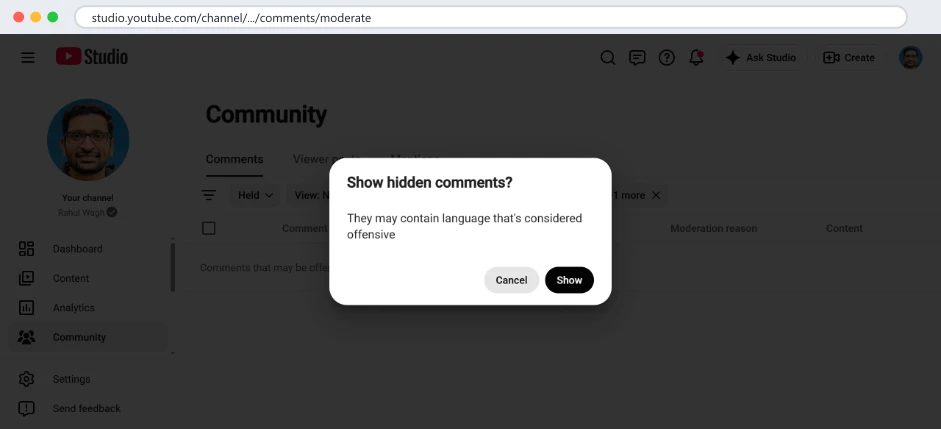
To see them: open Community, then Comments, click the Published chip and choose Held. Then comes the part that catches people. The held list does not show the comments either. It shows one line, "Comments that may be offensive have been hidden", and a button, Show hidden comments. Click it and a dialog asks you to confirm.
Studio's Held view on my channel, 11 October 2026: the held comment is behind a button and then a confirmation. Two clicks before it is visible.
On my channel on 11 October there was exactly one comment behind those two clicks from the previous month, a viewer swearing at me under an AWS Organizations video because the free tier does not apply to organisation accounts. Rude, but a real point. If that had been a question in the same language, it would have waited there indefinitely; Studio sends no notification for held comments.
Each held row has four actions: Approve (publish it, it then appears as a new unanswered comment with its original date), Remove, Report, and Hide user from channel. Approve is the fix when the comment was wrongly held. If you approve one that is days old, answer it the same day, because to the viewer it has been silence since they wrote it.
2. Is a filter chip narrowing the list?
Under the Comments tab there is a row of chips: a moderation status (Published or Held), a sort, Search, and any filters you have added such as Response status or Content type. Every chip stays applied until you remove it, and Studio keeps the whole set in the page URL, so the same narrowed view comes back next time you open Studio, on any device where you are signed in.
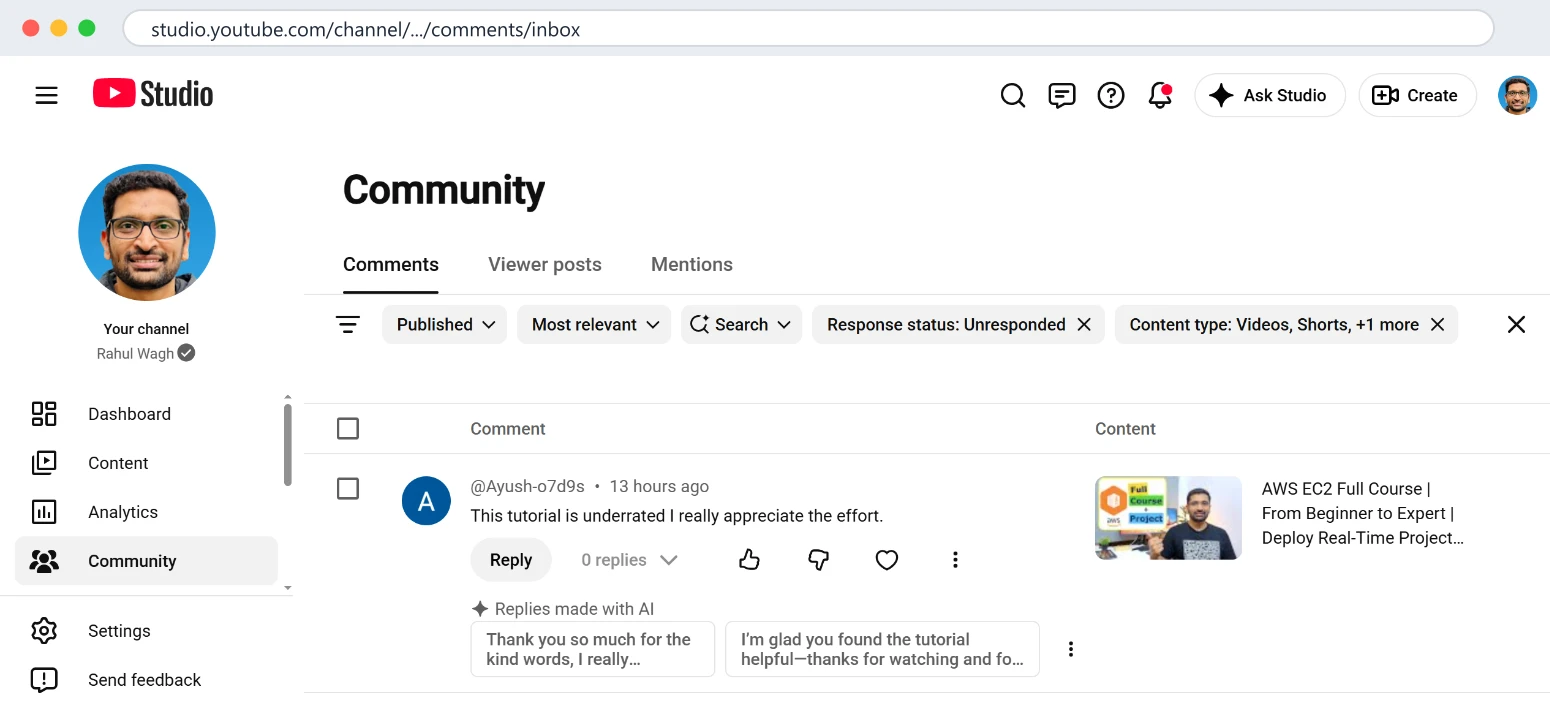
My Studio inbox on 11 October 2026 with Response status: Unresponded applied. It shows one comment. Remove the chip and the full list returns.
The chips I use on purpose, Response status: Unresponded and View: Newest, are exactly the ones that hide comments when I forget them. With Unresponded on, every comment I have already replied to disappears, which is the point, until a viewer tells me they commented and I search for it in the wrong view. The fix is the X on each chip. Check the Content type chip in particular: it defaults to Videos, Shorts and posts all ticked, and if it has been narrowed to one, the other two kinds of comments are not missing, they are filtered.
3. Is the list sorted by Most relevant?
Studio opens the comment list sorted by Most relevant. Relevance favours comments with likes and replies, which are, by definition, the ones that have already had attention. A comment from four hours ago with no likes under a video with 350 comments can sit on page three. On 11 October the oldest unanswered comment on my channel was 13 hours old under my EC2 course for this reason: it was there the whole time, below older comments with more likes.
Change the sort chip to Newest. If you only ever look at comments by opening your latest video from the Content page, you are seeing one video's comments; the Community page is the whole channel, and with Newest at the top it is the closest thing Studio has to an inbox.
4. Was it a comment on a community post?
Comments under community posts are not in the Comments tab at all. They have their own tab, Viewer posts, next to Comments and Mentions. Nothing in the Comments list hints that another list exists, and the mobile app buries it further. If your audience talks under your posts, check Viewer posts separately.
A related point for anyone using a comment tool: the YouTube Data API has no endpoint for community post comments, so no tool built on the official API, including mine, can show them. Studio is the only place.
5. Is it a reply inside a thread you already answered?
The Comments list shows top-level comments. Replies are collapsed under each one behind a count, "2 replies". When a viewer replies inside a thread, nothing on the top-level row changes except that count. Studio's Response status filter considers the thread responded if you have replied anywhere in it, so a viewer's second question under your reply does not appear as unresponded.
This bit me in the first week of October: a second viewer asked a question inside a thread I had answered, and no view I had showed it as new. Two places to look. Open the thread in Studio and read the latest reply. Or check the Mentions tab, which lists comments that tag your handle; replies to you often do, but not always. I changed my own tool, ReplyDial, on 6 October so that a thread comes back into the inbox when a viewer's reply arrives after mine and reads like a question, because Studio has no equivalent. I wrote more about follow-ups in why you miss YouTube comments.
6. Is the Search chip holding a query?
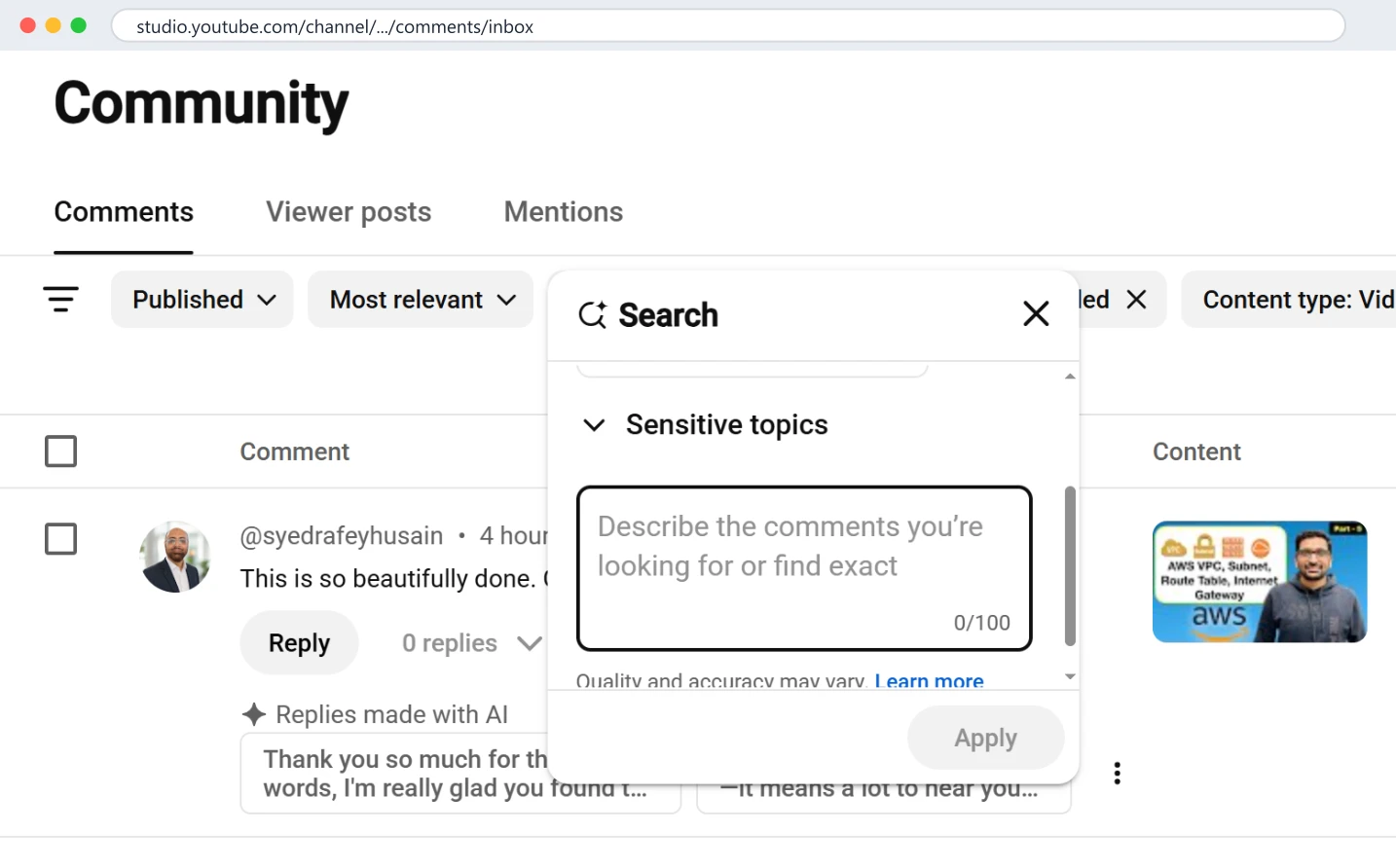
Studio's comment search changed in 2026. The Search chip now opens a dialog with suggested searches ("General compliments", "Excitement and enthusiasm", "Sensitive topics") and a box that says "Describe the comments you're looking for or find exact". It is a language-model search: you describe the kind of comment and it filters the list to matches, with a note that "quality and accuracy may vary".
Studio's Search chip on 14 October 2026: suggested searches, a free-text description box, and a note that quality and accuracy may vary. An applied search is a filter like any other.
Useful, and a trap. An applied search is just another chip, and like every chip it persists. If you searched for "questions about pricing" on Monday, the list on Tuesday is still only those matches, and a comment that the model did not classify as about pricing is invisible. The fix is the same X. If you need an exact match, type the exact phrase; the box supports it, and exact is reliable where "describe" is a guess.
7. Are your comment settings holding everything?
In Studio, Settings, then Community, then Defaults, there are two levels for comments on new videos: Basic, which holds potentially inappropriate comments and publishes the rest, and Hold all, which holds every comment until you approve it. There is also a separate box, "Hold comments with hashtags and URLs".
If someone, possibly you in a cautious moment, switched the channel to Hold all, every comment since then has gone to the Held view in section 1, and nothing shows on your videos or in the Published list until you approve it. The symptom is a channel that suddenly gets no comments at all. On my channel I found on 3 October 2026 that the hashtags-and-URLs box had been unticked for seven years, which is the opposite problem: link spam was publishing instantly. Both settings are worth a look once a month.
8. Is the viewer on your hidden users list?
Settings, Community, Automated filters has a list called Hidden users. Any account on it has every comment held automatically, across all your videos, with no notice to them or to you. Accounts get there in two ways: you clicked Hide user from channel on one of their comments at some point, or a moderator did. If one specific person swears they commented and you can never find it, check the list. Removing them from it stops future holding; their past held comments are still in the Held view.
9. Does the video have comments turned off?
Two ways this happens. You can turn comments off per video in the video details under Comments and ratings, and it is easy to do by accident when editing several videos at once. And any video marked as made for kids has comments disabled by YouTube with no option to turn them on. If a whole video shows zero comments in Studio, open its details before you look anywhere else.
10. Did the viewer delete it, or did YouTube?
Comments the viewer deletes are gone from everywhere, including Studio. Comments YouTube removes for policy reasons are also gone, though some move to Held or Likely spam first, so check section 1. There is nothing to recover and nothing to do, except not to assume the viewer is lying; on my channel, the one who says "I commented and it vanished" is usually right, and the comment is usually in the Held view.
11. Is the Studio app behind the website?
The YouTube Studio app on a phone shows comments too, but it is not the same view. In my use it often lags the website, it caches lists so a pull-to-refresh is needed, and it does not expose everything the website does: the Held view, the full filter set, the Viewer posts tab and the AI search are either missing or several taps deeper. When a comment shows on the website and not in the app, or the reverse, trust the website, refresh the app, and if it stays wrong sign out of the app and back in. I answer most of my comments from a phone, but through my own tool's web app rather than the Studio app, partly for this reason.
A worked example from this week
On 12 October a viewer wrote under my AWS Organizations video: they had created an organisation in their free-tier account, got an email that the account was now paid, and could not revert it. A fair, specific question. It did not reach me through the bell; I found it the next morning in the Unresponded view, sorted by Newest, where it was the second item. A month earlier, a different viewer had asked the same thing in language that got it held, and that one I only found on 11 October, behind the two clicks in section 1, while writing a different post.
Same question, two viewers, two different hiding places, and only one of the two had any chance of being answered on time. That is the whole reason this checklist exists. Nothing was broken in Studio in either case. The comments were exactly where Studio puts comments like them; I just had to know the eleven places.
How the filters live in the URL, and how to reset everything
Every chip you apply in the Comments tab is written into the page address as a filter parameter. You can see it: after you set Response status to Unresponded, the URL grows a long encoded block that names the sort, the engaged status and the content types. Studio reads that block back when you return, which is why a filter you set last Tuesday is still active on Friday and on your other laptop.
Two consequences. The good one: once you have the view you want, bookmark the page and it opens that way every time; mine is the Unresponded, Newest view. The bad one: there is no single "reset filters" button. To get back to everything, click the X on each chip, including the Search chip if it shows a query, and set the sort chip back by hand. If the page still looks narrowed, open the plain address, studio.youtube.com, go to Community, and the default view returns.
If someone else moderates your channel, they share this problem in reverse: a filter they set in their session does not affect yours, so "I can see it, why can't you" between two people is almost always a filter chip.
Why every tool shows a different number from Studio
If you also use a comment tool, free or paid, it will disagree with Studio sometimes, and the reasons are the sections above seen from outside. The public YouTube API returns published comments only, so held and likely-spam comments are invisible to any tool that uses an API key. Comments on community posts are not in the API at all. Tools read a window, the newest 100 per video for example, and cache results. Studio is uncached and complete, which is why this checklist is about Studio and not about tools.
Our free unanswered comments checker is a good example. On 11 October it reported 0 unanswered comments out of the 157 newest on my last 20 videos, while Studio showed one unanswered comment, 13 hours old. The checker was right about what a stranger can see; Studio was right about now. Both were telling the truth.
Can it show...
Studio website
Studio app
A tool using the public API
Held for review
Yes, two clicks
Limited
No
Likely spam
Yes
Limited
No
Community post comments
Yes, Viewer posts tab
Yes, deeper
No, not in the API
Replies inside threads
Yes, expand the thread
Yes, expand
Only if the tool reads replies
Comments older than the newest 100 per video
Yes
Yes
Depends on the tool
Every video on the channel in one list
Yes, Community page
Yes
Yes, if it scans the whole channel
The five-minute routine that stops this happening
Open Community, Comments. Set the sort to Newest. Set Response status to Unresponded. Bookmark the resulting URL; the filters live in it.
Answer everything in that view, every day. Mine takes 20 to 30 minutes for a channel that gets about 200 comments a week.
Once a week, switch the Published chip to Held and click through both prompts. Approve what was wrongly held, remove abuse, hide repeat offenders.
Once a week, open Viewer posts and the Mentions tab.
Once a month, open Settings, Community: confirm Basic or Hold all is what you intend, confirm the hashtags-and-URLs box, and look at the Hidden users list.
That routine covers all eleven causes. The daily step is the one that matters; the rest is housekeeping.
Questions people ask
Why can I see a comment on the video but not in Studio?
A filter chip or a saved Search is narrowing the Studio list. Remove every chip (the X on each) and sort by Newest. If the comment is a reply, expand its thread.
How long does a comment stay held for review?
Until you act on it, with a deadline: YouTube's help pages say comments held for review are deleted automatically after 60 days if you do nothing. So a wrongly held question does not wait forever; it waits two months and then disappears, which is worse.
Why does YouTube Studio say I have comments but show none?
Usually the Held view's own hiding layer: the count includes held comments, and the list hides them behind Show hidden comments and a confirmation. Click through both. Otherwise, check the Content type chip.
Can I turn off "potentially inappropriate" holding?
Not entirely; Basic is the lowest setting and it still holds what the classifier flags. You can only decide what to do with each held comment afterwards. Approving a wrongly held comment teaches nothing to the classifier as far as I can tell; the same viewer can be held again next week.
Does the Studio app show held comments?
Partially, and later than the website. For anything to do with held or filtered comments, use the website, on the phone's browser if you must.
I replied to a comment and my own reply is not showing
Your reply is subject to the same rules as everyone else's: if your settings hold comments with links and your reply contains a link, your reply is held. On a channel with Hold all on, even the owner's replies can wait for approval. Check the Held view for your own name. If you replied from the mobile app, give the website a minute and refresh.
Why do I see "Comments that may be offensive have been hidden" when I have no offensive comments?
Because the message is about the Held list as a category, not about the specific comments in it. Studio hides every held comment behind that line, whatever the reason it was held, including comments held only because they contain a link. Click Show hidden comments and confirm; the list underneath is usually ordinary.
Will a comment show up in Studio if the viewer edited it?
Yes, with the edited text and the original timestamp, and if the edit added a link or a word the classifier dislikes, the edited version can move to Held even though the original was published. A comment that was visible yesterday and is held today was often edited.
What to do this week, no tool needed: open the Published chip, pick Held, and click through both prompts. Then clear every chip and sort by Newest. If a viewer ever told you they commented and you could not find it, it is in one of those two places.
ReplyDial shows every unanswered comment across your whole channel in one list, brings a thread back when a viewer replies after you, drafts a reply in your voice, and posts only what you approve. The unanswered comments checker is free and needs no sign-in.
See your own unanswered comments
ReplyDial lists every comment on your channel still waiting for a reply, drafts answers in your voice, and posts only what you approve. Free for 7 days on Creator limits, no card.
Six places YouTube comments hide: the Held filter, Most relevant sort, follow-ups in answered threads, the bell, Shorts and posts, old videos. My 104k channel.
40 of my real YouTube replies, verbatim, from 629 answers on five videos, grouped by situation, with the numbers behind them and what broke when AI wrote them.
Every comment tool gets 10,000 YouTube API units a day per project and a reply costs 50: about 200 posts a day, shared by all its users. My real numbers.