What the YouTube 'Includes paid promotion' label means and misses
The label means the creator ticked a box in Studio. On 447 sponsored videos across 10 channels it was present on 33 percent; the description disclosed 83.
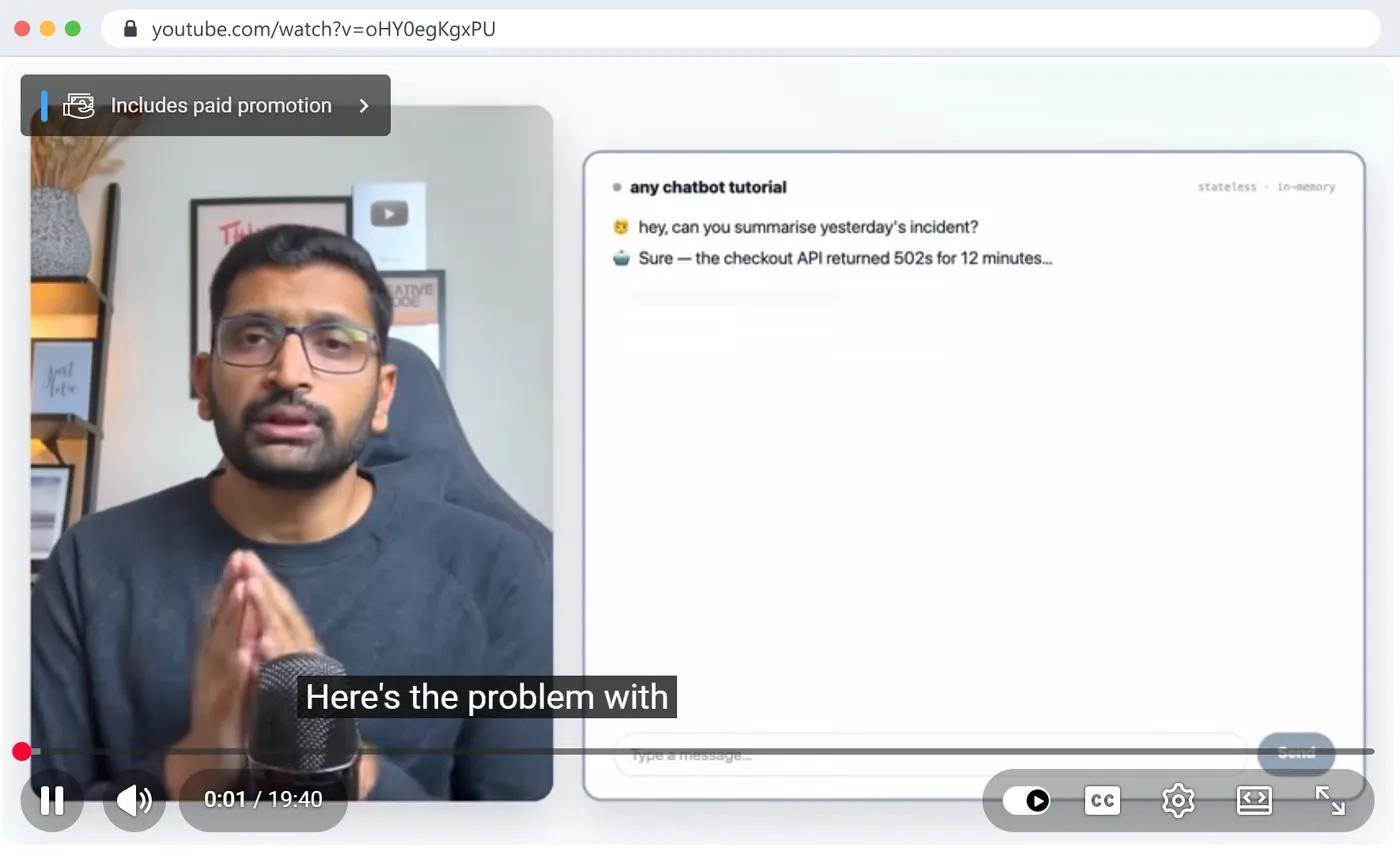
"Includes paid promotion" is a label YouTube shows in the top-left corner of the player for the first few seconds of a video. It appears because the creator ticked a box in YouTube Studio saying the video contains a paid promotion such as a product placement, sponsorship or endorsement. It is a declaration by the creator, not a detection by YouTube, it does not say who paid, and it is far from complete: across 447 sponsored videos on 10 channels in my niche, counted on 26 October 2026, the label was present on 146 (33 percent). The description named or disclosed the sponsor on 370 (83 percent). Only 69 videos had both.
I run a 105,000-subscriber DevOps tutorial channel with 12 sponsored videos of my own, 8 of them labelled, and I built the free channel analyzer for YouTube, which reads the label through the YouTube Data API for every video it scans. This post is what the label is, how it looks to a viewer, how it looks in Studio and in the API, who in my niche uses it and who does not, the three things it cannot tell you, and what I found when I checked my own channel and did not like the answer.
How often is the label actually used?
Ten channels: nine cloud and DevOps channels I scanned for the pitch-list post plus my own, newest uploads of each (up to 300), YouTube Data API, 26 October 2026. "Sponsored" means the label or a written disclosure. "Text" means the title or description names the sponsor or uses a disclosure phrase.
Channel
Sponsored videos
With the label
With text
Label share
TechWorld with Nana
35
4
32
11%
Abhishek Veeramalla
23
4
21
17%
Tech With Lucy
161
16
159
10%
Travis Media
150
56
133
37%
Be A Better Dev
10
6
4
60%
Rahul Wagh (me)
12
8
9
67%
DevOps and AI Toolkit
9
7
3
78%
Bret Fisher
41
40
6
98%
Cloud With Raj
5
5
2
100%
KodeKloud
1
0
1
0%
The totals, which are the numbers to keep:
447 sponsored videos. 146 carry the label (33 percent). 370 have a written disclosure (83 percent).
69 videos (15 percent) have both the label and the text.
77 videos (17 percent) have the label and nothing in writing. On those, you know money changed hands and you do not know with whom.
301 videos (67 percent) disclose in writing and have no label. A viewer who looks only at the player sees nothing on two thirds of the sponsored videos in this niche.
The channels that tick the box almost every time (Bret Fisher, Cloud With Raj, DevOps and AI Toolkit) are the channels that write the least in their descriptions. The channels that write the most (Tech With Lucy, Nana, Abhishek) tick it least. Creators seem to treat the two as alternatives, and the rules treat them as a pair.
What the viewer sees: my Trigger.dev video on 6 October 2026, one second in. The 'Includes paid promotion' box sits in the top-left corner of the player and fades after a few seconds. The label does not name the brand. Click to enlarge.
What does "Includes paid promotion" mean, exactly?
It means the person who uploaded the video told YouTube the video contains a paid promotion. There are three places where that one fact lives.
In the viewer's player. The small box in the top-left corner, visible for the first seconds of playback and again if you scrub back to the start. On the mobile app it is the same box in the same corner. Nothing else on the watch page changes: no mention under the title, no line in the description unless the creator wrote one, nothing in the channel's About tab.
In YouTube Studio. The checkbox is under the video's Details, behind Show more, in a section called Paid promotion. It asks whether the video contains a paid promotion such as a product placement, sponsorship or endorsement. Ticking it adds the label. There is a second option that lets the creator turn the visible label off while still declaring the promotion to YouTube; that option exists for creators who put their own disclosure in the video and want to avoid two, and it is a reason the viewer-facing label undercounts even the declared promotions.
In the YouTube Data API. Each video has a field paidProductPlacementDetails.hasPaidProductPlacement, true or false. This is the field every sponsor-detection tool reads, including mine. One request covers 50 videos for one unit of quota, which is why the analyzer can check 300 videos for about 13 units. Here is the real response for two of my videos on 26 October 2026, the labelled Trigger.dev video and the unlabelled Hostinger one:
The field is a boolean. It has no brand, no date of the deal, no amount, no distinction between a sponsorship, a free product and an affiliate relationship. Everything else a tool shows you about a sponsor comes from reading the description and the links, not from this field.
What the box is for, according to YouTube. YouTube's rules require creators to tick it when a video contains a paid promotion, and YouTube's help text tells creators that the label does not replace the disclosures their local law requires. In the United States that is the FTC's endorsement rules, in the UK the ASA and CMA guidance, in the EU the consumer-protection rules each country applies; all of them ask for a disclosure the viewer actually notices, which a three-second box in a corner may not be. So the label is a platform requirement layered on top of the legal one, and the written "This video is sponsored by" line is usually the part that satisfies the law.
Who ticks the box and who does not?
The table above splits into three kinds of channel, and the split follows the format of the video more than the honesty of the creator.
Live-stream and talk channels tick it almost every time. Bret Fisher's 41 sponsored uploads are weekly live streams with a sponsor read at the start; 40 carry the label. Cloud With Raj, 5 of 5. DevOps and AI Toolkit, 7 of 9. The sponsor segment is spoken, the description carries links, and the box is the one written disclosure that always happens. On these channels the label is the only reliable signal, and "who paid" needs the first two minutes of the video.
Tutorial channels with a disclosure habit tick it rarely. Nana writes "sponsored by" or "thanks to" in 32 of 35 descriptions and ticks the box on 4. Abhishek, 21 of 23 in text, 4 ticked. Tech With Lucy, 159 of 161 in text, 16 ticked. These creators disclose clearly, in the place a reader will find it, and most of them appear to consider that done. A viewer scrubbing the first seconds of their videos would conclude the channel takes almost no sponsors, and would be wrong by a factor of eight.
Mixed channels, including mine, do a bit of both. Travis Media: 56 labels on 150 sponsored videos, 133 of them with text, 39 with both. Me: 8 labels on 12, 9 with text, 5 with both. Be A Better Dev is the odd one: 6 labelled videos, 4 with text, and no overlap at all, so 6 of its 10 sponsored videos have a label and no written brand anywhere.
That last pattern, label without a name, is the one that creates work for everyone downstream. In my own niche it is 77 videos out of 447. On each one a brand, an agency or a curious viewer has to watch the video to learn who paid, and tools can do nothing with it except count it.
Why do creators skip the box?
I can only speak for myself and for what the descriptions suggest, but the pattern in the table points at three reasons.
The first is that the description is where the work already happens. A creator who negotiates a deal writes the sponsor's line, the link and the code into the description as part of delivering the video, often from a template the brand supplied. The box lives in a different place, behind Show more in the Details panel, and nothing in that flow sends you there. On my four unlabelled videos the disclosure sentence was in the brand's brief and the box was not.
The second is the belief that the two are alternatives. The box feels like YouTube's version of the sentence, so once the sentence is written the box looks redundant. YouTube's rules do not read it that way: the box is required whenever there is a paid promotion, whatever else the description says.
The third is a vague fear that the label costs views. I have seen nothing that supports it and nothing that rules it out; YouTube has not published an effect either way, and the ten channels above include heavily labelled channels with strong views and unlabelled channels with weak ones. What I can say is that the fear, if it exists, is asymmetric: the label is on screen for seconds, while a missing label is visible forever to every tool that reads the API.
How do I turn it on, and what does the hide option do?
In YouTube Studio, open the video, click Details, scroll to Show more, and find the Paid promotion section. Ticking the first box declares the promotion and adds the visible label. A second control lets you keep the declaration and remove the on-screen label; YouTube offers it for creators whose own disclosure inside the video is clearer than the box. If you use it, the viewer sees nothing at the start of the video, while the API field still reads true, so brands and tools still see a declared promotion. For my own channel I would rather have both the label and the sentence than make a viewer rely on either one.
Bulk editing works: in the Content list you can select several videos, choose Edit, and set Paid promotion for all of them at once. That is how I will fix my four in one go.
What does the label miss?
Three things, in order of how often they matter.
1. Two thirds of sponsored videos have no label at all. 301 of 447 in this data. If you are a brand filtering a creator's channel by the label to judge how commercial it is, you will underestimate most tutorial channels badly. Tech With Lucy would look like a channel with 16 sponsored videos; the descriptions say 161. If you are a creator who believes your competitor "never takes sponsors" because you never see the box, read ten of their descriptions before you decide.
2. The label never says who. It is a boolean. On the 77 label-only videos the brand is in the audio and nowhere else. On the labelled videos that also have text, the text is doing the identifying, not the label. My own channel has two videos from December 2024 and January 2025 that are labelled and whose descriptions contain only my own course, membership and consulting links. I know what those promotions were; nobody else can tell from the outside.
3. It cannot distinguish kinds of deal. A flat-fee sponsorship, a free product sent for review, an affiliate arrangement where the creator earns per sale, and a creator promoting their own paid course can all end up with the box ticked, or not, at the creator's judgement. In practice affiliate links alone are rarely labelled in this niche, and a creator's own products never are, which is correct under YouTube's definition but means the label is not a proxy for "this creator earns money from this video" either way.
What the label does well: it is the one signal that does not depend on how a creator writes. Every sponsor-detection method that reads text has to guess at phrasing, and the guesses fail in both directions. Yesterday's post on who sponsored a YouTube channel has two examples from my own channel where a sentence like "state locking is supported by AWS S3" was read as a disclosure. The label has no such problem: when it is there, a promotion was declared, full stop. The right way to use it is as the floor of a channel's sponsorship count, never the ceiling.
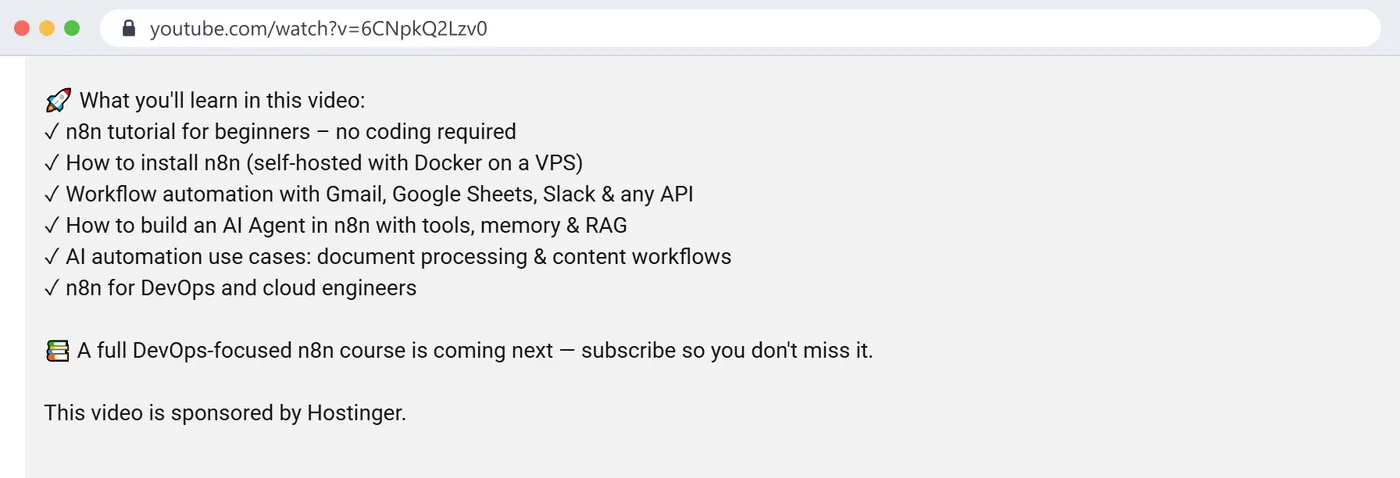
The other case: my n8n tutorial of 26 August 2026 says 'This video is sponsored by Hostinger' at the end of the description, and the API returns hasPaidProductPlacement: false for it. A viewer scrubbing the first seconds sees no label. Click to enlarge.
How do I tell if a video is sponsored when there is no label?
The order I use, which is also the order the analyzer uses:
The first three lines and the last ten lines of the description. Disclosures live at one end or the other. "This video is sponsored by", "sponsored by", "thanks to X for sponsoring", "in partnership with", "brought to you by", "#ad", and in titles, "(Powered by X)". A discount code next to a brand name counts; nobody prints a brand's code for free.
The links, followed to the end. A tracking link that resolves to a brand's domain and appears only on a handful of videos is the sponsor. A link that appears on every video is the creator's own course or community.
The first two minutes of the video. On live-stream channels and on label-only videos this is the only place the brand is named. There is no shortcut.
The pinned comment. Some creators put the sponsor link there instead of in the description. The analyzer does not read comments for this, so it is a manual step.
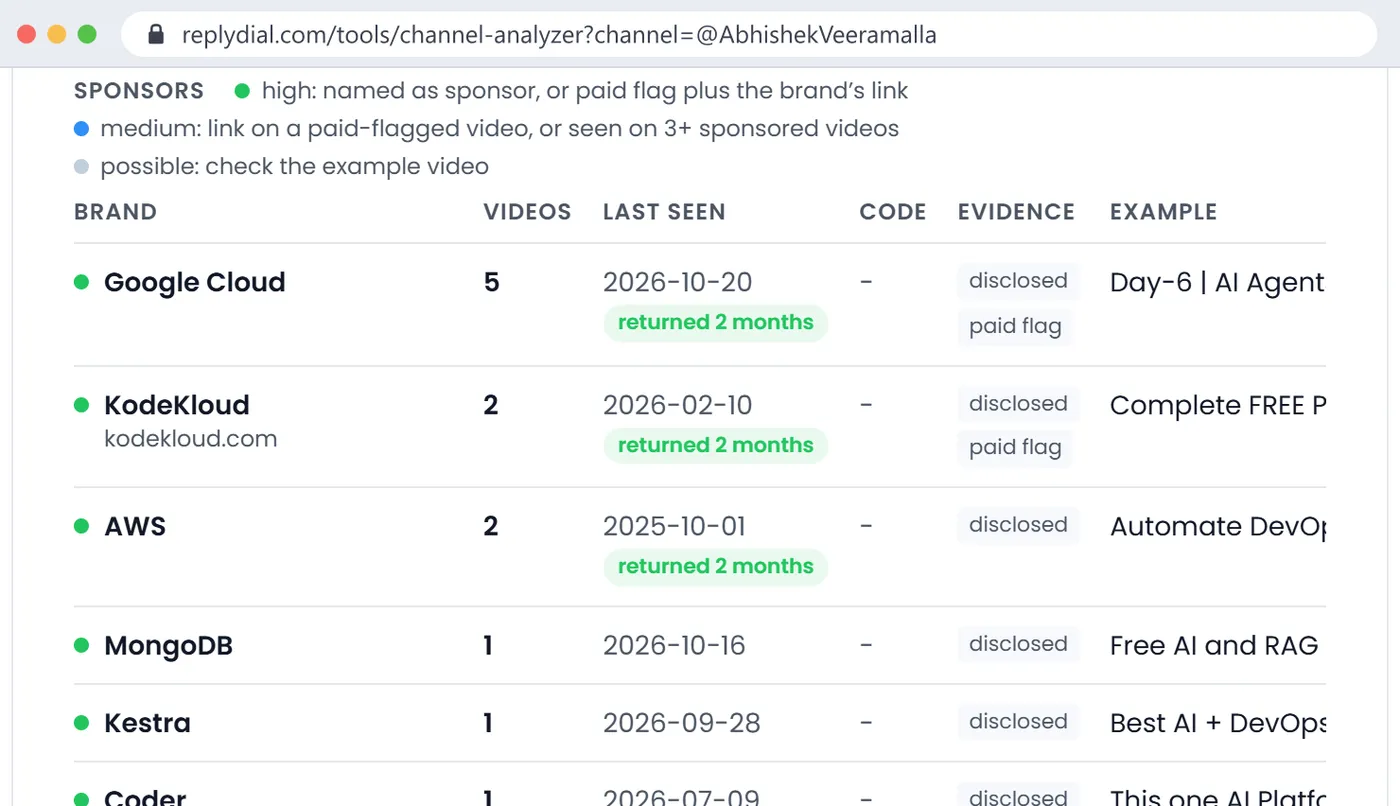
The analyzer's sponsor table shows which of these produced each row, in an Evidence column: "paid flag" for the label, "disclosed" for text, "link" for a followed link. A brand with "disclosed" plus "paid flag" is as certain as public data gets. A brand with "link" only is a lead to check by opening the example video.
The Evidence column on Abhishek Veeramalla's report, 26 October 2026: Google Cloud and KodeKloud carry both 'disclosed' and 'paid flag'; AWS, MongoDB, Kestra and Coder are 'disclosed' only, meaning the description named them and the box was not ticked. Click to enlarge.
What I found on my own channel
I ran the analyzer on my own channel on 24 October and again on 26 October, and the label numbers were the uncomfortable part of the report. Here is every sponsored video among my newest 245 uploads, with both signals.
Published
Video
Brand
Label
Named in text
2024-06-10
Migrate Like a Pro: AWS to UpCloud
UpCloud
yes
no
2024-12-31
Beyond AWS Cloud Practitioner Certificates
not named
yes
no
2025-01-27
Top 5 Azure Mistakes Beginners Make
not named
yes
no
2026-02-26
I Told AI to Deploy My Cloud Infra
Trigger.dev
no
yes
2026-03-31
What Happens When AI Runs Your Cloud?
Kestra
no
yes
2026-06-02
What is RAG? Build a Local AI Agent
Oracle
no
yes
2026-07-02
AWS Bedrock + Claude + MCP Server (two uploads)
Teleport
yes
yes
2026-08-26
n8n Tutorial for Beginners
Hostinger
no
yes
2026-09-16
I Trained an AI on 7,000 of My Own YouTube Comments
Crusoe
yes
yes
2026-09-29
Reduce AI token count
Oracle
yes
yes
2026-10-06
Stop Building Stateless AI Chatbots
Trigger.dev
yes
yes
12 sponsored videos. 8 labelled. 9 with a written disclosure. 5 with both.
4 videos say "sponsored by" in the description and are not labelled: Trigger.dev on 26 February 2026, Kestra on 31 March, the first Oracle video on 2 June, and Hostinger on 26 August. On each of those I wrote the disclosure, put it where a reader finds it, and did not tick the box. The law is satisfied; YouTube's rule is not, and a brand reading my channel by the label would think my first Trigger.dev and first Oracle videos were organic.
3 videos are labelled and name no brand in the text at all: two from the turn of 2024 into 2025, and the UpCloud migration video from June 2024 where the brand is in the title and the links but never as "sponsored by". The analyzer counts them, shows UpCloud as medium confidence from the link, and shows nothing for the other two because there is nothing to show.
So on my own channel the label and the description disagree on 7 of 12 videos. I am not an outlier in this table; I am close to the middle of it. The fix on my side is ten minutes in Studio, and it is on my list for this week. The reason to do it is not the viewer, who reads the description, and not the brand, who reads it too. It is that the label is the one disclosure a machine can read without guessing, and machines are now how brands build their shortlists. A channel that discloses in text only looks less commercial than it is to every tool that reads the API, including the ones agencies pay for.
What this means for you
If you are a viewer: the label is honest when it appears and tells you nothing when it does not. Read the description's first and last lines before deciding a video is independent.
If you are a creator: tick the box and write the line. The two are not alternatives; the box is YouTube's requirement and the line is the law's, and the box is what tools count. Doing both costs nothing. If you use the option that hides the visible label, know that the API still shows the declaration, so brands will still see it.
If you are a brand or an agency: never judge a channel's sponsorship history by the label alone; in a tutorial niche it undercounts by two thirds. Put both forms of disclosure in the contract, the box and the line, so the deal is visible to regulators, viewers and the next brand's tools alike.
If you build tools: treat hasPaidProductPlacement as the floor. Read the text for the names, follow the links for the domains, and show the evidence per row so the reader can tell a declared promotion from a guess.
Quick answers
Does "Includes paid promotion" mean the video is an advert?
It means the video contains a paid promotion, usually a sponsor segment or a product placement inside an otherwise normal video. The whole video is rarely an advert; the label does not say how much of it is.
Can YouTube add the label without the creator?
No. The label comes from the creator's own declaration in Studio. YouTube does not detect sponsorships and label them.
Does the label affect views or revenue?
YouTube has published nothing saying it does. In the ten channels above, the channels that label every video and the channels that label almost none include some of the most and least sponsored channels in the niche; there is no pattern that connects the label to anything else.
Why does a sponsored video I know about not have the label?
Most likely the creator disclosed in the description and did not tick the box, which in this data is the most common pattern of all. Less often, the creator declared the promotion and chose to hide the visible label.
Can I filter YouTube search to sponsored videos?
No. The label is not a search filter and the API has no filter on the field either; you have to fetch videos and read the boolean for each.
What to do this week, no tool needed: open your own three most recent sponsored videos in Studio and check two things on each, whether the Paid promotion box is ticked and whether the description names the sponsor in words. Fix whichever is missing. Then do the same check on the last ten videos of the channel you compare yourself to, and notice how different its sponsorship count looks once you read the descriptions.
ReplyDial's free channel analyzer for YouTube reads the label and the descriptions for the newest 300 videos of any public channel and shows the evidence for every brand; ReplyDial itself is the inbox for answering your own channel's comments, the part of a sponsored video a brand reads after the segment.
See your own unanswered comments
ReplyDial lists every comment on your channel still waiting for a reply, drafts answers in your voice, and posts only what you approve. Free for 7 days on Creator limits, no card.
Which parts of YouTube comment handling you can safely automate (moderation, sorting, drafting) and which part you should not (posting), with the exact lines from YouTube's API Developer Policies and spam policy, and the setup I run on my 104k-subscriber channel.
AI-drafted replies are fine. Automated replies are the problem. A plain-language reading of YouTube's spam policy and API developer policies, and the line between the two.
What ChannelCrawler, Heepsy, Modash, HypeAuditor, Upfluence and GRIN charged on 3 Nov 2026, what each tier gates, which lock you in, where $0 and $79 fit.