The pinned comment that gets clicks is the one that gives the viewer the thing the video made them want and did not hand them: the link you mentioned, the code you showed, the correction to the mistake at 12:40, the answer to the question half the comments ask. On my channel the best-performing pin is a one-line apology with a link, 31 likes and still climbing after two years. The worst is a polite plug for my own product, 0 likes in sixteen days across three videos. Same channel, same author, same pin slot. The difference is whether the pin serves the viewer who just watched or serves me.
I run a 104,000-subscriber DevOps tutorial channel, and on 19 October 2026 I exported the comments of my five most popular videos, 1,599 threads, to see what my own pinned and top-level comments had earned. This post is that data, the six kinds of pin that work on a tutorial channel and why, the three kinds that do not, and a short procedure for choosing what to pin on a video you published this week versus one from 2023.
What have my pinned comments actually earned?
Every top-level comment from my channel on those five videos, with likes as of 19 October 2026. A creator's top-level comment is almost always a pin, since there is no other reason to comment under your own video.
Video
Pinned comment
Posted
Likes
Replies
AWS VPC, Part 5
"Here is link for NAT gateway which i did not cover in the session" plus the link
May 2024
31
2
Ansible full course
"Many of you asked for github link and here it is" plus the repo
March 2025
16
1
EC2 full course
"I answer every comment on this channel, so ask away. If you're a creator drowning in comments, the tool I built for it is at replydial.com"
3 October 2026
0
0
IAM user tutorial
Same text
3 October 2026
0
0
Helm chart tutorial
Same text
3 October 2026
0
0
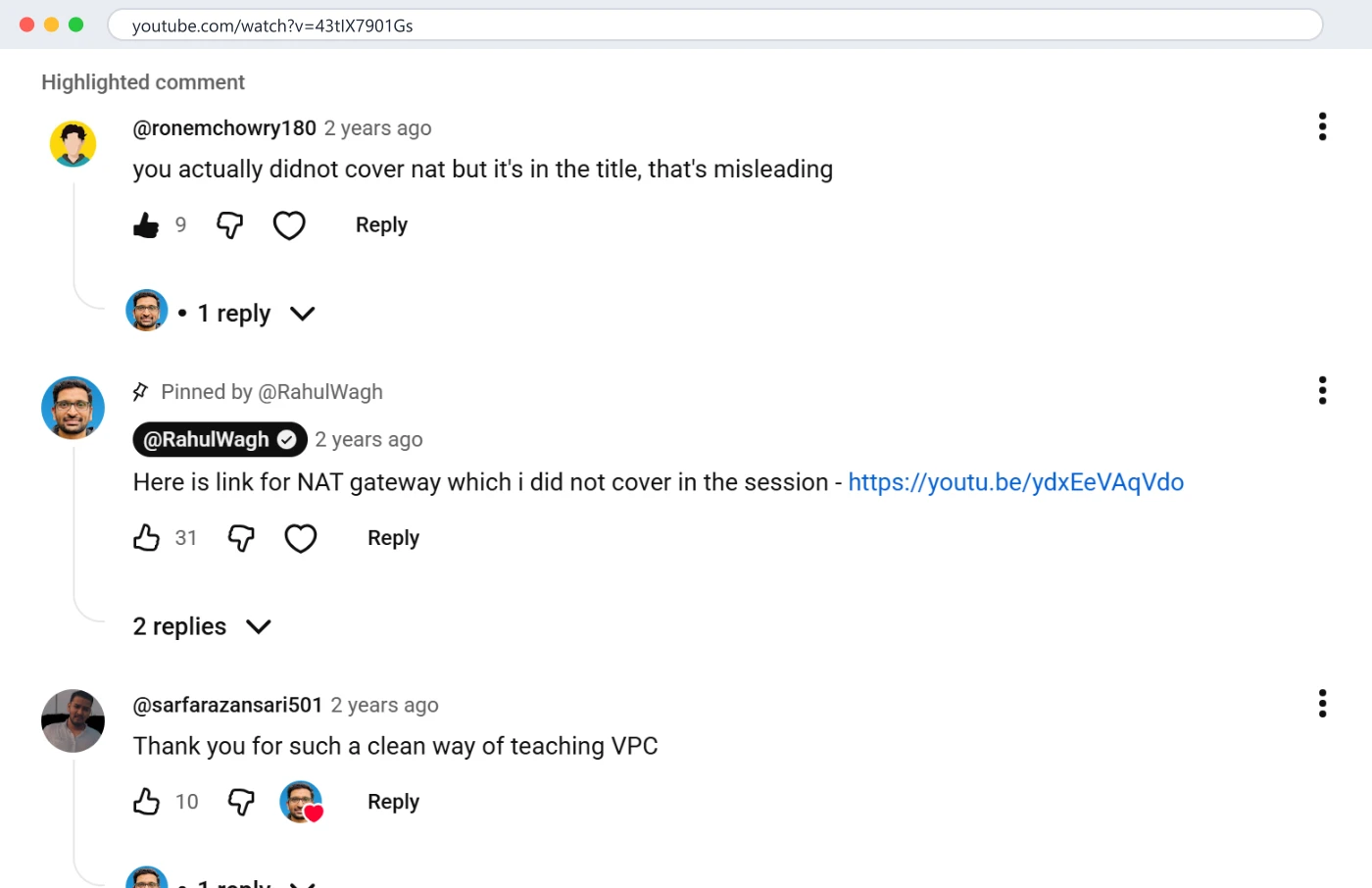
Two pins that answered a demand visible in the comments earned 47 likes between them. Three pins that promoted something nobody under those videos had asked about earned none. The 31-like pin sits above a 9-like complaint that it was written in reply to; the pin is more popular than the complaint that caused it.
The VPC video, 13 October 2026: a viewer's complaint that the title promised NAT, 9 likes; my pinned comment with the missing link, 31 likes. The best pin I have is an admission with a link. Click to enlarge.
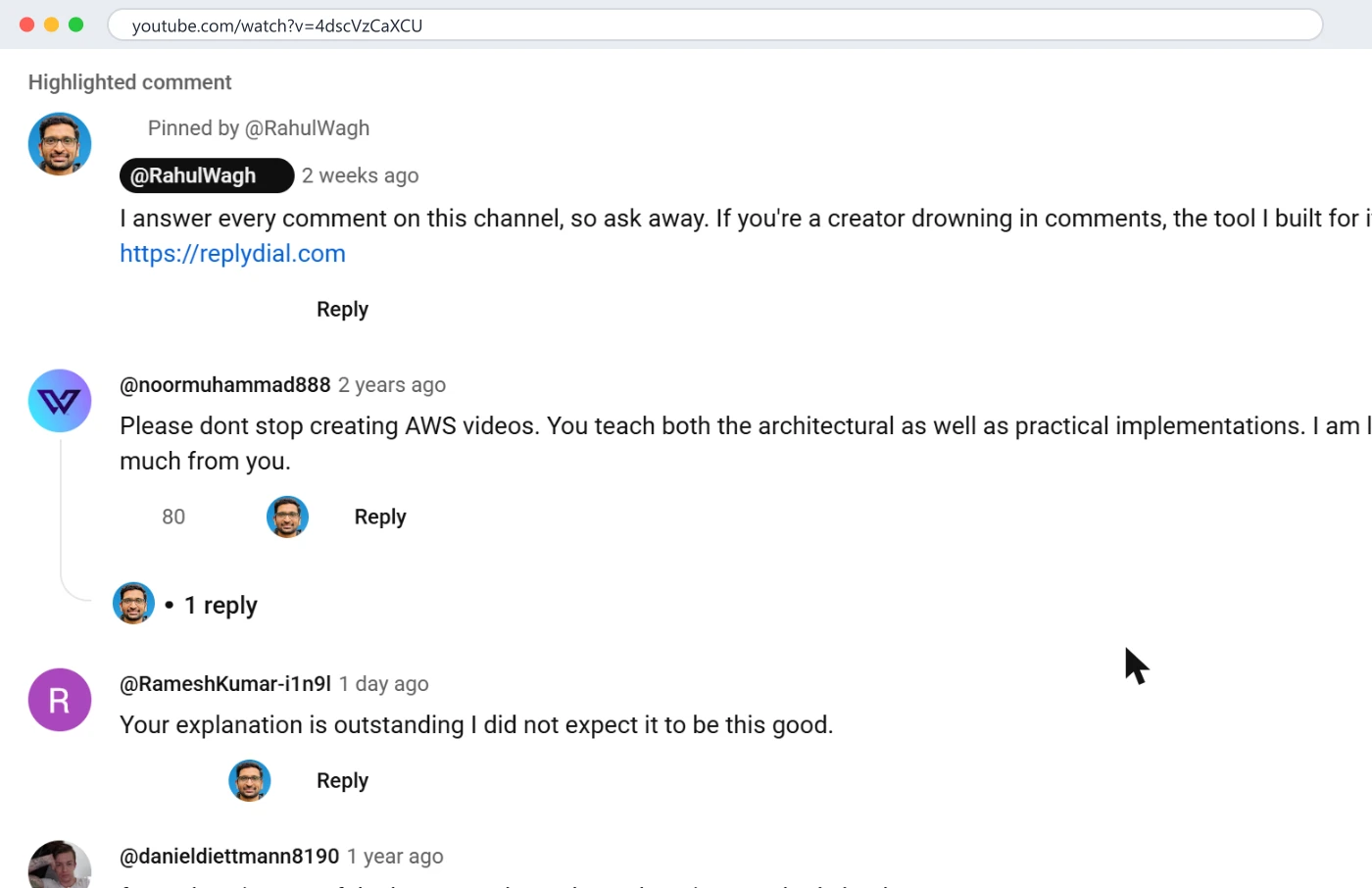
The product plug is worth a closer look because I wrote it, I believed in it, and it did nothing. Sixteen days, three videos with 1,047 comments between them and thousands of daily views, zero likes. Viewers under an EC2 tutorial are learning EC2. A sentence about a comment tool for creators is not for them, and pins that are not for the viewer in front of them get scrolled past like an advert, which is what it was. I am leaving those pins up for now as the control group, and I will replace them with the kind below.
The EC2 course on 19 October 2026: my pinned product plug, two weeks old, no likes, directly above a two-year-old viewer comment with 80 likes asking me not to stop making AWS videos. The audience told me what to pin; I pinned something else. Click to enlarge.
What the two good pins have in common
Both of my pins that earned likes were written in reply to a demand that was already visible in the comments, both are one sentence plus a link, and both admit something: "which i did not cover in the session", "many of you asked". Neither thanks anyone for watching. Neither asks for a like. They read like a note left on a door by someone who knows why you knocked.
The timing is the other thing. The NAT pin went up the same day as the 9-like complaint, which was seven months after the video was published. The GitHub pin went up sixteen months after the Ansible course. Neither is an upload-day pin. They are maintenance pins, placed when the comments had made the need obvious, and they have earned likes every month since because the videos keep getting search traffic from people with exactly that need. A pin on an old video is read by more people than a pin on a new one, on most tutorial channels, because the old videos are where the views are.
Compare the plug. It went up on upload-day logic, on three videos at once, with the same text, on 3 October, answering nothing anyone under those videos had asked. The viewers of a Helm tutorial are not short of comment tools; they are short of a working chart. The pin slot was spent on me.
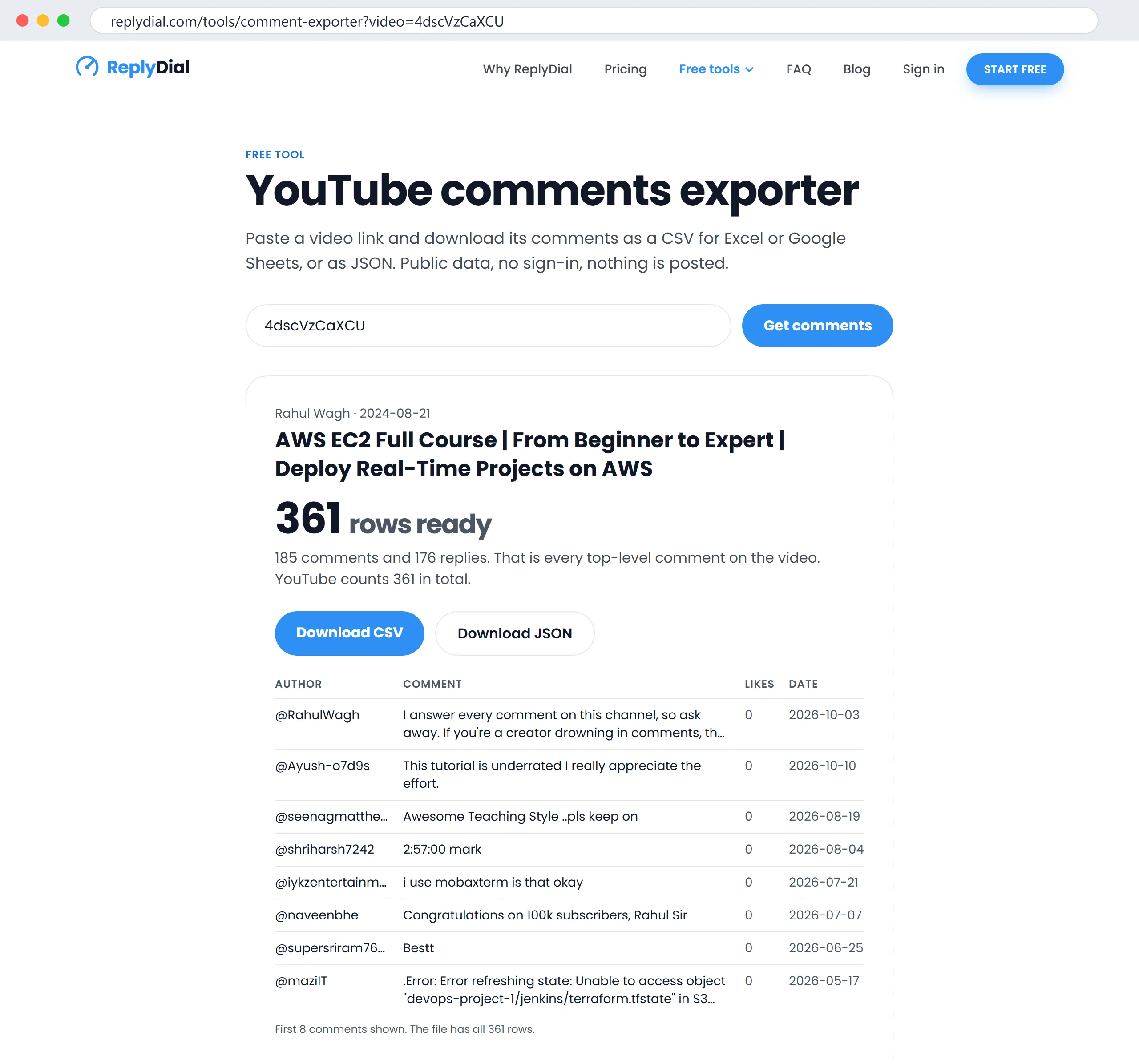
The free exporter with my EC2 course, 18 October 2026. Column F is where the pin is: the most repeated question in the newest 200 comments. Click to enlarge.
Six pins that get clicks on a tutorial channel
Each of these is something I have pinned, seen pinned on channels I follow, or been asked for in my own comments. They are ranked by how reliably they earn likes and clicks on my channel.
1. The thing you promised and did not deliver. My 31-like pin. The title said NAT, the video ran long, NAT got cut, and a viewer said so with 9 likes of agreement. The pin admits it in half a sentence and links the separate video. Honest, specific, useful, and it turned the most critical thread on the page into the most helpful one. If you have ever cut a section, go and pin the link now.
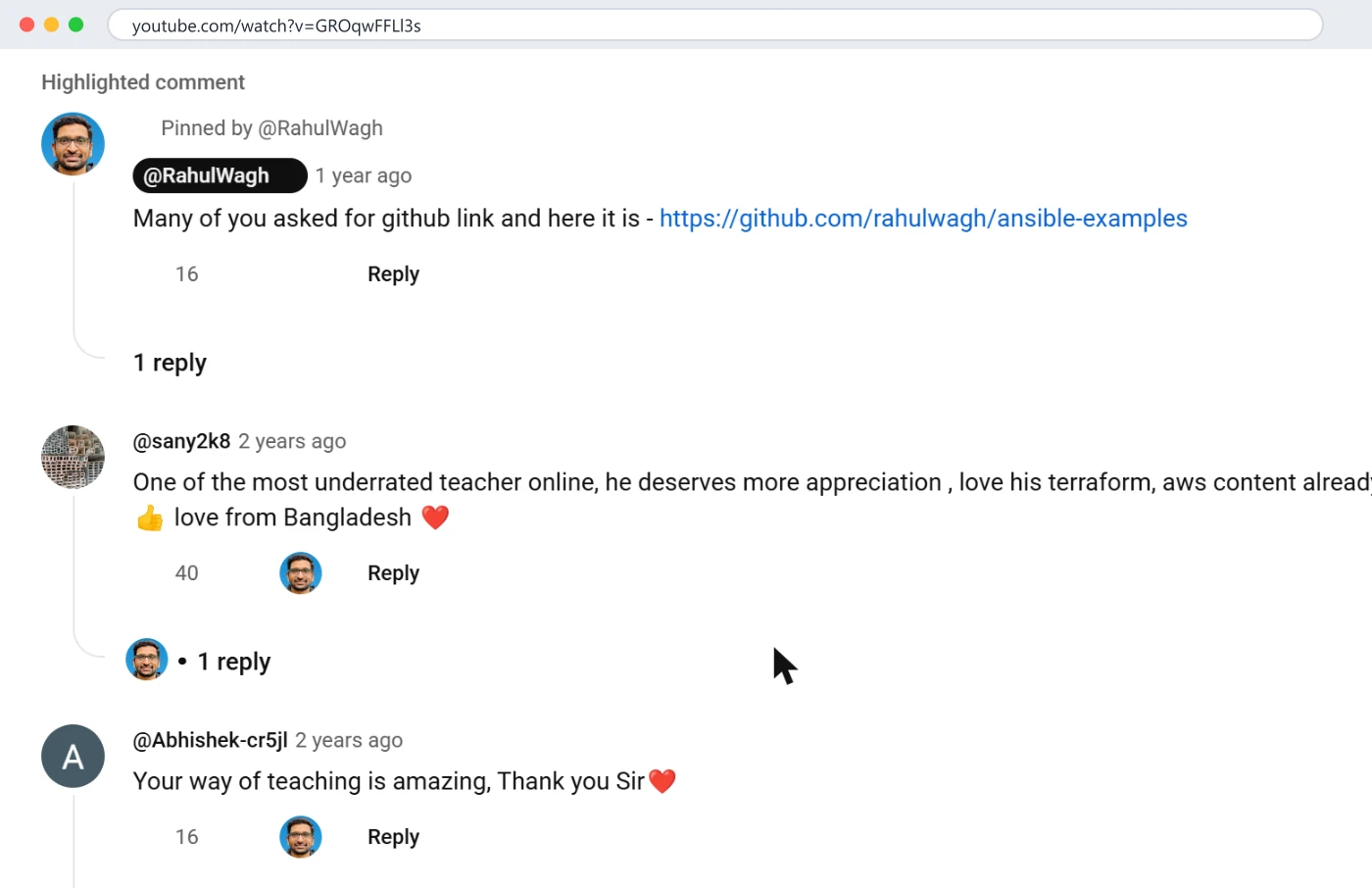
2. The code, repo or file the video uses. The 16-like Ansible pin. "Many of you asked" was literally true: "link", "GitHub" and "repo" appear 23 times across the five videos' comments, and under the Ansible course specifically it was the most repeated request. A viewer following a tutorial with the terminal open wants to paste, not type. Put the link in the description too, but the pin is what they see when they scroll down to ask.
The Ansible course on 19 October 2026: the pinned GitHub link at 16 likes, posted sixteen months after the video. Below it, a 40-like comment with my heart on it and a thank-you with another. Pins, hearts and replies doing three different jobs on one screen. Click to enlarge.
Look at what else is in that screenshot, because it shows the three tools side by side. The pin is mine and carries the link. The 40-like comment under it ("one of the most underrated teacher online") has my heart on it and a reply from me; I did not pin it, because a pinned compliment helps nobody who scrolls down with a problem. The 16-like thank-you has a heart and a reply too. Pin the useful thing; heart the kind thing; reply to both.
3. The correction. When a viewer caught the wrong CIDR in my VPC diagram in September 2026 (12.0.1.0/16 in the diagram, 12.0.0.0/16 everywhere else), the right response was a reply thanking them and a pin saying "At 14:20 the diagram shows 12.0.1.0/16; the correct value is 12.0.0.0/16 as used in the console." A pinned correction does two things: it stops the next fifty people from being confused, and it tells every viewer that you read your comments. You cannot edit a published video; the pin is the edit.
4. The answer to the question half the comments ask. Search your comments for the repeated question first. On the VPC video the most common technical question across two years is some version of "how does an instance in the private subnet reach the internet", which is the NAT question again, so the pin above answers it. On the EC2 course it is the key file: four of the newest 200 comments are some version of "no such file", "permission denied" or a chmod question, and the older pages have more. A pinned three-line answer ("Before you connect: cd to the folder with the .pem, run chmod 400 key.pem, then ssh") would save me a reply a week and save viewers an hour. I have not pinned it yet; it is next.
5. The "what changed since recording" note. Twelve of the comments across the five videos ask whether the content still works in a later version or a newer console. A pin that says "Recorded on Terraform 1.5 and the 2023 console; as of October 2026 step 3 is under Settings instead of Actions, everything else is unchanged" keeps a two-year-old tutorial alive. Update the pin, not the video.
6. One question, asked back. Not a product pitch; a real question you want answered. "Which part should I go deeper on next: VPC peering, Transit Gateway or PrivateLink?" On a channel where 45 of 964 recent comments are requests for the next video, a pin that asks turns scattered requests into a vote you can count, and the replies under the pin are your next six months of topics.
Three pins that do not work
The plug. See the table. 0 likes. If you must mention your product, course or membership, do it in reply to the viewer who asked for more, where it is welcome; the four replies on my channel that mention my course are all under comments that asked, and they did not get scrolled past.
The generic thank-you. "Thanks for watching, please like and subscribe." The viewer has heard it in the video, in the end screen and in the description. A pin is the one slot on the page that can say something specific; spending it on the generic sentence tells the viewer there is nothing specific to say.
The giveaway or engagement bait. "Comment 'yes' if you want part 2." It produces comments with nothing in them, it trains viewers to post nothing, and if you run a comment inbox the way I do, it fills it with 200 "yes" replies you then have to read. Pin number 6 above asks a real question instead and gets real answers.
When the pin is a question for the pinned viewer
One variant worth its own paragraph: pinning a viewer's comment and replying under it with the answer. The comment that asked for NAT could have been the pin itself, with my reply beneath it; the viewer gets a notification that their comment was pinned, the complaint stays visible in their words, and the answer sits under it. I chose to pin my own comment instead because the title complaint, as written, was something I wanted to answer rather than headline. Both work. Pin the viewer's comment when their phrasing is the useful part (a correction, a well-put question); pin your own when the useful part is your answer.
What I would not do is pin a viewer's compliment. It feels generous and it is the same mistake as the plug: the top of the comment section is spent on something the next viewer does not need. Heart it instead. The heart is visible, it costs nothing, and it leaves the pin for the link.
Examples by channel type
My channel is tutorials, and the six pins above are tuned for it. The same logic, applied elsewhere, with the pin I would write.
Channel
The pin that serves the viewer who just watched
The pin to avoid
Tutorial or course
The code, the command people get stuck on, the correction, the version note
"Check out my course" with no question under the video asking for it
Review or unboxing
The exact model and the price you paid, and the one thing you would change
An affiliate wall of links with no context
Vlog or story
The answer to the question everyone asks in the first hour (where, what camera, is he okay)
"Like and subscribe"
Cooking
The written recipe quantities, or the substitution people ask about
A giveaway condition
Music or covers
Chords, tuning, the original artist with a link
"Stream my single" when nobody has asked
Gaming
The settings, the mod list, the seed
Engagement bait ("comment your rank")
News or commentary
The source links, and a correction if one was needed
A pinned argument with a critic
The column on the left is always "the thing the video made them want". The column on the right is always "the thing I want from them". Readers can tell the difference in a second, and the like count on my own three plugs says what they do about it: nothing.
How a pin interacts with your replies
A pin is not a substitute for answering comments; it is the answer to the one question you are tired of typing. On my channel the NAT question kept arriving after the pin, less often, and each one still got a one-line reply with the same link. The pin catches the viewers who scroll; the reply catches the one who asked. Together they close the question. The pin alone leaves the asker unanswered, and the reply alone leaves the next fifty scrollers to ask again.
Two practical consequences. When you pin an answer, reply to the viewer whose comment prompted it, with the same link, so they get the notification; a pin sends no notification to anyone except the person whose comment you pinned. And when a new comment asks the pinned question, reply "it's pinned at the top, here is the link again"; that is kinder than "read the pinned comment", and it costs nothing.
If you run a comment inbox the way I do, the pinned question is also the one to watch for in the inbox: every time it appears again, the pin is not doing its job, usually because it is too long or buried under an old pin that should have been replaced. I covered how the inbox surfaces repeat questions in turn YouTube comments into video ideas.
Pin, heart, or reply: which does what?
Creators have three ways to mark a comment, and they are often confused for one another.
Action
What the viewer sees
Best for
Does it rank anything?
Pin
The comment moves to the top of the section, labelled "Pinned by" you
The one thing every viewer should see
No; it changes reading order, not recommendations
Heart
A small heart with your avatar on the comment
Thank-yous you want more of; a kind comment you cannot reply to
No
Reply
Your text under theirs, with your name badge
Every question, every complaint
No
Pin a viewer's comment
Their comment at the top, with your reply under it if you add one
A correction or a question a viewer phrased better than you would
No
I wrote about the ranking side in do comments help the YouTube algorithm; YouTube's own FAQ lists what its recommendations watch and pins are not on it. The pin is for people, which is a better reason.
One mechanic that matters: there is one pin per video. Pinning a new comment unpins the old one. So the pin is a decision you can change, and on an old video it probably should change as the questions change.
How to choose the pin for a video
My procedure, which takes about five minutes per video with an export and less with Studio's search.
Export the comments with the free comment exporter, or open the video's comments in Studio and sort by Newest.
Count the repeats. Search for "link", "github", "error", "?", "version", and the name of the topic you cut or glossed over. The most repeated ask is the pin. I showed the searches, with what they found on my channel, in how to search your own YouTube comments.
Check for a correction. Read the most-liked critical comment. If it is right, the pin is the fix plus a thank-you.
Write one to three lines. The first line is the thing (link, command, correction). The second line, if any, is why. No greeting, no "thanks for watching".
Pin it, and reply to the comment that asked. Pin from the three-dot menu on your own comment in Studio or on the watch page. Then go back to the viewer whose comment prompted it and reply with the same link, so they get the notification.
Revisit in three months. If the questions under the video have moved on, so should the pin.
What to pin on a new video versus an old one
A new video has no comments yet, so the pin is a bet on what viewers will want. On a tutorial that is almost always the code and the one prerequisite people skip; pin those on upload day. A video from 2023 has hundreds of comments, and they tell you exactly what to pin: the correction, the version note, the most repeated question. The old videos are where pins earn the most, because that is where the traffic from search lands, two years after you stopped thinking about the video.
On my channel most comments arrive on videos more than a year old. The VPC video is from October 2023 and gets new comments every week; its pin from May 2024 is still the most useful thing on the page. If you only ever pin on upload day, the videos doing your real work have no pin, or a stale one.
What I am changing on my own channel
Honesty, since the table at the top is not flattering. My plan, unless the numbers change by the end of the month: the three product pins from 3 October come down and are replaced with pin number 4 on the EC2 course (the key-file command) and pin number 5 on IAM and Helm (what changed since recording; the Helm tutorial's comments already mention "deprecated" and version problems, and a two-year-old Helm walkthrough deserves a dated note). The NAT and GitHub pins stay. And the product gets mentioned where it belongs: in replies to the people who ask how I keep up with comments.
Questions people ask
How do I pin a comment on YouTube?
On the watch page or in Studio, open the three-dot menu on the comment (yours or a viewer's) and choose Pin. One pin per video; pinning another replaces it. You can pin from the phone app the same way.
Can I pin a viewer's comment instead of my own?
Yes, and it is often the better pin: a viewer's correction or a viewer's well-phrased question, with your reply under it. The viewer gets a notification and a badge of sorts, which is a small kindness that costs nothing.
Should the pinned comment have a link?
If the link is the point, yes. YouTube does not block links in the creator's own comments, though if you have "Hold comments with hashtags and URLs" on, your own linked comment can be held until you approve it; I covered that in YouTube comments held for review. Both of my best pins are links.
Do pinned comments help with the algorithm?
No evidence from YouTube that they do. They help with viewers, which is what the comments section is for.
How often should I change the pin?
When the questions change. On an old tutorial that is every few months; on a new upload, revisit after the first hundred comments.
What to do this week, no tool needed: open your three most-viewed videos, read the most-liked critical comment on each, and pin either the link it is asking for or the correction it is making. Then come back in a month and compare the likes on that pin with whatever was pinned before.
ReplyDial shows every unanswered comment across your channel in one inbox, which is also the fastest way to see which question repeats under each video and therefore what to pin. The free unanswered comments checker and comment exporter need no sign-in.
See your own unanswered comments
ReplyDial lists every comment on your channel still waiting for a reply, drafts answers in your voice, and posts only what you approve. Free for 7 days on Creator limits, no card.
How 45 requests and 47 how-to questions in 964 real comments became a video list: the counts, the clusters, the one that became a 31-like video, and the method.
Studio's new AI search, the exact-match trick, a free export to a spreadsheet, and the API. What searching 964 real comments on my channel found, with numbers.