How-to
Do comments help the YouTube algorithm? What YouTube says
YouTube's own FAQ lists what its recommendations watch, and comments are not on it. What that means, what comments do instead, and what 629 replies show.
17 October 2026 · 16 min read
Blog · How-to
Held for review on YouTube, from a real channel: what Basic and Strict hold, where held comments sit, the 60-day deadline, what the four buttons do.
By Rahul Wagh·· 16 min read
"Held for review" means YouTube's moderation system has stopped a comment from publishing until you, the channel owner, look at it. Viewers cannot see it, you get no notification about it, and it sits in a separate view in YouTube Studio behind two extra clicks. If you do nothing, YouTube's help pages say it is deleted after 60 days. The system holds comments it thinks may be spam, self-promotion, gibberish or "potentially inappropriate" on the Basic setting, and more of everything on Strict, and YouTube says plainly that it "may not always get it right".
I run a 104,000-subscriber tutorial channel and have been reading its Held view for years. This post is what the setting does on a real channel, with the screens from my own Studio and the exact wording from YouTube's help pages as of 17 October 2026, and the decision I make for each held comment. It is longer than the help page because the help page does not tell you the three things that matter: where the held comments actually are, what gets wrongly held on a normal channel, and what each of the four buttons does to the viewer.
YouTube runs every new comment through an AI moderation step before it publishes. Depending on your channel setting, some comments are published immediately and some are held. A held comment:
The levels, in YouTube's own words from its "Learn about comment settings" page:
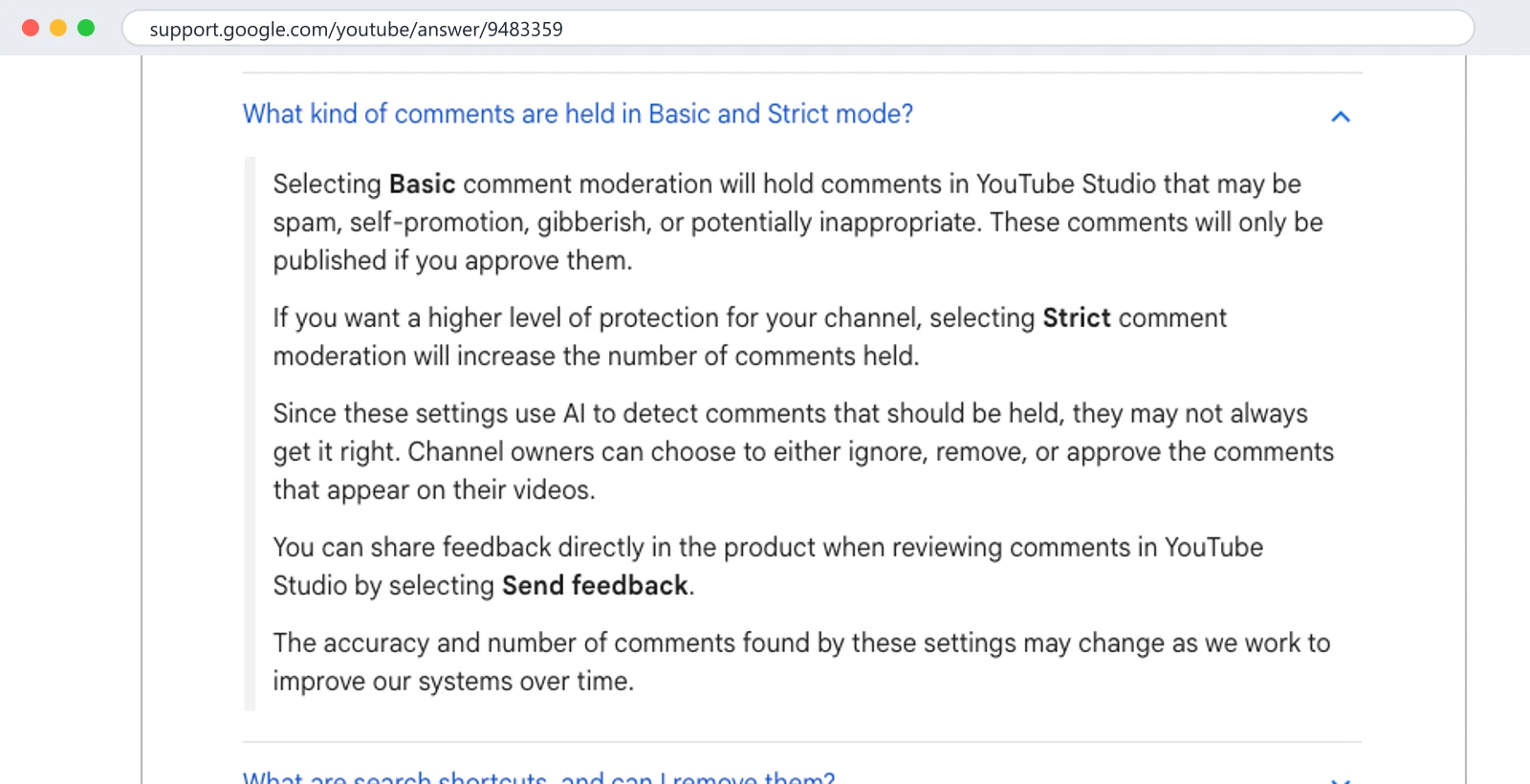
Selecting Basic comment moderation will hold comments in YouTube Studio that may be spam, self-promotion, gibberish, or potentially inappropriate. These comments will only be published if you approve them.
If you want a higher level of protection for your channel, selecting Strict comment moderation will increase the number of comments held.
Since these settings use AI to detect comments that should be held, they may not always get it right.
There are two more holds that are not "review" in the AI sense but land in the same place: the box "Hold comments with hashtags and URLs", and your blocked words list. Both hold matching comments regardless of level.
Not where you look first. Open Community, then Comments. The first chip in the filter row says Published; click it and pick Held. That switches the list to held comments. Then the second layer: the list says "Comments that may be offensive have been hidden" with a button, Show hidden comments. Click it. A dialog asks you to confirm. Only then do you see the comments.
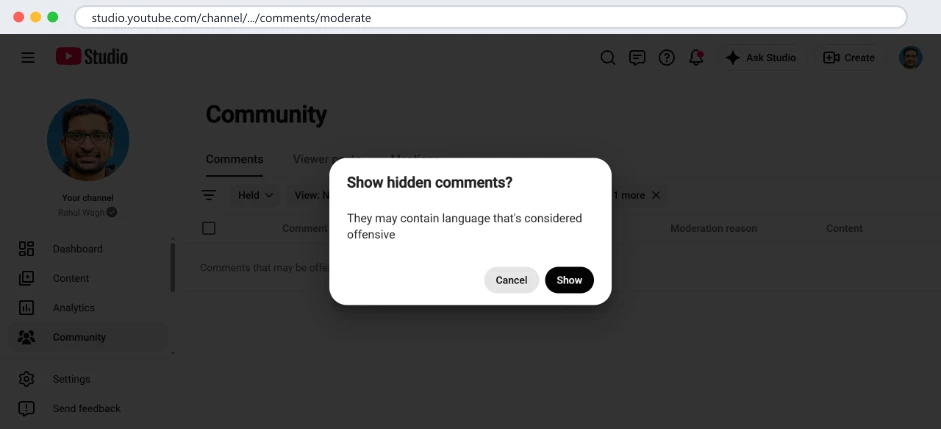
The warning is about the category, not the content. A comment held only because it contains a link, or only because the classifier guessed wrong, is behind the same "may be offensive" line as actual abuse. On my channel on 11 October the held list contained one comment: a viewer swearing at me under an AWS Organizations video because the free tier does not apply to organisation accounts. That one was correctly held. The fair question underneath it arrived again, politely, from a different viewer on 12 October, and that one published normally and got an answer.
On a phone, the Studio app shows held comments too but later and with fewer controls; for anything to do with held comments I use the Studio website in the phone's browser.
Until you act, with a deadline. YouTube's help says comments held for review are removed automatically after 60 days if you do nothing. So the Held view is not a permanent archive. A real question that the classifier wrongly held will disappear on day 61, and the viewer will never know it was ever seen. This is the strongest argument for opening the Held view on a schedule: once a week is enough for a channel my size, and that is the Sunday step in my routine.
Approving a comment publishes it with its original timestamp, and from that moment it is an ordinary comment: visible on the video, in the Published list, and counted as unresponded until you reply. Approving a three-week-old comment and not replying is worse than leaving it held, because now the viewer can see that you saw it.
I cannot see inside YouTube's classifier, so this is what I observe on a tutorial channel, not a specification.
| Kind of comment | Held on my channel? | My read |
|---|---|---|
| Swearing at the creator | Yes, reliably | Correct |
| Links to other sites | Yes, when the hashtags-and-URLs box is ticked | Correct, and the box was unticked on my channel for seven years |
| "Great video, check out my channel" | Usually | Self-promotion, correctly held |
| Lookalike accounts copying my name and photo | Sometimes; the ones with links yes, the ones without often publish | The dangerous ones get through |
| Gibberish and emoji strings | Usually | Correct |
| Technical comments with words like "kill", "attack", "exploit" | Occasionally | Wrong; a DevOps channel has "kill the process" in ordinary comments |
| Questions in languages other than English | Rarely in my experience | Mostly correct |
| Criticism without swearing ("too verbose", "mic is bad") | No | Correct; those should publish and be answered |
The pattern: Basic catches the obvious and misses the clever, and it occasionally takes a legitimate technical comment hostage. Strict would catch more of the clever and take more hostages. For a solo creator who reads the Held view weekly, Basic is the right setting. For a channel that cannot review held comments at all, Strict silences more of the abuse at the price of silencing more viewers; it is a trade, and the help page is honest that it is.
Each held row has four actions. The help page does not spell out the consequences for the viewer, so here they are.
Approve publishes the comment immediately, under the video, with the time it was originally posted. The viewer is not told it was held; to them it simply appears. From then on it is a normal comment: it can be replied to, liked, pinned, and it counts in your Unresponded view. Use it for anything that is a real question or a real opinion, however rough the language, if you intend to reply.
Remove deletes the comment from your channel. The viewer is not notified. They can see it in their own comment history as if it were still there, which is why removed commenters sometimes insist their comment is "still up". Use it for abuse with nothing to answer, and for spam that is not worth reporting.
Report sends the comment to YouTube as a possible policy violation, in addition to removing it from your channel. It takes a reason. I use it only for scams, impersonation and threats, which are the things YouTube acts on at the account level; reporting rudeness does nothing a Remove does not.
Hide user from channel adds the account to your Hidden users list. From then on, in YouTube's words, "comments from hidden users don't show in YouTube Studio". Not held, not reviewable, not shown anywhere on your channel, and the viewer is not told. They can still type comments, and nothing happens. It is the strongest button and the quietest. The list is in Settings, Community, and you can remove an account from it later, but what they wrote while hidden is not recoverable.
The decision tree I use, in order: if removing the insult leaves a question, Approve and answer. If it leaves nothing, Remove. If it is a scam or an impersonation, Report. If it is the same account for the third time, Hide user.
Here is the whole life of the one held comment on my channel in September 2026, because the abstract rules are easier to follow with a real case.
On a day in mid-September a viewer watched Part 2 of my AWS Organizations series, in which I create an organisation from a root account. They tried it on a free-tier account, got an email from AWS saying the account was now on a paid plan, found they could not revert it, and came back to the video angry. The comment they wrote opened with a swear word aimed at me, said I should have warned them, and complained that the video was placed second in the series. Basic moderation held it for the swearing. I was not notified. It sat there.
On 11 October, while writing a different post, I opened the Held view for a screenshot: Published chip, Held, Show hidden comments, confirm. There it was, 26 days old. Under the rules above: removing the insult leaves a real point (a warning about the free tier was missing), so the content deserved an answer. But the comment itself, as written, would have sat under my video with a swear word in it for the next viewer to read. I did not approve it and I did not remove it. I left it held, which meant it would be deleted automatically a month later.
On 12 October a different viewer asked the same question politely: free-tier account, created an organisation, email about a paid plan, how to revert. That comment published normally, appeared in my Unresponded view the next morning, and got the answer. The angry viewer's point was addressed, in public, under the same video, without the insult.
That is the pattern I would suggest for any held comment with a real point wrapped in abuse: do not publish the abuse, do answer the point, ideally under the next polite version of it, and if nobody asks politely within a week, answer it as a pinned comment of your own. The viewer who swore will not see a reply; they will see, if they come back, that the question was answered.
If you ever use a comment tool, or wonder why a tool shows different numbers from Studio, the technical side helps. The YouTube Data API, which every legitimate third-party tool uses, gives each comment a moderation status, and the channel owner's signed-in tool can ask for comments by status.
| Status in the API | What Studio calls it | Who can read it | Cost to change it |
|---|---|---|---|
| published | Published | Anyone, with an API key | 50 units to remove, update or re-moderate |
| heldForReview | Held | Only the channel owner, signed in, asking explicitly | 50 units to approve or reject |
| likelySpam | Likely spam | Only the channel owner, signed in, asking explicitly | 50 units to approve or reject |
Two things follow. A public tool, including our free unanswered comments checker, only ever sees published comments, so held and likely-spam comments are invisible to it by design. And a connected tool that wanted to show your held comments would have to request them separately and would spend 50 of its 10,000 daily units for every approve or reject, the same as posting a reply, which is why most tools do not bother and why I did not build it into mine. The Held view in Studio is free, complete and two clicks away; that is the right tool for it.
Every tool that reads comments through the YouTube Data API, including mine, sees published comments. A public tool with an API key cannot see held comments at all. A tool you have signed into with your Google account can request held comments explicitly, with a moderation status filter, but then acting on them costs 50 API units each out of a daily 10,000, the same as posting a reply. I explained that budget in YouTube API quota for creators.
In practice this means the Held view in Studio is the only complete list, and the only place to approve, remove, report or hide. Our free unanswered comments checker reads only published comments, by design, so if a viewer says they asked and the checker shows nothing, the Held view is where to look.
Four things decide what a viewer's comment does on your channel, and they stack:
So "why was this held" has four possible answers, and "why did this publish when it should not have" usually means the account is on the approved list or the video has its own looser setting.
What I do, and how long it takes on a channel that gets around 200 comments a week.
| When | What | Time |
|---|---|---|
| Sunday | Published chip, choose Held, click Show hidden comments, confirm | 1 minute |
| Sunday | Approve anything with a question in it, then answer it the same day | 2 to 5 minutes |
| Sunday | Remove abuse and spam; Report scams and impersonation; Hide user for repeat accounts | 2 minutes |
| Monthly | Settings, Community: confirm Basic or Strict is what you intend, the hashtags-and-URLs box, the blocked words, the hidden and approved lists | 2 minutes |
Ten minutes a week, and most weeks the Held view is empty or has one item; the point of the routine is that the one item is sometimes a real question from a real viewer who will otherwise hear nothing for 60 days and then nothing forever. The 60-day deletion means monthly is too rare for the Held view itself; a question held on the first of the month and reviewed on the first of the next has 30 days left, which is fine, but a question held the day after your monthly check is gone before the next one.
Their channel is on Basic or Strict and the system flagged your comment, or it contained a link, or a blocked word, or your account is on their hidden list. You will not be told which. If it matters, rewrite it without links and without anything that could read as self-promotion, and post it again.
Only in your own comment history, where they look published. The creator sees them in the Held view. Nobody else sees them.
The help page says only that the settings use AI and may not always get it right, and that accuracy may change over time. On my channel, approving a comment from a viewer has not stopped the same viewer being held again. Treat Approve as a decision about one comment, not as feedback to the system; the Send feedback link in Studio is where feedback goes.
They are two statuses in the same held area. Likely spam is the system's higher-confidence spam bucket; held for review is the broader "look at this" bucket. Both are reviewed the same way and both are invisible to viewers until approved.
New comments are held less often from that moment. Comments already held stay held until you act or 60 days pass; the switch does not release them. And it applies to new uploads by default; existing videos keep the setting they had, per the help page, so change the videos that matter individually.
You are not told. The comment appears in your own history and you see it on the video while signed in, but nobody else does. The test is to open the video in a private window, signed out, and look for your comment under Newest. If it is not there after a few minutes, it was held, or the channel has you hidden, or it contained a link on a channel that holds links.
Every comment in the Held list, regardless of why it was held. The line "comments that may be offensive have been hidden" is a blanket warning for the whole view. A comment held because it contained a link to a GitHub repository is behind the same warning as one held for abuse. Click through; most of what is behind it on a normal channel is not offensive.
Yes. The channel setting in Settings, Community, Defaults applies to new uploads. Each video's own comment setting, in its details under Comments and ratings, can be changed afterwards, and the help page says changing the default does not change existing videos. A tutorial that attracts link spam can be stricter than the rest of the channel.
What to do this week, no tool needed: open the Held view today, click through both prompts, approve the questions and answer them before the day ends, remove the rest. Then put "Held view" in your calendar for the same day next week. That single recurring entry is the whole fix.
ReplyDial shows every published, unanswered comment across your channel in one list and posts only what you approve; it cannot see held comments, and neither can anything else outside Studio, which is why this post exists. The unanswered comments checker is free and reads what the public can see.
ReplyDial lists every comment on your channel still waiting for a reply, drafts answers in your voice, and posts only what you approve. Free for 7 days on Creator limits, no card.
7 days on Creator limits, no card. Nothing is posted without your click. See the privacy policy.
How-to
YouTube's own FAQ lists what its recommendations watch, and comments are not on it. What that means, what comments do instead, and what 629 replies show.
17 October 2026 · 16 min read
How-to
Comments missing in YouTube Studio? Eleven causes checked on a real 104k channel in October 2026: held status, filters, sort, Viewer posts, Search, settings.
14 October 2026 · 16 min read
How-to
40 of my real YouTube replies, verbatim, from 629 answers on five videos, grouped by situation, with the numbers behind them and what broke when AI wrote them.
13 October 2026 · 21 min read