Free tool
Channel analyzer for YouTube
Enter a channel and get a one-page read of where it stands: five scores, the three things to fix first, its niche, what it sells, and who has sponsored it, how often and when. Public data, no sign-in needed; save, watch and compare reports with a free account.
3 fresh scans a day without an account, with the first three sponsors shown. A free account shows every sponsor and fix, with 10 a day and the full detail for 7 days.
Uses YouTube API Services on public data only. By running a lookup you agree to the YouTube Terms of Service and acknowledge Google’s Privacy Policy. See our privacy policy for what this tool keeps (a report cache of up to 30 days; saved reports stay in your account until you delete them, refreshed within 30 days).
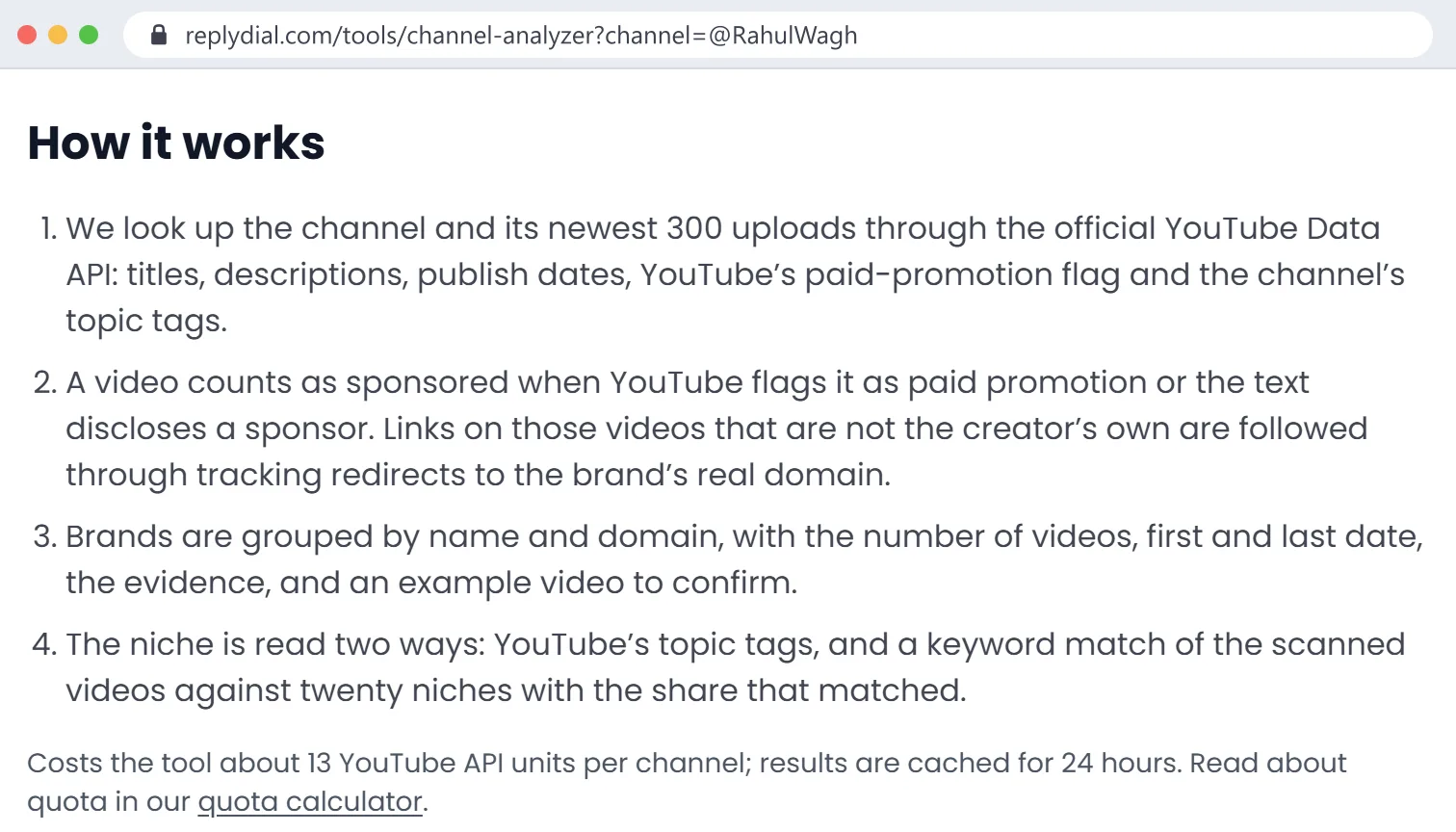
How it works
- We look up the channel and its newest 300 uploads through the official YouTube Data API: titles, descriptions, tags, publish dates, views, likes and comment counts, captions, YouTube’s paid-promotion flag and the channel’s topic tags.
- The comment threads of the newest 5 long videos (up to 100 each) are read for audience care: did the channel reply, how fast, and were the buying questions among the answered ones. Only counts are kept, plus a few unanswered buying questions as text without names.
- Five scores from 0 to 100 (audience care, engagement, consistency, discoverability, commercial readiness) and the three things to fix first are computed from that data with fixed rules, explained in each section. They are ReplyDial’s read, not a YouTube metric.
- A video counts as sponsored when YouTube flags it as paid promotion or the text discloses a sponsor. Links on those videos that are not the creator’s own are followed through tracking redirects to the brand’s real domain.
- Brands are grouped by name and domain, with the number of videos, first and last date, the evidence, and an example video to confirm.
- The niche is read two ways: YouTube’s topic tags, and a keyword match of the scanned videos against twenty niches with the share that matched.
Costs the tool about 18 YouTube API units per channel (13 for the videos, 5 for the comment sample); a report is reused for a day, can be refreshed after that, and is deleted after 30 days. Read about quota in our quota calculator.
Who this is for
Agencies and brands
Qualify a channel in a minute: niche, how commercial it already is, which competitors have sponsored it, and when. Download the CSV for the shortlist. Still looking for channels? Discover searches every analyzed channel by niche, size and sponsor, and YouTube when the inventory has nothing.
Creators
Run your own channel for the scores and the fix-first list. Then look up channels one step bigger in your niche: their sponsors are your pitch list, and the example videos show what the integration looked like.
Questions people ask
117 questions from agencies, brands and creators, answered honestly, including what this tool cannot do. Every answer shows the part of a real report (my own channel) that answers it; click a screenshot to zoom.
Finding who sponsored a channel
How can I find out who sponsored a YouTube channel?
Enter the channel's handle or link above. The analyzer reads its newest 300 videos and lists every brand it can tie to a sponsored video, with how many videos, the first and last date, the evidence and an example video you can open to confirm.
How do I know if a YouTube video is sponsored?
Three public signs: YouTube's "Includes paid promotion" label, which the creator ticks when uploading; a disclosure in the description such as "sponsored by" or "thanks to X for sponsoring"; and a tracked link or discount code for a brand. The analyzer checks all three on every scanned video.
What does "Includes paid promotion" mean on a YouTube video?
It means the creator told YouTube the video contains a paid product placement, endorsement or sponsorship. YouTube shows a short label at the start of the video. The analyzer reads the same flag through the official API and counts it as evidence.
Can I see every brand a YouTuber has ever worked with?
Not every one. The analyzer reads the newest 300 uploads and finds sponsors that were flagged as paid promotion or disclosed in text. A sponsor mentioned only out loud, never flagged and never written in the description, is invisible to any tool that reads public data.
Can it find a sponsor that is only mentioned in the video, not in the description?
No. The analyzer reads titles, descriptions, links and YouTube's paid-promotion flag, not the audio. If the creator ticked the paid-promotion box, the video is still counted as sponsored even when the brand is not named in text.
What is the difference between a brand mention and a sponsorship?
A mention is the creator talking about a product they chose; a sponsorship is paid. The analyzer only counts a brand when there is a paid signal (the flag, a disclosure, or a link on a disclosed video). A brand the creator simply recommends, with no disclosure, is not listed.
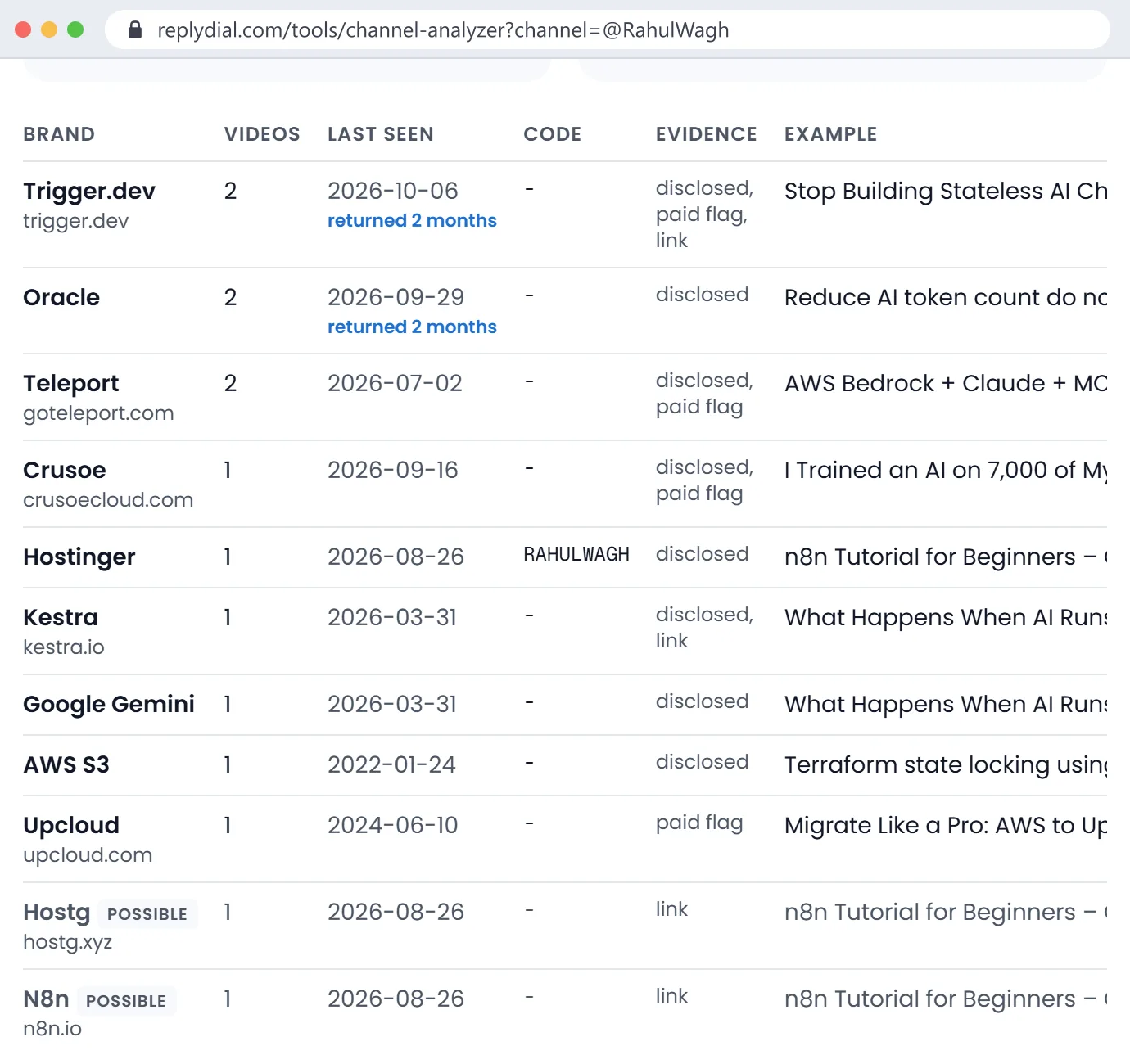
Can I find the discount code a YouTuber used for a sponsor?
Often, yes. When a description puts a code on the same line as the brand's name or link (for example "use code NETWORKCHUCK50"), the analyzer shows it in the Code column and in the CSV.
Where does a shortened or tracking link in a description actually go?
The analyzer follows tracking and shortener links through their redirects to the final domain, so a sponsor link that goes through an agency's tracker is shown as the brand's own domain.
Is an affiliate link the same as a sponsorship?
No. An affiliate link pays the creator a commission per sale; a sponsorship is usually a flat fee for a segment. The analyzer lists affiliate programmes under "what it sells" when it sees Amazon tags or affiliate disclosures, and lists sponsors separately.
Are sponsored videos always labelled on YouTube?
They should be, but they are not always. YouTube asks creators to tick the paid-promotion box, and advertising rules in many countries require a disclosure, yet many sponsorships appear only in the description. That is why the analyzer uses three signals instead of one.
Can I search YouTube for all sponsored videos?
Not through YouTube itself; there is no search filter for paid promotion. The analyzer answers the question one channel at a time, which is how agencies usually work: shortlist the channels, then check each one.
Which videos on this channel were sponsored by a specific brand?
Each sponsor row shows the number of videos and links an example; the CSV lists every brand with first and last dates. Open the example video, then use YouTube's search inside the channel for the brand name to see the others.
What does "high", "medium" and "possible" mean in the sponsor list?
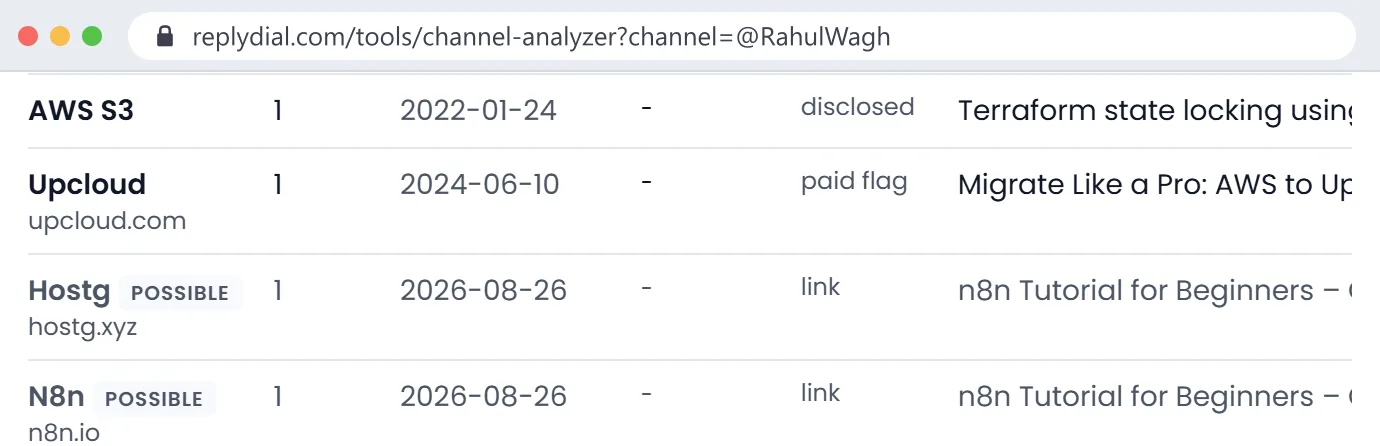
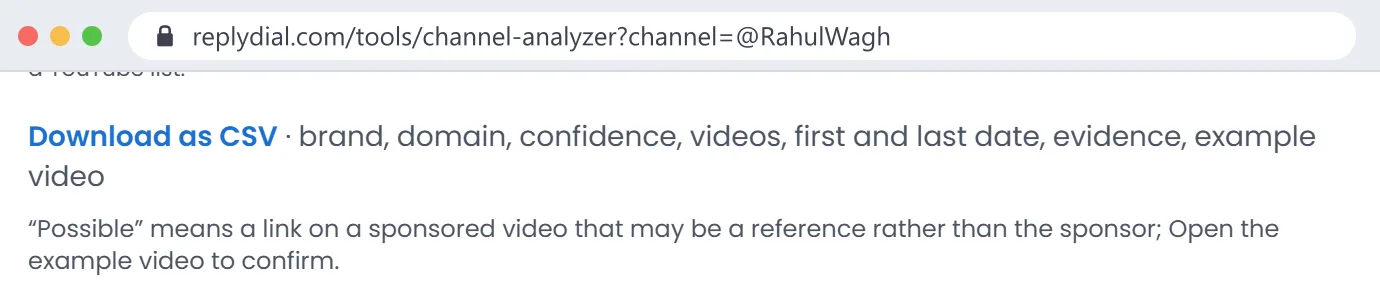
High: the brand is named as sponsor in the description, or the paid-promotion flag plus the brand's own link. Medium: a link on a video YouTube flagged as paid promotion, or a link seen on three or more sponsored videos. Possible: a link on a sponsored video that may be a reference rather than the sponsor; check the example video.
Why does a brand appear twice, once with a domain and once without?
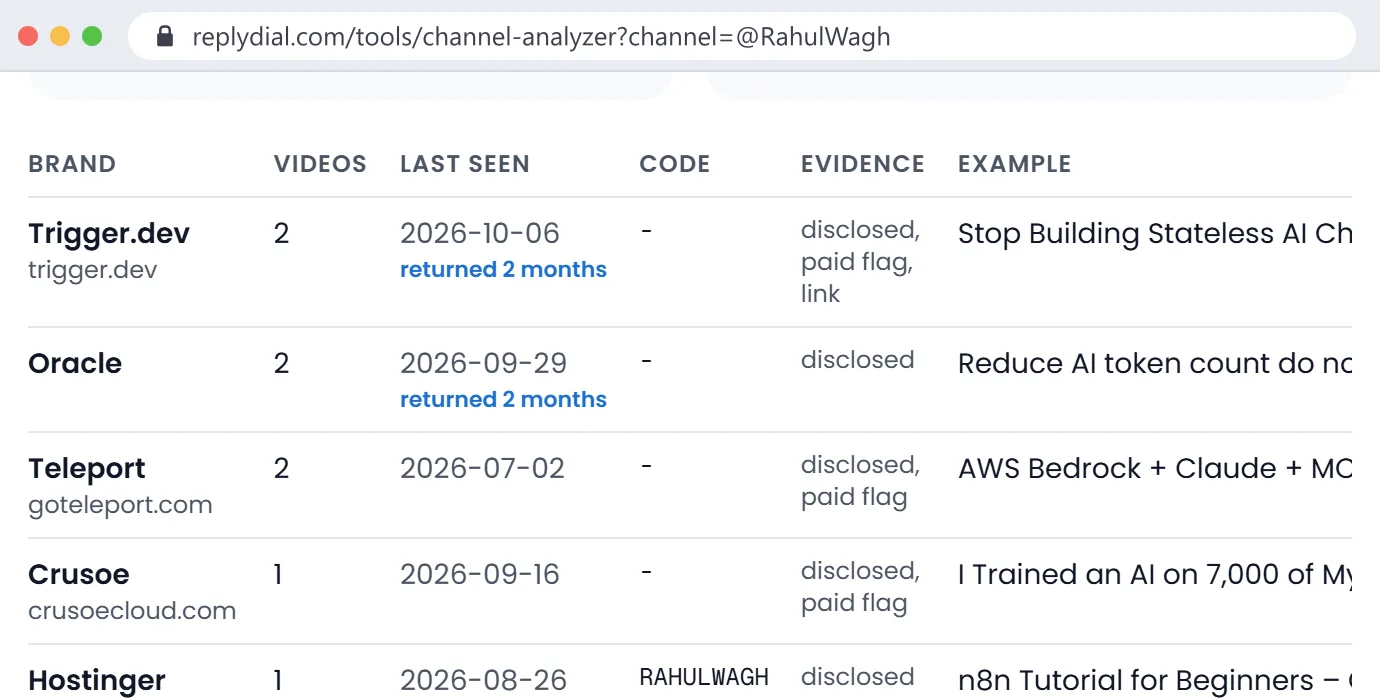
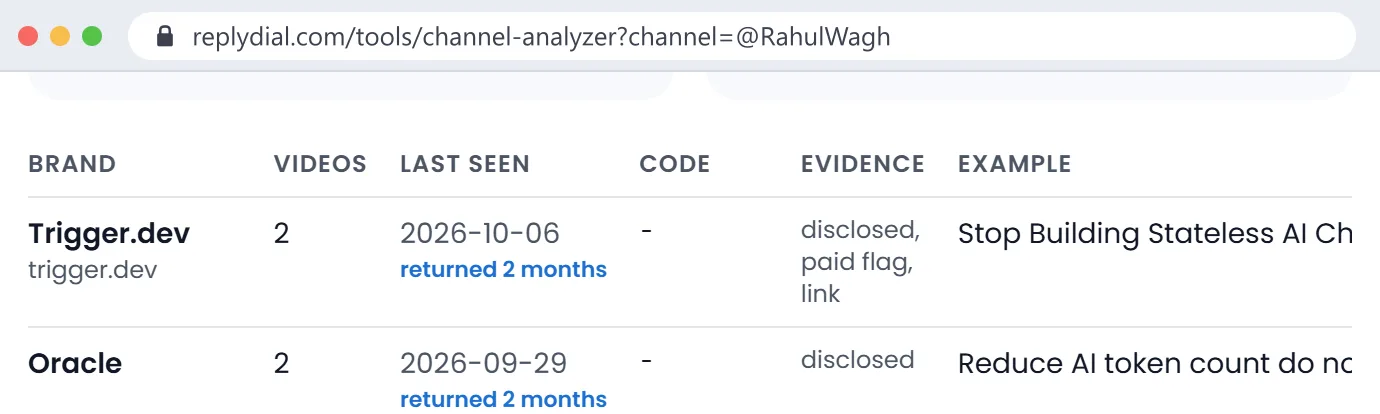
The analyzer merges a named brand and its domain when the names match, for example Trigger.dev and trigger.dev. When the name in the description and the domain differ (a parent company, or an agency's tracker), they can show as two rows. The CSV makes it easy to merge them.
Why is a website listed as a sponsor when it is just a tool the creator used?
On a sponsored video, every outside link is a candidate. Links to documentation, government sites and well-known reference sites are filtered out, and the rest of the uncertain ones are marked "possible". Open the example video to confirm before you rely on a possible row.
Can there be more than one sponsor in a single video?
Yes, and the analyzer counts each named brand separately. A video can also have a main sponsor plus affiliate links; the evidence column tells you which is which.
Why do so many YouTubers have the same sponsors, like VPNs?
Some brands buy YouTube integrations at scale across whole niches, especially VPNs, hosting, password managers and learning platforms. Running the analyzer on a few channels in one niche shows you exactly which brands those are, which is useful whether you are a creator pitching or a brand checking saturation.
Did the creator or YouTube add the paid promotion label?
The creator does, when uploading. YouTube can also apply it in some cases. The API returns only whether the flag is on, not who set it.
Sponsorship history, frequency and repeat brands
How can I tell if a YouTuber has done sponsorships before?
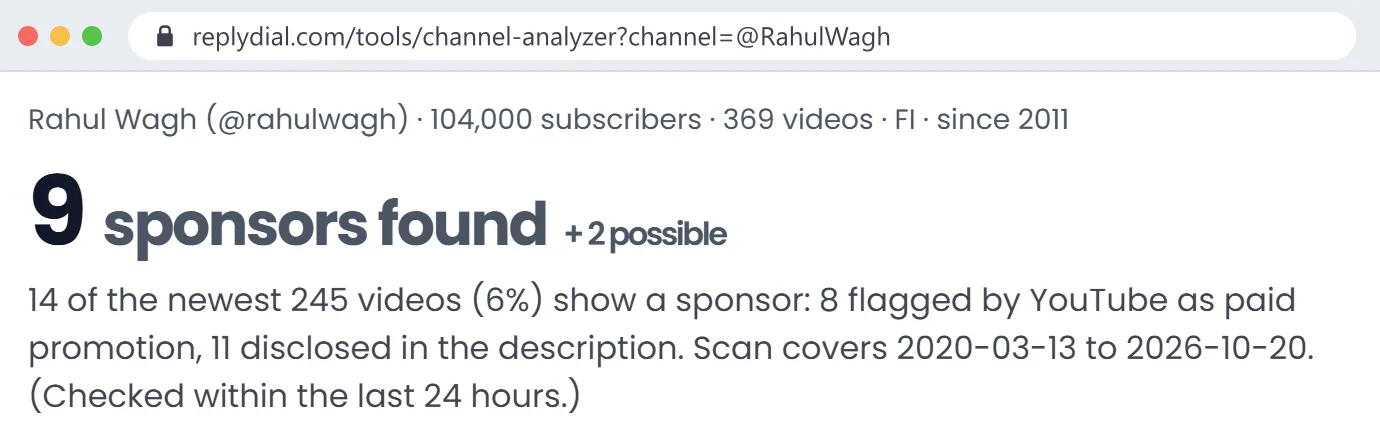
Look at the headline count and the sponsor table. "14 of the newest 245 videos show a sponsor" means the channel takes sponsorships; zero across 300 videos means it either does not or never discloses them in text.
How often does this YouTuber post sponsored videos?
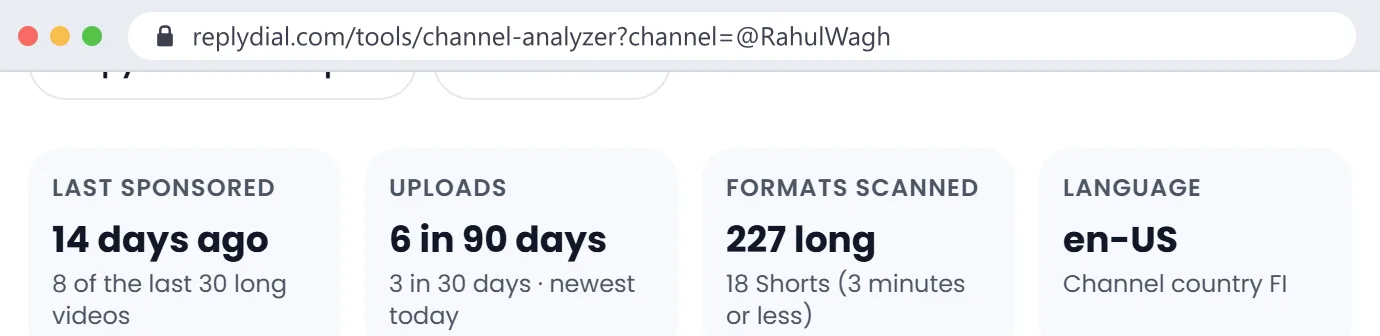
The "Last sponsored" box shows how many of the channel's last 30 long videos had a sponsor, and how many days since the most recent one. That is the quickest read on sponsorship frequency.
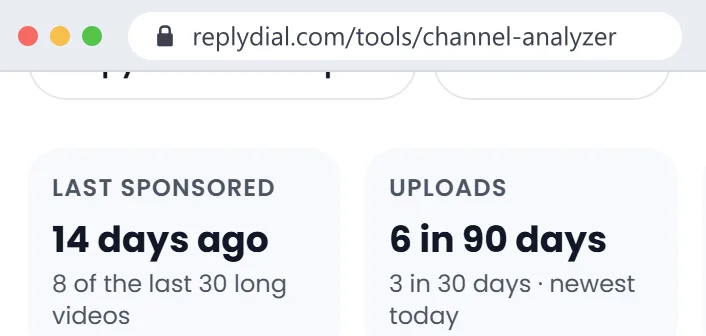
When did this channel last have a sponsor?
The "Last sponsored" box gives the number of days since the newest sponsored video, and each sponsor row has its last-seen date.
Has a brand sponsored this channel more than once?
Yes if the row says it appeared on several videos, and the "returned N months" note shows it came back in different months. A brand that keeps returning is a good sign the integrations worked for it.
Does this channel already work with my competitor?
Search the sponsor table or the CSV for your competitors' names and domains. If a direct competitor sponsored the channel recently, many creators have exclusivity clauses for a period, so ask before you pitch.
How many sponsored videos has this channel posted?
The headline counts sponsored videos in the newest 300 uploads, split into videos YouTube flagged as paid promotion and videos disclosed in the description.
Is a channel that takes many sponsors a bad sign?
Not by itself. A high share shows the audience tolerates sponsors and the creator delivers them reliably. Look at whether the same brands come back, which suggests results, and whether the channel's niche matches yours.
How far back does the sponsor history go?
To the oldest of the newest 300 uploads. The result shows the exact date range of the scan. For a channel that uploads daily that may be a year; for a weekly channel, several years.
Why does a sponsor I know about not appear?
Usually because it was only mentioned out loud, or it is on a video older than the scan window, or the description named it in a way the rules did not catch. Open the video and check the description; if you think it should have been found, tell us and we will improve the rules.
Channel niche and category
How do I find out what niche a YouTube channel is in?
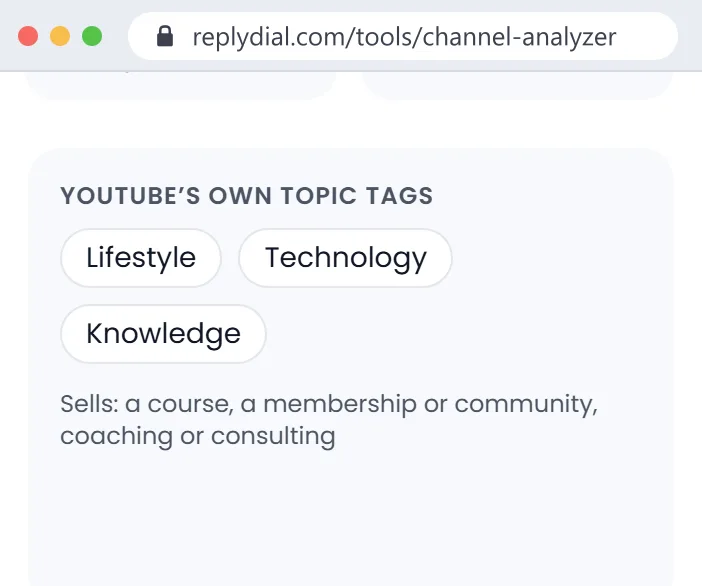
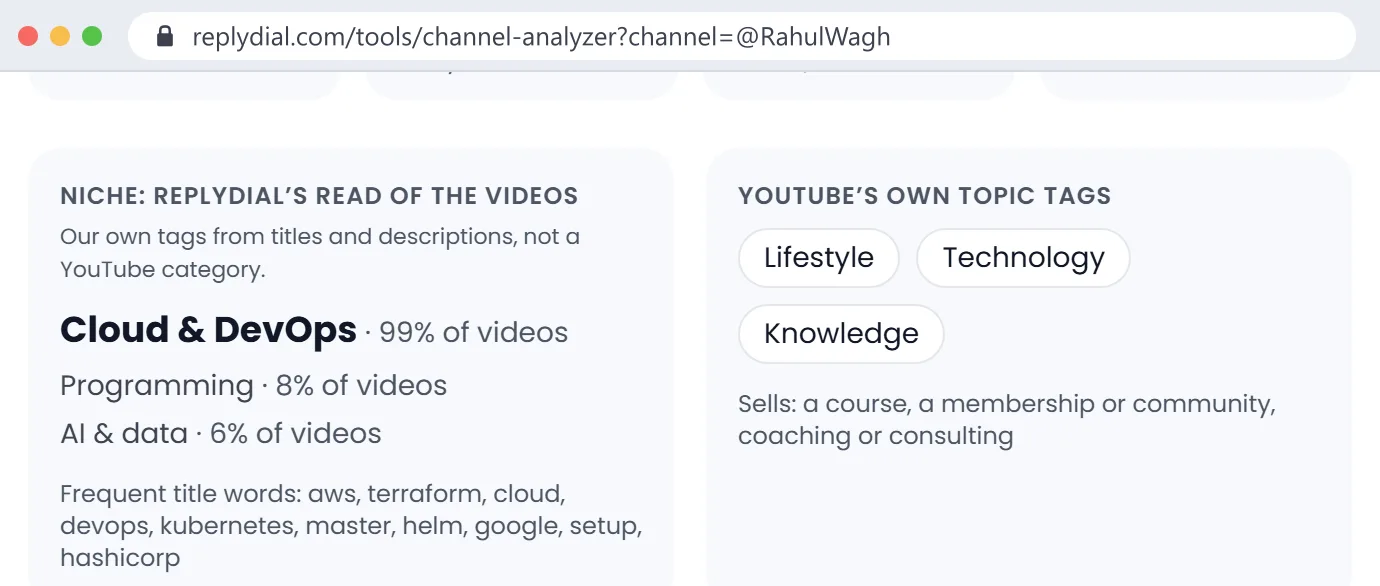
The analyzer shows two reads. YouTube's own topic tags for the channel (broad, such as Technology or Lifestyle) and our keyword read of the scanned titles and descriptions against twenty niches, with the share of videos that matched each one.
Does YouTube give channels an official category?
Not a single one. Each video has a category the creator chooses, and YouTube attaches topic tags to channels and videos. The analyzer shows YouTube's topic tags as published and labels its own niche read separately so the two are never confused.
What are YouTube topic categories?
They are links to topic pages (for example Technology, Video game culture, Lifestyle) that YouTube assigns to channels. They are useful for broad grouping and too coarse for picking creators; that is why the analyzer adds a finer niche read.
How accurate is the niche result?
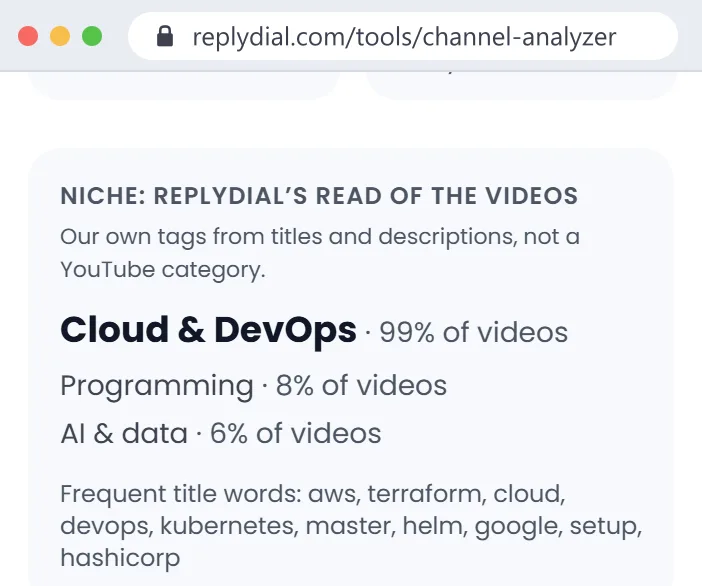
It matches keywords in titles and descriptions, so it is accurate for focused channels and can be pulled around by a channel that covers several topics. The percentage next to each niche tells you how much of the channel it describes.
What niche is a channel that covers lots of topics?
The analyzer lists up to three niches with the share of videos for each. A channel at 40 percent AI, 16 percent cloud and 6 percent travel is a multi-topic tech channel, and the shares tell you how likely your product fits its average video.
Has this channel changed niche recently?
Compare the niche shares with the scan's date range and the frequent title words. If the words are about a topic that only appears in recent uploads, the channel is moving. A future version will split niche by period.
Which niches do you detect?
Twenty: cloud and DevOps, programming, AI and data, personal finance, business and marketing, creator growth, fitness, cooking, gaming, tech reviews, education, travel and vlogs, beauty and fashion, home and DIY, cars, music, kids and family, entertainment, news and commentary, real estate, and self-improvement.
What are the frequent title words for?
They are a quick sense of what the channel actually makes, in its own words, and a good source of keywords for a brief or a search.
For agencies and brands vetting channels
How do agencies and brands vet a YouTube channel before a deal?
They check fit (niche and topics), commercial history (past sponsors, how recent, which competitors), consistency (upload count), audience language and country, and what the channel sells itself. The analyzer puts those public signals on one page in about a minute.
How do brands build a YouTube creator shortlist?
Usually: a long list from search, a discovery tool or referrals; then each channel vetted for fit and history; then outreach. The analyzer is built for the vetting step, one channel at a time, with a CSV and a printable report for the shortlist.
Can I use this to check a creator before my client signs?
Yes, that is the main use. Look at recent sponsors (conflicts), the share of recent long videos with a sponsor (saturation), upload count over 90 days (consistency) and the published business contact.
Can I send the report to a client?
Use "Copy link to this report" to share the live page, or "Save as PDF" for a one-page printout with the header, menu and FAQ removed.

Is this channel brand-safe?
The analyzer shows the raw flags YouTube publishes: videos marked made for kids and age-restricted videos in the scan. It does not score brand safety; open a few recent videos and judge against your client's own standards.
Does the creator have open ad spots?
Not directly visible. A proxy: the share of recent long videos with a sponsor. If 28 of the last 30 carry a sponsor, the slots are busy; if 2 of 30, there is room.
Does this channel's audience match my target country?
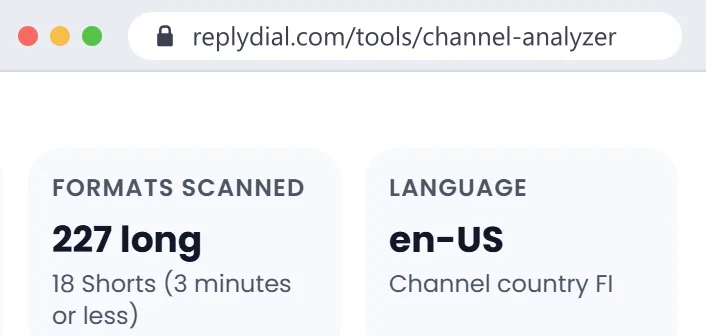
The analyzer shows the channel's country setting and the most common audio language of its videos. Viewer country is private to the channel owner, so ask the creator for a screenshot of their audience analytics.
Should brands judge creators by subscribers or average views?
Average views on recent long videos are what a sponsor actually buys. Subscriber counts are rounded publicly and include people who no longer watch. Ask the creator for their average views on the last 10 long uploads.
Can I analyse several channels at once?
One at a time today, each with its own CSV. Bulk vetting of up to ten channels behind a free sign-in is on the list; tell us if you would use it.
Can I compare two channels side by side?
Open each in its own tab and compare the reports. A side-by-side view is planned, shown as separate columns rather than a combined score.
How do agencies use the sponsor list to price a deal?
As context, not a price. A channel that brands keep coming back to is worth more than one with a single sponsor, and a channel whose last sponsor was a direct competitor may need an exclusivity discussion.
Does the analyzer find new creators for me?
No. It vets a channel you already have in mind. For discovery, use YouTube search, the channels in your target creators' related lists, or a discovery database, then bring the shortlist here.
Can I find YouTubers in a niche with under 10,000 subscribers?
Not with this tool, which does not search. Small creators in a niche are easiest to find through YouTube search sorted by upload date, community posts and the comments of bigger channels in the niche.
Is there a tool for finding similar YouTube channels?
Not this one; similar-channel discovery needs search or a database, which this free tool deliberately does not build. Run the analyzer on the channels you find to compare their sponsor history.
For creators looking for sponsors
How do I find sponsors for my YouTube channel?
Run the analyzer on three to five channels in your niche that are a little bigger than yours. The brands that sponsor them are your pitch list, the example videos show what the integration looked like, and the codes show how the brand tracks results.
How do I find brands that sponsor channels in my niche?
Analyse channels in your niche and download the CSVs; the brands that appear on several of them are the ones actively buying in your niche right now.
What brands sponsor small YouTube channels?
Run the analyzer on channels with 5,000 to 50,000 subscribers in your niche. Brands that sponsor channels that size are the ones most likely to answer you; brands that only appear on million-subscriber channels usually buy through agencies.
How many subscribers do I need to get a sponsorship?
There is no fixed number; brands buy views and fit. Small, focused channels do get sponsors. The analyzer shows you which brands sponsor channels your size, which is a better answer than a threshold.
Do sponsors contact you, or do you contact them?
Both happen. Small and mid channels usually pitch first. Use the sponsor list from similar channels to choose who to pitch, and mention the similar channel they sponsored in your email.
How do I know if a brand is worth pitching?
If it sponsored several channels in your niche and came back to the same channels more than once, it is buying and it is getting results. One-off sponsors are a weaker bet.
What should go in a sponsor prospect spreadsheet?
Brand, domain, which similar channels it sponsored, how recently, the code format it uses, and your contact attempt. The analyzer's CSV gives you the first four columns for each channel you analyse.
Can I analyse my own channel?
Yes. It is a quick audit of what a brand sees: your niche as your titles describe it, whether your business contact is published, and your sponsor history.
Should I publish my business email in my description?
If you want brand deals, yes. YouTube's own "View email address" button requires a captcha and is invisible to tools; an email written in the channel description is the first thing agencies look for. The analyzer shows whether one is there.
Which websites help creators get sponsorships?
YouTube's own BrandConnect for eligible channels, sponsorship marketplaces, agencies that represent creators, and direct pitching. Whichever you use, knowing which brands already sponsor your niche makes the pitch specific.
How do I spot a fake brand deal?
Warning signs are asking you to pay for shipping or a starter kit, no company website, a free email address, and payment only after posting with no contract. Check whether the brand appears as a sponsor on other real channels; a real buyer leaves a trail.
Sponsorship rates and pricing
How much should I charge for a YouTube sponsorship?
This tool does not estimate prices. Creators commonly quote a price per thousand views based on their average views on recent long videos, adjusted for niche and the type of integration; business, finance and tech niches usually command more than entertainment. Use the sponsor history here as negotiating context.

How much should a brand pay a YouTuber for a sponsored video?
There is no public price list. The fair inputs are the creator's average recent views, the niche, the integration length and placement, and usage rights. Ask for average views on the last ten long uploads, then compare quotes from several creators.
How do companies calculate how much to pay a YouTuber?
Most use expected views times a rate per thousand views, then adjust for niche, audience country, integration type and any performance component such as a code or link.
Are sponsorship rates negotiable?
Usually. Bundles of several videos, longer usage rights and exclusivity all move the price. A brand that sponsored the channel before has a track record to negotiate from.
Is a flat fee, a CPM deal or an affiliate commission better?
Flat fees give the creator certainty, CPM deals tie payment to views, and affiliate commissions tie it to sales. Many deals combine a flat fee with a code. The analyzer shows which brands use codes, which hints at a performance component.
Do creators get paid for talking about a product, or per click?
Most YouTube integrations are a fixed fee for the segment, sometimes with a bonus tied to a code or link. Pure per-click deals are rarer and usually called affiliate programmes.
Why does this tool not estimate a price?
Because public data does not include audience country, watch time or past deal prices, and a confident-looking number built on guesses would mislead you. YouTube's API rules also require price estimates to be clearly labelled as third-party; we would rather show evidence than invent a figure.
Audience, engagement and fake followers
Can I see another channel's audience demographics?
No. Age, gender and country of viewers are private to the channel owner in YouTube Studio. Any tool that shows them for someone else's channel is estimating. Ask the creator for a screenshot of their audience tab.
Can I check another channel's traffic by country?
Not from public data. The analyzer shows the channel's declared country and its main audio language, which are a reasonable first filter.
How can I tell if a channel bought fake subscribers or views?
Look for a big gap between subscribers and recent views, comments that are generic and repetitive, and sudden jumps in view counts on old videos. This tool does not score that; open recent videos and read the comments.
What is a good engagement rate on YouTube?
It varies a lot by niche and channel size, so a single number is misleading. Compare a channel's likes and comments per view with similar channels in the same niche rather than with a global average.
Why are YouTube subscriber counts rounded?
YouTube shows public subscriber counts rounded to three significant figures. The API returns the same rounded number, so 104,000 means somewhere between 103,500 and 104,500.
Does the analyzer show views and likes?
Not yet. Engagement and recent-performance numbers are planned once our use of YouTube's derived-metrics rules is approved; until then the analyzer shows only data YouTube publishes as is, plus our labelled niche read.
Do sponsored videos get fewer views than normal ones?
It depends on the channel, and that is a question worth asking before you buy. A comparison of sponsored and non-sponsored videos on the same channel is planned for the analyzer.
Contact details and business email
How do I find a YouTube channel's business email?
The analyzer shows any email the creator wrote in the channel description, plus emails and booking links on business-contact lines of the newest 20 video descriptions. If none is published, use the "View email address" button on the channel's About page on YouTube, which requires signing in and a captcha.
Does the YouTube API return a channel's contact email?
No. The business email behind YouTube's "View email address" button is not available through the API, by design. Only what the creator writes into descriptions is public text.
Do you guess or look up emails from other sites?
No. The analyzer shows only contacts the creator published in their own channel or video descriptions, exactly as written, with where it found them.
What is the best way to contact a YouTuber about a deal?
The business email they published, with a short, specific first message: who the brand is, why this channel, one example of a similar channel you worked with, and a clear next step. Avoid comments and direct messages for business.
Where can I find a YouTuber's manager or agency?
Often in the channel description or the business-contact line of recent videos ("for business inquiries contact my management at"). The analyzer lists those links and emails when they are there.
Why is a personal email shown?
Only because the creator wrote it into their public channel or video description, usually for business enquiries. If you are the creator and want it gone from this report, remove it from your descriptions; the analyzer does not store it.
Competitor and market research
How can I see which YouTubers my competitor sponsors?
This tool works channel by channel, so analyse the channels in your niche and search the CSVs for your competitor. It does not offer a reverse lookup by brand, which would need a stored database of channels.
How do I find brands that are spending on YouTube sponsorships?
Analyse the top ten channels in a niche; brands that appear across several of them in recent months are the ones spending now.
Which brands sponsor the most creators in my niche?
Run the analyzer on your niche's leading channels and count brand appearances across the CSVs. It takes a few minutes and is more current than most published lists.
Can I find every video a specific brand has sponsored?
Not across YouTube. Within a channel, the sponsor row and the example video point you to it.
Can I track a competitor's YouTube sponsorships over time?
Re-run the analyzer on the same channels monthly and compare the CSVs. We do not keep history for you, so save the files.
Disclosure rules
Do I need to disclose YouTube sponsorships?
Yes. YouTube's policies require creators to tick the paid-promotion box for paid placements, and advertising rules in the US (FTC), the UK (ASA) and many other countries require a clear disclosure the viewer cannot miss.
Is YouTube's paid-promotion label enough on its own?
Regulators generally expect a disclosure in the video and in words viewers will notice, not only a platform label. Many creators say it out loud and write it at the top of the description as well.
Do I need to disclose affiliate links?
Yes in most countries; an affiliate link is a material connection. A clear line near the link, and a mention in the video, is the usual practice.
Do free products count as something I need to disclose?
Generally yes; a free product is a benefit, and advertising rules usually treat it as a material connection that should be disclosed.
Are brands responsible when a creator does not disclose?
Regulators in several countries have said both the brand and the creator can be held responsible. Agencies usually put disclosure requirements in the contract.
Did this channel use the paid-promotion flag or only the description?
The headline splits the two: videos YouTube flagged as paid promotion and videos disclosed in the description. A channel with many disclosures and few flags discloses in text but rarely ticks the box.
Can I report a YouTuber who did not disclose a sponsorship?
YouTube's help centre has a reporting route for undisclosed paid promotion. Check the description first; many disclosures are there even when the label is missing.
What the channel sells and how it earns
How do YouTubers make money besides ads?
Sponsorships, affiliate links, their own courses, memberships and communities, coaching, merchandise and newsletters. The analyzer's "Sells" line shows which of those a channel promotes in its descriptions.
Does this creator sell their own course or coaching that could compete with my product?
Check the "Sells" line. If it says course or coaching and you sell education, the creator may treat you as a competitor; it is worth asking before you pitch.
Does this channel have a newsletter or membership I could sponsor instead?
If "Sells" lists a newsletter or membership, the creator has other placements to offer, often cheaper and better targeted than a video integration.
How do I check another channel's monetization status?
Not from public data. Whether a channel is in the YouTube Partner Programme is private. Visible ads on its videos are a hint, not proof.
How do I know if a channel is earning money on YouTube?
You can see the visible signals: sponsors, affiliate links, memberships, merchandise and courses. Ad revenue is private; any revenue figure for someone else's channel is an estimate.
How accurate are earnings estimators like Social Blade?
They multiply estimated views by a wide range of possible ad rates, which is why the ranges are so large. Sponsorship income, often the bigger part for business channels, is not in those figures at all.
Compared with other tools
Is there a free tool that shows which brands sponsor a YouTube channel?
This one. It is free, needs no sign-in, shows the evidence for every sponsor, and lets you download a CSV.
How is this different from Social Blade?
Social Blade tracks subscriber and view counts over time and estimates earnings. The analyzer answers different questions: what the channel is about, what it sells, who sponsored it, and how to contact the creator. Use both.
How is this different from vidIQ or TubeBuddy?
Those are tools for creators to grow their own channels, with keyword research and optimisation. The analyzer is a vetting tool for any channel, built for agencies, brands and creators researching sponsors.
How is this different from HypeAuditor or Modash?
Those are paid influencer databases with audience estimates across platforms. The analyzer is free, YouTube-only, shows only evidence it can point to, and does not keep a database of creators.
Why is the analyzer free?
It is made by ReplyDial, a tool that helps creators answer their YouTube comments. Free tools are how people find us, and the sponsor question comes up constantly in creators' comment sections.
Do you have an API or a bulk export?
The page has a CSV per channel. A JSON endpoint exists for the same data with the same daily limit; bulk vetting is planned behind a free sign-in.
Data, privacy and limits
Does this tool use the official YouTube API or scrape YouTube?
The official YouTube Data API v3, with public data only. It does not log in to YouTube or scrape pages. The only other requests it makes are to follow outbound links to their final domain.
How far back does the analysis go?
The newest 300 uploads, including Shorts. The result shows the exact date range.
Why does my latest video not show up?
A report is reused for a day so repeat lookups cost no quota. After that the report shows a Refresh now link under the headline; click it and the channel is read again. Reports are deleted after 30 days.
Do you store the channels I look up?
A report is kept for up to 30 days so that repeat lookups and a colleague opening the same link do not spend quota again, then it is deleted. We do not build a database of channels, sponsors or contacts, and nothing links a report to the person who ran it. Saved reports are different: they stay in your account until you delete them and are refreshed within 30 days.
Can I enter a channel handle, a URL or a channel ID?
Any of them: @handle, a youtube.com/@handle or /channel/ link, or the UC... channel ID.
Why is there a daily limit?
Each fresh scan reads a channel from YouTube's API, so the analyzer counts them: 3 a day without an account, 10 a day on a free account for its first 7 days, then the plan's number (3 on Free, 10 on Creator, 25 on Pro, 100 on Agency, 250 on Agency Team). A report already in our database opens free and is not counted. Visitors together share 100 fresh lookups a day; accounts draw on their own pool, so a busy public day never blocks an account.
What does a free account see after the 7-day trial?
Every sponsor row with its codes and evidence, the five scores, the three fixes, and the detail behind the first score (audience care), with up to 10 saved reports. The detail behind the other four scores, the business contact the creator published, the CSV, compare and the watch list are part of Creator ($12 a month) and every paid plan; the first 7 days of a new account include them. Without an account you see the first three sponsors and the first fix.
How much YouTube API quota does one analysis use?
About 18 units out of the 10,000 a project gets per day: one for the channel, one per 50 uploads to list them, one per 50 videos to read their details (views, likes and comment counts ride on the same call), and one per video for the five-video comment sample behind audience care.
Why are Shorts counted separately?
Shorts and long videos are bought and priced differently by sponsors, and most integrations are in long videos. The analyzer counts videos of three minutes or less as Shorts, and "Last sponsored" looks only at long videos.
Are past live streams counted?
Yes, as long videos. YouTube marks premieres and past streams the same way, so the analyzer does not try to separate them.
Does the analyzer follow YouTube's API policies?
It reads public data with an API key, keeps a report for at most 30 days (YouTube's limit for API data), shows YouTube's own data as published, and labels the niche, the scores and the sponsor grouping as our own analysis. From the comment sample it keeps counts and a few unanswered buying questions as text, never names. Our quota request and the data-use amendment are with Google; the FAQ will say when they land.
I am the creator. Can I remove my channel from this tool?
Each report is built from your public data and deleted within 30 days; nothing else is stored. If you want a report gone sooner, email the address in the footer with the channel handle and it is removed the same day.
Something looks wrong in my report. How do I tell you?
Email contact@replydial.com with the channel and the row that looks wrong. Every rule is plain text matching, so a wrong row usually becomes a better rule within a day.